WorldLink GSM Pro BETA 2026 Free Download – Samsung, MTK, Unisoc
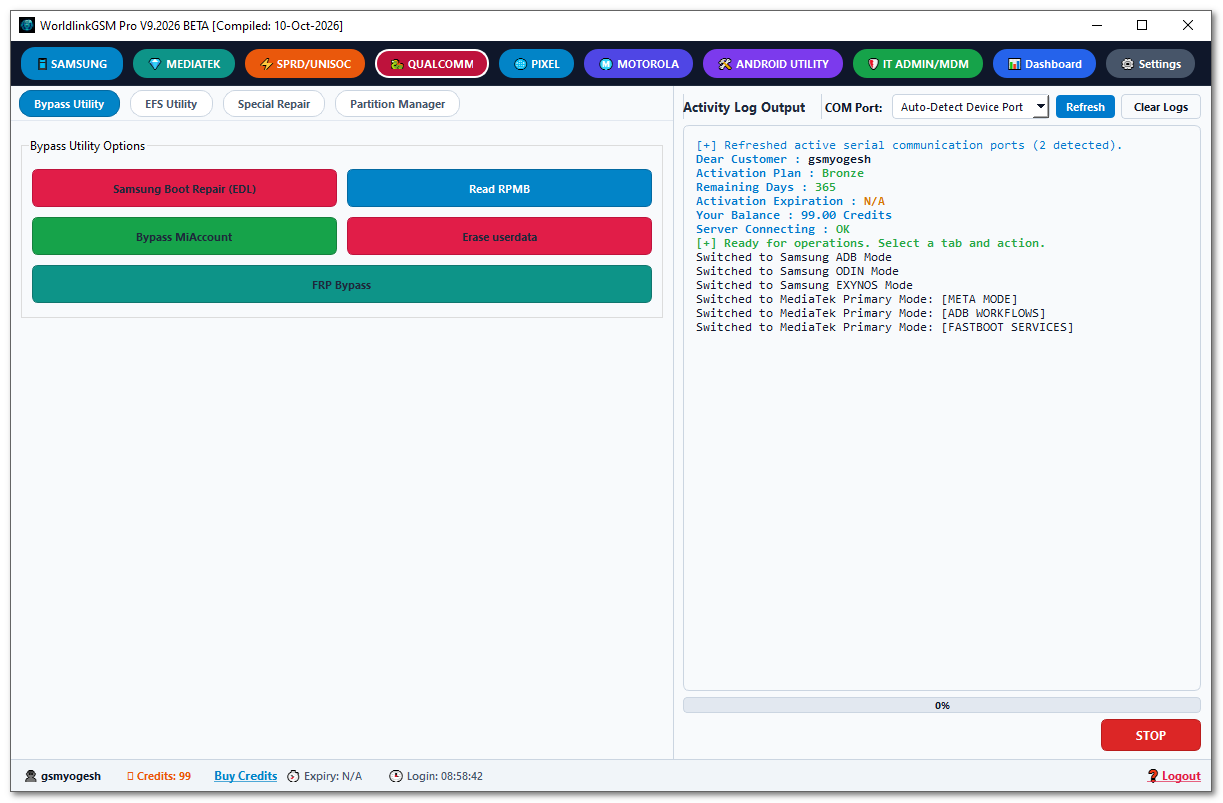
WorldLink GSM Pro BETA 2026 is a multi-brand Android servicing tool for Windows covering Samsung, MediaTek, SPRD/Unisoc, Qualcomm, Google Pixel, Motorola, and Android Utility sections. It includes device information reading, firmware flashing, factory reset, FRP services, bootloader operations, partition management, MDM/PayJoy removal, Transsion partition patching, Samsung Knox AP repacking, and a Regional Lock server — all organized across eight major service tabs. Activation uses a 10-day free HWID-based key. The file is WorldlinkGSMPro_BETA_2026.rar at 131.5 MB.
⚠️ Beta Notice: WorldLink GSM Pro BETA 2026 is a beta release. Activation and device operation success have not been independently verified. Always test on a non-primary device first and back up all data before running any operation.
Tool Information
| Detail | Info |
|---|---|
| Tool Name | WorldLink GSM Pro |
| Version | BETA 2026 (V9.2026) |
| File Name | WorldlinkGSMPro_BETA_2026.rar |
| File Size | 131.5 MB |
| Platform | Windows |
| Supported Platforms | Samsung, MediaTek, SPRD/Unisoc, Qualcomm, Google Pixel, Motorola, Android Utility |
| Activation | 10-Day Free Key via HWID Generation |
| Setup File | WorldLink GSM Pro_boxed.exe |
| Status | Beta — Not Independently Verified |
| License | Free (10-Day Trial) |
| Password | No Password |
WorldLink GSM Pro BETA 2026 Key Features
Samsung
- MTP Mode — Read Info, Reboot Download/Recovery/Fastboot, Remove FRP OS 16, Enable ADB OS 16, Enable ADB QR Code, Factory Reset, Check IMEI (Server)
- ADB Mode — Relocks Fixed 2026, New Patch 2026, Direct Hardware Injection, KG Completed (ADB), Premium Bypass OS 16 (Native), Read Info, Reboot, Knox Guard Bypass 2026, Disable Factory Reset
- Odin Mode — Get Device Info, Read/Write PIT, Flash Firmware, Factory Reset (CSC)
- Exynos Mode — Select/Auto Detect Chipset, Remove Bypass/FRP
MediaTek
- BROM / Preloader — Flash Firmware (Native), META Mode, Read Info, Enable ADB, Remove PayJoy (MDM), Kill Scorpio (MDM), Factory Reset, Remove FRP, Unlock Bootloader, Partition Manager, Boot META (Preloader), Backup/Restore NV/Sec (Raw), Fix Blackscreen, Fix Anti-Crack
- META Mode (Transsion Parameter / IMEI) — Read Device Identity, Copy to Target, Auto Gen IMEIs/MACs, Write Parameters NVRAM (Transsion Security Auth)
- ADB Workflows — Read Info, Plugin Bypass 2026, Disable Factory Reset, Disable OTA Updates, Reset IT Admin, Remove Plugin (Old Patch), Latest Patch (Regional Lock), Latest Patch (SEC Plugin-MDM), Reboot to BROM/Preloader/Recovery/Fastboot, Apply Private DNS
- Fastboot Services — Read Info, Check Unlock Ability, Read Chip SOC ID, 1-Click Fastboot Auto-Unlock, Unlock/Relock Bootloader (Flashing), OEM Tran Unlock, Skip Confirm Key, Wipe metadata/md_udc/userdata, Remove OEM Warnings, Reboot System/EDL/BROM, 1-Click Auto Patch Build Package (.wlgsm), Flash Anti-Crack Custom Image (Securitycom/P7 Bypass), Flash Selected Partition
SPRD / Unisoc
- BROM Services — Automated Blackscreen/Regional Unlock, Factory Reset + FRP, Factory Reset (Safe Wipe), Erase FRP Only, Unlock/Relock Bootloader, Read Info/Identity, Unlock Network/Simlock, IMEI Services, Secure Reboot
- DIAG Services — Write Dual IMEI, Read IMEI/Device Info, Boot DIAG Mode, Force BROM (Universal), Enable ADB, Factory Reset, Reboot, Network/Simlock Unlock
- Patcher (MDM / Regional) — Patch Regional (Bypass/Permanent), Patch MDM Lock (Unisoc)
- ADB Mode — Apply Private DNS, Read Info, Enable ADB (DIAG), Reset FRP, Reboot System/Bootloader/Recovery/Fastbootd, Unlock Bootloader (Fastboot), Boot DIAG Mode
Qualcomm
- Bypass Utility — Samsung Boot Repair (EDL), Read RPMB, Bypass Mi Account, Erase Userdata, FRP Bypass
- EFS Utility — EFS Backup, Flash, Erase
- Special Repair — Change Serial, Unlock KG, Fix MDM Block, KG Unload
- Partition Manager — Read Partition Info, Read, Write, Erase, Write TAR, Reboot
Google Pixel & Motorola
- Google Pixel — Read Info (Fastboot), Reboot Bootloader/Recovery, Reset FRP Lock, Unlock Bootloader
- Motorola — Read Info, Get OEM Unlock Data, Unlock Bootloader, Erase FRP/Factory Reset (Fastboot), Reboot, Generate Key (Helio G85), 1-Click Fastboot Unlock, LK Patcher (1-Click Patch Little Kernel, Inject Universal Bypass Certificate), XML Firmware Flasher (Flash Firmware Package), ADB — Read Info, Disable Bloatware, Bypass FRP
Android Utility
- Bootloader Special — 1-Click Junior Unlock, Open Output Folder
- Transsion Services (Patch by Model) — Reload Server Definitions, Patch File by Model Offsets
- Transsion Services (Universal Super) — Run Universal Super Patcher (30+ Signature Ablation — Locked Bootloader)
- Transsion Services (Super Editor) — Unpack & Scan All APKs, Instant Partition Explorer, Smart Debloat List, Disable Anti-Crack (P7), Neuter 5-Min Reboot Loop, Fix GMS/APKs (SecurityCom), Disable AVB Verity (flags=3), Apply Auto-Patch Preset, Debloat Selected/Repack Super.img
- Transsion Services (Proinfo / Miscdata) — Patch MTK (PROINFO), Patch SPRD (MISCDATA)
- Transsion Firmware Downloader — Search Firmware, Open in Browser, Copy Link & Password
- Samsung Knox — Cook & Repack AP TAR.MD5
- Regional Lock Server — Verify, Submit Regional Order, Check Status
- IT Admin / MDM — Initialize IT Admin Mode, Remove PayJoy/Scorpio MDM (ADB), Reboot System (Fastboot), Apply Private DNS
Download WorldLink GSM Pro BETA 2026
- File Name: WorldlinkGSMPro_BETA_2026.rar
- File Size: 131.5 MB
- Activation: 10-Day Free Key via HWID
- License: Free (10-Day Trial)
- Password: No Password
How to Install WorldLink GSM Pro BETA 2026
- Download
WorldlinkGSMPro_BETA_2026.rarfrom the MEGA link above. - Right-click the RAR file and select Extract Here. Wait for extraction to finish.
- Open the extracted
WorldlinkGSMPro_BETA_2026folder. - Double-click
WorldLink GSM Pro_boxed.exeto run the setup. Verify the file’s source and digital signature before accepting any security prompts. - Wait for the initialization window to finish loading. If Windows Security displays a warning, read it and verify the publisher rather than ignoring it automatically.
- Click Copy Hardware ID in the WorldLink GSM Pro setup window — your HWID will be copied to clipboard.
- Open the activation page provided by the software distributor. Locate the Generate 10 Days Free Activation Key section.
- Paste your HWID into the required field and click GENERATE KEY NOW. Copy the generated key.
- Return to the setup window, paste the key into the activation field, and click REGISTER LICENSE.
- Click LOAD (Load.exe) at the bottom of the setup window and wait for the main program to open.
- When the login prompt appears, enter the username and password provided by the software distributor and click LOGIN.
- Connect a supported device, select the correct platform and service mode, and back up device data before running any operation.
Important Notes
- This is a Beta release — activation and device operation success have not been independently verified. Test on a non-primary device first.
- The 10-day free activation key is generated using your Hardware ID — it is tied to your specific PC and cannot be reused on another machine.
- Verify the publisher when Windows Security displays a warning during setup — do not dismiss security prompts without reading them.
- Always back up device data, EFS, and NV partitions before running any FRP reset, factory wipe, firmware flash, or partition operation.
- Login credentials are provided by the software distributor — check the download source or activation page for the current credentials.
Conclusion
WorldLink GSM Pro BETA 2026 covers an impressive range of servicing operations across Samsung, MediaTek, Unisoc, Qualcomm, Google Pixel, and Motorola — including Knox Guard Bypass 2026, MTK PayJoy/Scorpio MDM removal, Transsion IMEI writing via NVRAM, Unisoc BROM and Diag services, Motorola LK Patcher, Transsion Universal Super Patcher, Samsung Knox AP repack, and a Transsion Firmware Downloader. The 10-day free HWID activation makes it accessible without any upfront cost. Being a Beta release, approach it with appropriate caution — test before using it on customer devices. Download WorldLink GSM Pro BETA 2026 using the MEGA link above.
Credits: All credits go to the WorldLink GSM Pro development team. Disclaimer: For educational purposes only. Beta release — verify publisher before running. Always back up data before any operation. Use responsibly and legally. We are not liable for any device damage or data loss.
Related Tools
- Vivo Info Reader Latest Version Free
- TSM Pro Edition V2026.10.16 Download
- GSM Family Tool v1.1.8 Free Download