A.N.TOOL v4.6 Free Download – Lifetime-Free
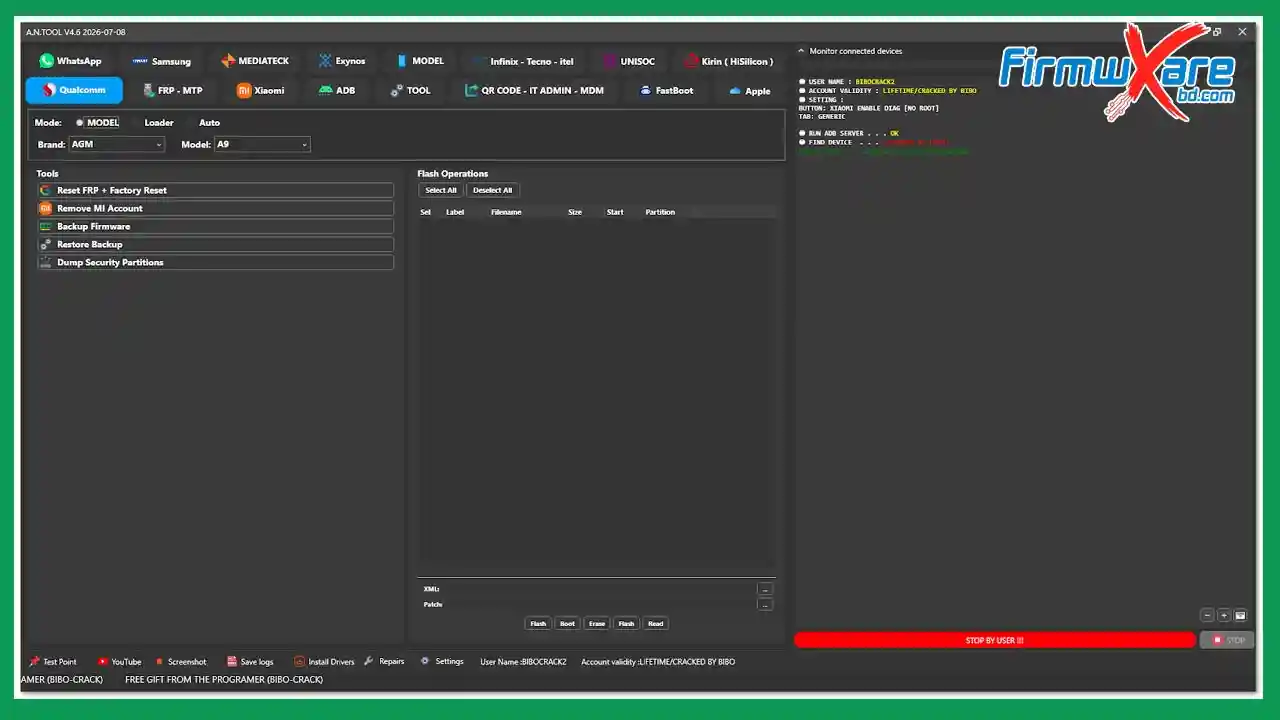
A.N.TOOL v4.6 is a free, comprehensive Windows mobile servicing platform covering Qualcomm, MediaTek, Samsung, Xiaomi, Exynos, Unisoc, Kirin/HiSilicon, Infinix/Tecno/itel, and Apple devices in one organized interface. It covers firmware flashing, partition management, FRP removal, MDM/KG bypass, bootloader unlock, factory reset, ADB/Fastboot tools, QR Code IT Admin/MDM bypass, Samsung Odin integration, Arabic language tools, and OTA control — across 40+ supported Android brands. The tool launches through a loader (BIBO V4.6.exe) and uses the login credentials BIBOCRACK2 / 112233. A cleanup BAT file must be run after each session. File size is 385.7 MB.
Tool Information
| Detail | Info |
|---|---|
| Tool Name | A.N.TOOL |
| Version | v4.6 (Latest — 2026-07-08) |
| File Name | ANTOOL_Free_Login.rar |
| File Size | 385.7 MB |
| Platform | Windows |
| Supported Chipsets | Qualcomm, MediaTek, Exynos, Unisoc, Kirin (HiSilicon) |
| Supported Brands | Samsung, Xiaomi, Huawei, Honor, Oppo, Vivo, Infinix, Tecno, itel, Motorola, Nokia, Google & 30+ More |
| Loader | BIBO V4.6.exe |
| Login Username | BIBOCRACK2 |
| Login Password | 112233 |
| License | Free (Lifetime) |
| Password | No Password |
A.N.TOOL v4.6 Key Features
Qualcomm
- Mode Selection — Model, Loader, Auto
- Brand and Model Selection
- Reset FRP + Factory Reset
- Remove MI Account
- Backup Firmware / Restore Backup
- Dump Security Partitions
- Flash Operations — Select All/Deselect All, Flash, Erase
FRP-MTP & ADB (Multi-Brand)
- MTP Open Tool, Enable ADB Code
- Supported brands — Huawei, Xiaomi, Vivo, Oppo, Infinix, Tecno, Alcatel, Lenovo, Sony, Motorola, Honor, OnePlus, BlackBerry
- Reset FRP (ADB), Open Chrome, Open YouTube, Open Google Maps
Xiaomi
- Recovery 5.0
- Reset FRP — MediaTek/Qualcomm
- Bypass Mi Account (Qualcomm)
- Write Partition (Enter Name), Reset EFS / Fix NV Data (Qualcomm)
- Factory Reset, Read Info, Reboot System
- Enable Diag (No Root)
ADB Tools
- Bypass FRP, Read Info, Read Partition Table, Check Root State, Get Battery State
- Remove Ads, Factory Reset (Old Android)
- Fix Wireless Test Assistant
- Arabic Language Tools — Add Arabic Language (ADB), Add Arabic Keyboard (ADB)
- Reboot Options — Recovery, System, Power Off, EDL (QC), META, Fastboot
- OTA Control — Disable OTA, Enable OTA
- Password Converter Tool
QR Code / IT Admin / MDM
- Supports Android 11 / 12 / 13 / 14 / 15 / 16
- Enable ADB QR — Method 1, 2, 3 (with SN)
- Enable ADB QR Auto (No SN)
- Enable ADB QR Android 14-15-16 Auto (No SN)
- Test DPC IT Admin QR, SafeKey IT Admin QR, Install Shieldx QR
Fastboot
- Partition Manager — Get Partitions, Erase
- Set Slot A / Set Slot B, Format Data, Fix dm-verity
- Read Info, Relock Bootloader, Reboot Recovery, Exit Fastboot
- Erase FRP, Reboot Fastboot, Start Flash (.bat)
Apple
- Read Info — Product Name, Product Type, iOS Version, Model Number, Activation State, Serial Number
- Bypass Activation Lock (A12+)
Samsung
- Odin Flash — BL, AP, CP, CSC, Home CSC, PIT, Auto Reboot, Bypass MDM
- Flash PIT / Backup PIT (Download Mode)
- FRP Reset — Android 5/6/7/8
- Auto Firmware Directory, Flash Firmware (Download), Read Info
- MTK — Reset FRP (Download Mode 2023-2024), Preloader/BROM FRP Reset
- MTP — Enable ADB, Reset FRP, Bypass MDM/Knox KG/FRP, Remove FRP Android 16, CSC Region Change, Change Serial Number, Factory Reset, Read Info, Enter/Exit Download
- Samsung Tablet (T509/T505/X216B) — Exit MDM, Enter MDM, Fix Bootloader, Remove Google Account Protection, Fix Blue Screen, Remove MDM (Temp), KG/MDM Disable
- Services — Remove Samsung Account (ADB), Add Arabic Language (multiple methods), Add Arabic Keyboard, Fix Fingerprint after Arabic, Fix Arabic Setup, Delete Arabic
MediaTek
- Connection modes — Old Phone/Preloader, Custom EMI, Custom AUTH, Custom DA, Xiaomi Protocol, Auto Preloader to BROM, BROM (Old devices), One Click
- Unlock/Relock Bootloader, Exit Recovery Fix
- Factory Reset — Safe, Erase, eMMC New OS (1 & 2), Android 5G, Oppo/Vivo, Vivo Y1s-Y30, Rebuild Userdata, UFS, UFS Android 10/11
- Remove Huawei ID (Fastboot), Bypass Auth, FRP Reset (BROM)
- META Mode — Read Info
- Partition Manager — Write, Erase, Backup, Booting Storage
- Backup/Restore Full Software (BIN)
Exynos
- Factory Reset — Default, FAT Format, Keep Data, Safe, Nokia Safe
- Exynos 1280 — Auto FRP Reset (Odin), Enable ADB Root (Odin), Reset FRP (ADB)
Infinix / Tecno / itel
- One Click / Brand AUTO-CPU / Old Phone
- FRP Reset (Preloader/eMMC), Remove MDM (Preloader/eMMC)
- Enter BROM (Erase Preloader)
Unisoc
- Reset FRP, Read Info, Disable/Enable ADB
- Boot by CPU, Flash PAC, Flash Firmware (PAC), Unpack PAC
- Flash Samsung Firmware (BL/AP/CP/CSC), FRP Reset, Backup Firmware, Factory Reset, Restore Backup, Dump/Flash Security Partitions, Fix Memory
- Diag Mode — Enter (2 methods), Factory Reset, Get Info, Exit, Extra Diag Factory Reset (Mode 1/2, Smartphone/OldPhone/Smartwatch), Read Info
Kirin (HiSilicon)
- Fastboot / Factory Fastboot, Boot by CPU (Test Point)
- Kirin 620 Mode 1 (Test Point)
- Read Info, FRP Reset, Unlock Bootloader (Temp)
- Reset FRP/Format, Remove ID — Erase Oeminfo / Patch Oeminfo
- Backup/Flash/Erase Oeminfo
Supported Brand Model List (40+ Brands)
Samsung, Oppo, Huawei, Honor, Infinix, Tecno, Nokia, Kirin, Unisoc, AGM, ASUS, Alcatel, Astel, Benco, CMDC, Coolpad, Doogee, Geely, Gionee, Google, Hisense, K-Touch, LG, LeEco, Lenovo, Meizu, Micromax, OnePlus, TCL, Vivo, Wiko, Wileyfox, ZTE, Realme, Motorola — with brand and model search function.
Download A.N.TOOL v4.6
- File Name: ANTOOL_Free_Login.rar
- File Size: 385.7 MB
- Login Username: BIBOCRACK2
- Login Password: 112233
- License: Free (Lifetime)
- Password: No Password
How to Install A.N.TOOL v4.6
- Download the ANTOOL_Free_Login.rar from the MEGA or Google Drive link above.
- Extract the RAR archive to a new folder using WinRAR or 7-Zip.
- Extract
A.N.TOOL V4.6 2026-07-08.exeinto the same new folder — this unpacks the main A.N.TOOL files. - Copy
BIBO V4.6.exeand paste it directly into the folder containing the extracted A.N.TOOL files. - Run
BIBO V4.6.exe— when the security warning prompt appears, click Yes to install the required certificate. - Open the main
A.N.TOOL.exeapplication. - Run
BIBO V4.6.exeagain as the loader. - On the A.N.TOOL login screen, enter Username: BIBOCRACK2 and Password: 112233. Check Save Login and click LOGIN.
- Use the tool for your required operations.
- When finished, right-click
cleanup_Run_as_admin_after_run_loader_.batand select Run as administrator. This must be done after every session.
Important Notes
- BIBO V4.6.exe must be placed in the same folder as the A.N.TOOL files — do not run it from a different location.
- The login credentials are Username: BIBOCRACK2 / Password: 112233 — enable Save Login to avoid re-entering them each time.
- Always run the cleanup BAT file as Administrator after every session — right-click
cleanup_Run_as_admin_after_run_loader_.bat→ Run as administrator. - Click Yes on the certificate security prompt when running BIBO V4.6.exe — this is required for the loader to function correctly.
- Always back up device data before running any FRP reset, factory wipe, partition flash, bootloader unlock, or firmware operation.
Conclusion
A.N.TOOL v4.6 is one of the most feature-complete free Android servicing tools available. Covering Qualcomm, MediaTek, Samsung (including Odin and MTK), Exynos, Unisoc (with full Diag mode), Kirin/HiSilicon, Infinix/Tecno/itel, Xiaomi, and Apple device info across 40+ brands — along with QR Code IT Admin/MDM bypass for Android 11–16, Arabic language tools, OTA control, Fastboot partition management, and a Password Converter — it addresses the full range of daily repair tasks in one dashboard. The free lifetime login (BIBOCRACK2 / 112233) and dual download mirrors make it easy to access. Remember to run the cleanup BAT as Administrator after every session. Download A.N.TOOL v4.6 today using the MEGA or Google Drive link above.
Credits: All credits go to the A.N.TOOL development team. Disclaimer: For educational purposes only. Always back up data before any repair operation. Use responsibly and legally. We are not liable for any device damage or data loss.
Related Tools
- QSM Unlock Tool V1.1 Latest Version
- HMD DeviceKit Tool Download (All Version)
- 365 Ultra Tool V1.2 Latest Version