Vivo Info Reader Latest Version Free Download by TTA
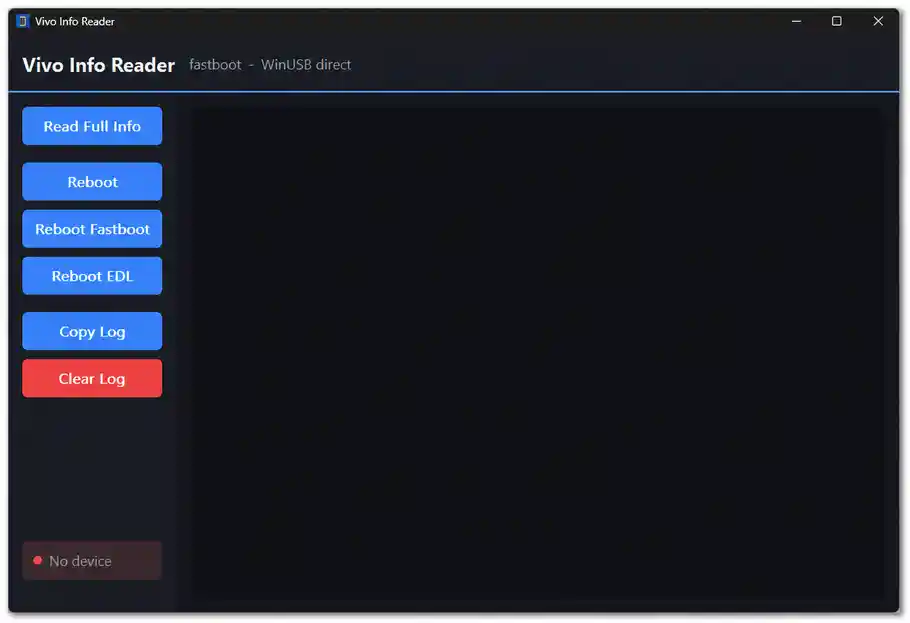
Vivo Info Reader by TTA is a small, free Windows utility for reading available device information from compatible Vivo phones through Fastboot mode via direct WinUSB communication. It is particularly useful when a device is severely damaged and Fastboot mode is the only accessible state — the tool can still pull the model, product name, chipset, IMEI1, IMEI2, serial number, MEID, product version, region, and PD code from the device. It also provides Reboot to System, Reboot to Fastboot, and Reboot to EDL options, and a copy-able operation log.
Tool Information
| Detail | Info |
|---|---|
| Tool Name | Vivo Info Reader |
| Developer | TTA |
| Platform | Windows (Single EXE) |
| Supported Devices | Compatible Vivo Devices |
| Connection Mode | Fastboot (Direct WinUSB) |
| Login Required | No |
| License | Free |
| Password | No Password |
Vivo Info Reader Key Features
Device Information Reading
- Read Full Info — retrieve all available device information in one click
- Detect connected USB device using VID and PID information
- Read device model and product name
- Display chipset and platform information
- Read IMEI, IMEI1, and IMEI2
- Read device serial number (SN)
- Display MEID information when available
- Read product version reported by the device
- Display region information
- Read PD code when supported by the connected device
Reboot & Connection
- Communicate with compatible Fastboot devices via direct WinUSB — no ADB driver required
- Check for connected Fastboot device before sending any command
- Reboot device to Android system
- Reboot device to Fastboot / Bootloader mode
- Reboot to EDL mode (where the device supports the transition)
Log & Interface
- Live operation log — displays command responses and operation status in real time
- Error messages when a device is not detected or a command fails
- Timeout messages when the device does not respond
- Copy Log button — copy the full operation log to clipboard
- Clear Log button — clear the log window
- Simple Windows desktop interface with separate action buttons and log area
Download Vivo Info Reader
- File Name: VivoInfo.exe
- Developer: TTA
- File Size: 1MB
- License: Free
- Password: No Password
How to Use Vivo Info Reader
- Download the Vivo Info Reader EXE from the Google Drive link above.
- Open the downloaded file — no installation wizard is required.
- Run the application as Administrator if prompted.
- Boot your Vivo device into Fastboot mode — hold the correct button combination for your model.
- Connect the device to your PC via USB cable.
- Check the device connection status in the tool — it will detect the device using VID and PID before sending any command.
- Click Read Full Info to retrieve all available device information — model, chipset, IMEI1/2, SN, MEID, version, region, and PD code will appear in the log.
- Review the log for returned information and operation status. If an error appears, check the USB connection and confirm the device is in Fastboot mode.
- Use the Copy Log button to save the log to clipboard, or Clear Log to reset the log window.
- Use the Reboot options (System / Fastboot / EDL) only when needed and confirmed as supported by your specific device.
Important Notes
- Vivo Info Reader communicates via direct WinUSB in Fastboot mode — standard ADB drivers are not required, but if the device is not detected, try installing the Vivo USB driver or universal Fastboot driver.
- The tool is read-only for device information — it does not write, flash, or modify any device data when using the Read Full Info function.
- The Reboot to EDL option only works on devices that support the transition from Fastboot to EDL — not all Vivo models support this command.
- Some information fields (MEID, PD code, region) may not appear if the connected device does not return that data — this is normal behavior, not a tool error.
Conclusion
Vivo Info Reader by TTA is a straightforward, no-activation Fastboot information reader that covers the key device identifiers technicians need when a Vivo phone is damaged and only Fastboot mode is reachable — model, chipset, IMEI1/2, serial number, MEID, region, and PD code, all pulled through direct WinUSB without requiring a full ADB setup. The Copy Log and Clear Log buttons keep the workflow clean, and the Reboot to EDL option adds a useful extra step for supported models. If you work with Vivo devices, download Vivo Info Reader using the Google Drive link above and keep it in your diagnostic toolkit.
Credits: Developed by TTA. All credits go to the original developer. Disclaimer: For educational purposes only. Use responsibly on devices you own or are authorized to service. We are not liable for any device damage or data loss.