TSM Pro Edition V2026.10.16 Download – Latest Version
TSM Pro Edition V2026.10.16 (TurboServiceMobile) is a Windows mobile servicing tool covering MediaTek, Qualcomm, Samsung, Exynos, Kirin, Unisoc, ASR, Fastboot, and universal ADB device bases in one organized interface. It handles device information, firmware flashing, FRP removal, factory reset, bootloader operations, partition management, KG/Knox bypass, IT Admin removal, CSC/serial change, IMEI repair, and OTA control. The October 1, 2026 update adds Samsung Exynos EUB+Download Mode FRP removal and Boot Repair/Exit EUB for five supported models including Galaxy Tab S6 Lite and Galaxy M31. Note: setup requires Speedify to be installed before the main TSM installer runs.
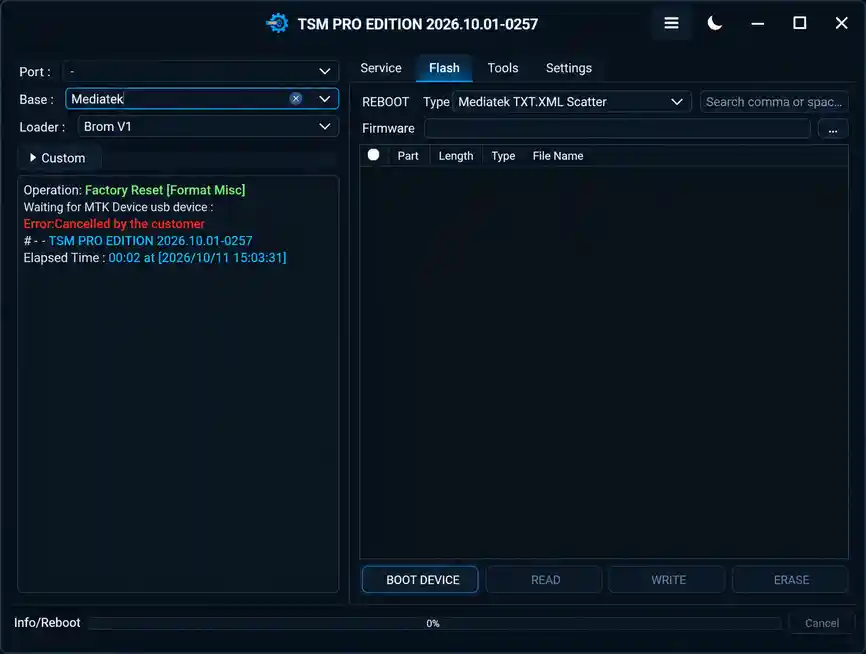
Tool Information
| Detail | Info |
|---|---|
| Tool Name | TSM Pro Edition (TurboServiceMobile) |
| Version | V2026.10.16 (Latest) |
| Release Date | October 16, 2026 |
| Platform | Windows |
| Supported Bases | MediaTek, Qualcomm, Samsung, Exynos, Kirin, Unisoc, ASR, Fastboot, ADB |
| Setup Requirement | Speedify must be installed before TSM Pro Edition |
| License | |
| Password | No Password |
TSM Pro Edition Key Features
1. MediaTek Base (BROM V1 / Preloader V6)
- Read Device Information
- Factory Reset — Format MISC
- Remove FRP, Remove FRP for Tecno/Infinix/itel (via Meta Task)
- Remove Mi Account, Remove Huawei ID
- Unlock / Lock Bootloader, Disable OTA Updates
- Security/EFS Backup, Read RPMB, Read OEMINFO, Read Hardware Keys (JSON)
- MT62xx Factory Reset / Reset Data
- TXT/XML Scatter Firmware Flashing — Read, Write, Erase
- IMEI Repair in Flash Mode (online feature)
- BROM V6 support for selected Oppo, Realme, and Tecno devices
2. Qualcomm Base (EDL / Custom)
- Read Device Information
- Factory Reset — Format MISC
- Remove FRP, Remove Mi Account, Remove Huawei ID
- Security/EFS Backup
- Qualcomm XML Firmware Flashing — Read, Write, Erase, Rawprogram XML Write
- EDL 9008 Deep Unbricking (online feature)
- Support for selected OnePlus and Oppo EDL modes
3. Samsung Base (Download / MTP / ADB)
- Remove Samsung KG — TSM APP Method, TSM APP v2 Method, No APP Method, Methods 1/2/3/4
- Remove Samsung Knox Cloud — Method 1 & Method 2
- Remove Android IT Admin — Device Control, Custom Profile 1, Custom Profile 2
- FRP Removal — MTP to OS (Nov 2025), MTP to Test Mode, Download Mode MTK (Mar 2024), Test Mode USA (Jan 2024)
- Factory Reset — Download Mode, MTP Mode
- Change CSC (MTP Mode)
- Change Serial Number — ADB Mode, MTP Method 1, MTP Method 2
- Remove Samsung Fix Call Not Sent
- Flash Multi-Package Firmware (ZIP, TAR, MD5) — with Erase First, Flash Lock, Repartition, Erase EFS options
4. Universal / Generic ADB Mode
- Factory Reset — Format FS
- Fix Install Apps — ADB Tasks, Network/DIAG Tasks
- Remove Ads — Xiaomi, Generic; Restore Ads — Generic
- Open Network/APN/CID Manager Menu
- Enable DIAG Menu — Samsung, Xiaomi, Xiaomi with SU
- Enable/Disable DNS, Factory Reset, HFA options
- Stop Change CSC via SIM
5. Fastboot Mode
- Read Device Information
- Unlock / Lock Bootloader
- Change Boot Slot (A/B), Remove FRP, Factory Reset — Format FS, Fix DM-Verity
6–9. ASR, Exynos, Kirin, Unisoc Bases
- ASR — Factory Reset, Remove FRP, Unlock/Lock Bootloader
- Exynos (Auto Detect) — Factory Reset, Remove FRP, Enable ADB, Remove FRP via EUB + Download Mode, Repair Boot / Exit EUB (new in 2026.10.01)
- Kirin (KIRIN620) — Factory Reset, Read Info, Remove FRP, Temporary Bootloader Unlock
- Unisoc (SC7731E) — Factory Reset, Read Info (DIAG), Remove FRP
TSM Pro Edition 2026.10.16 – Changelog
Release Date: October 16, 2026
🆕 Nothing EDL Mode
- Added Nothing 4B support in EDL Mode.
⚡ Unisoc ADL Mode – ZTE
- Added support for devices detected in Unknown USB Mode.
- Added Remove FRP.
- Added Factory Reset.
Tested ZTE Models
- ZTE nubia Neo 2 5G (Z2352N)
- ZTE Blade A56 (Z2473)
- ZTE nubia V80 Pro (Z2576)
- ZTE Blade A36 (Z2472)
- ZTE nubia Neo 3 GT 5G (Z2465N)
- ZTE Blade A55 (Z2450)
- ZTE Blade A75 4G (Z2359)
Note: This method is intended for ZTE devices.
📱 Samsung – New 2026 BIT Support
Added Samsung EDL Mode support for:
- Remove FRP
- Factory Reset
- Read/Write Firmware and Dump
Supported Samsung Models
- Galaxy A23 5G (SM-A236B) – BIT H
- Galaxy A23 5G (SM-A236E) – BIT H
- Galaxy A23 5G (SM-A236M) – BIT H
- Galaxy F14 4G (SM-E145F) – BIT D
- Galaxy Z Flip4 (SM-F721N) – BIT 8
- Galaxy Z Fold3 5G (SM-F926N) – BIT E
- Galaxy Z Fold6 (SM-F956N) – BIT 4
- Galaxy S21 FE 5G (SM-G990B2) – BIT K
- Galaxy Tab A9+ 5G (SM-X216C) – BIT C
- Galaxy Tab A9+ 5G (SM-X216N) – BIT D
📲 More Device Support
- TCL 9185W
- TCL T513Z
- TCL 30+ (T676K)
- ZTE nubia Neo 5G (8150N)
- ZTE Blade A112 (P635A60)
- REDMAGIC 11S Pro (NX809J)
- REDMAGIC Nova Gaming Tablet (NP03J)
- Honor Play 20A
- Lenovo Tab M11 (TB330XU)
- OUKITEL C68
🔧 Fastboot Flasher Improvements
- Improved Motorola Fastboot Flasher.
- Improved Xiaomi Fastboot Flasher.
🛠 Bug Fixes
Preloader Mode
- Fixed issues on Redmi A3 (blue).
- Fixed issues on POCO C61 (blue).
- Fixed issues on POCO C50 (blue).
Other Fixes
- Fixed crashes when using Remove FRP in MTP Mode on Android 16.
- Fixed Change CSC issues.
- Fixed the Motorola
flashfile/servicefileselection option.
Download TSM Pro Edition V2026.10.16
- File Name: TSM Pro Edition Setup[2026.10.16].7z
- Version: V2026.10.16
- Release Date: October 16, 2026
- File Size: 33.1 MB
How to Install TSM Pro Edition V2026.10.16
⚠️ Speedify must be installed before TSM Pro Edition. Follow the steps below in order.
- Download the TSM Pro Edition package from the MEGA or Google Drive link above.
- Extract
SpeedifyInstaller.rarusing WinRAR or 7-Zip. - Run
SpeedifyInstaller.exeand follow the installation instructions to install Speedify. - Launch Speedify and sign in to your account if required, then connect to a server if prompted.
- Extract
TSM Pro Edition Setup 2026.10.01.rar. - Right-click
TSM Pro Edition Setup 2026.10.01.exeand select Run as administrator. - If Windows displays a security warning, verify the file source before proceeding. Do not bypass security warnings for an unverified file.
- Complete the installation following the wizard instructions.
- Extract
TSM.rarif it is included in your package. - Copy
TSM.exefrom the extracted archive into the TSM Pro Edition installation folder. - Launch TSM Pro Edition from the installation folder and connect your device to begin servicing.
Important Notes
- Speedify must be installed first — do not skip this step or TSM Pro Edition may not function correctly.
- The new Exynos EUB+Download Mode operations require the exact matching firmware listed in the changelog table above — do not use a different firmware version for these models.
- IMEI Repair in Flash Mode and EDL 9008 Deep Unbricking are listed as online features — an active internet connection is required for these operations.
- Verify the file source and publisher before running any installer — do not bypass Windows security warnings without confirming the file origin.
- Always back up device data, EFS, and RPMB before running any FRP reset, factory wipe, firmware flash, or partition operation.
Conclusion
TSM Pro Edition V2026.10.16 is a well-rounded servicing tool that covers nine device bases — MediaTek BROM/Preloader with BROM V6, Qualcomm EDL, Samsung with six KG removal methods and three IT Admin methods, Exynos (now with EUB+Download Mode FRP and Boot Repair), Kirin, Unisoc, ASR, Fastboot, and universal ADB. The October 2026 update’s Exynos additions — FRP removal and Boot Repair/Exit EUB for the Tab S6 Lite and M31 — are a useful expansion. Download TSM Pro Edition V2026.10.16 today using the MEGA or Google Drive link above and make sure to install Speedify before running the main setup.
Credits: All credits go to the TSM Pro Edition (TurboServiceMobile) development team. Disclaimer: For educational purposes only. Always back up data before any repair operation. Use responsibly and legally. We are not liable for any device damage or data loss.