Download Unlock Tool V2026-11-05-0 (Latest Version) Setup File
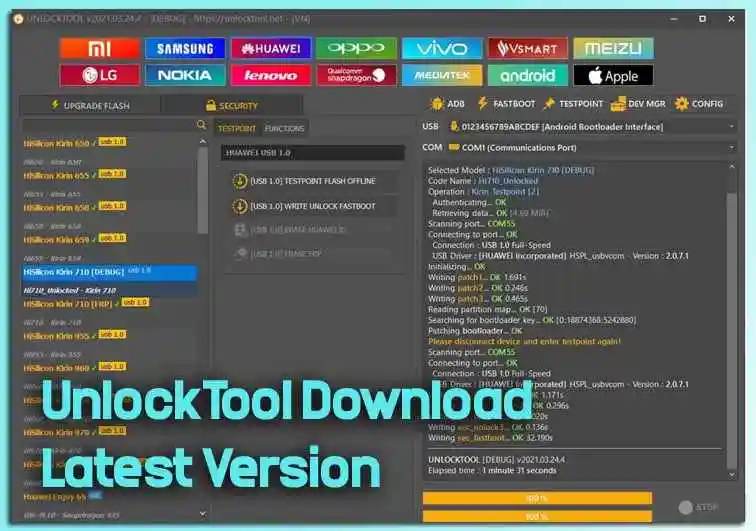
UnlockTool is an essential utility in the GSM domain, providing comprehensive support for popular brands like Xiaomi, Samsung, Huawei, Oppo, Vivo, and more. This versatile software simplifies critical tasks, including flashing stock ROMs, unlocking bootloaders, resetting FRP locks, and bypassing screen locks. The latest version, UnlockTool V2026-11-05-0, brings updated features and performance improvements to keep up with the latest Android devices and security patches.
In this guide, we’ll cover everything you need to know about UnlockTool — including how to download, install, and use it effectively for Xiaomi, Samsung, Huawei, Oppo, Vivo, and Qualcomm devices.
What is UnlockTool?
UnlockTool is a Windows-based software solution designed for smartphone technicians and advanced users. It supports a wide range of popular Android brands and allows you to perform tasks that are otherwise locked behind manufacturer restrictions. Key capabilities include:
- Flashing Stock ROMs: Restore your smartphone to its original factory firmware quickly and safely.
- Bootloader Unlocking: Unlock bootloaders on Xiaomi devices without needing official Mi account authentication.
- FRP Reset: Bypass Factory Reset Protection (FRP) locks on supported devices across multiple brands.
- Screen Lock Removal: Reset PIN, pattern, or password locks efficiently without losing data where supported.
Unlock Tool Download Latest Version 2026
- File Name: UnlockTool-2026-11-05-0.zip
- Version: v2026-11-05-0
- File Size: 230MB
- Author: unlocktool.net
- Update on: Sept. 23, 2026
- Compatible OS: Windows (32-bit & 64-bit)
How to Use UnlockTool
Step 1: Download and Extract
- Download the UnlockTool setup file using one of the links above.
- Extract the downloaded ZIP package to a folder on your computer using WinRAR or 7-Zip.
- Run the installer as Administrator.
Step 2: Install Necessary Drivers
Before connecting any device, install the required USB drivers included in the tool’s folder: MediaTek (MTK), Qualcomm (EDL), Samsung, Oppo, and ADB/Fastboot drivers. Without the correct drivers installed, UnlockTool will not detect your device. If your device is still not recognized after installing drivers, try a different USB cable or port.
Step 3: Perform Desired Operations
Xiaomi PIN / Pattern / FRP Reset
- Launch UnlockTool and navigate to the Xiaomi tab.
- Select your exact Xiaomi model from the dropdown list.
- Connect your device in EDL mode (hold Volume Down + Power, or use a test point).
- Choose FRP Reset or Factory Reset as needed and click Start.
Samsung PIN / Pattern / FRP Reset
- Launch UnlockTool and go to the Samsung tab.
- Select your Samsung model from the list.
- Connect your device in Download mode (hold Volume Down + Bixby + Power on older models, or Volume Down + Power on newer ones).
- Select FRP Reset or Screen Unlock and click Start.
Huawei PIN / Pattern / FRP Reset
- Launch UnlockTool and navigate to the Huawei tab.
- Select your Huawei model from the dropdown.
- Connect your device in EDL or Fastboot mode as required by your specific model.
- Choose FRP Reset or Format FS and click Start.
Oppo PIN / Pattern / FRP Reset
- Open UnlockTool and go to the Oppo tab.
- Select your Oppo model.
- Connect your device in EDL mode.
- Choose Format FS or FRP Reset and click Start.
Vivo PIN / Pattern / FRP Reset
- Navigate to the Vivo tab in UnlockTool.
- Select your Vivo model.
- Connect the device in EDL mode.
- Select Format FS or FRP Reset and click Start.
Qualcomm PIN / Pattern / FRP Reset
- Go to the Qualcomm tab in UnlockTool.
- Connect your Qualcomm device in EDL mode.
- Choose Format FS or FRP Reset and click Start.
UnlockTool V2026-11-05-0 — What’s New
Release Date: November 5, 2026
Version: 2026.11.05.0
Hash: 203ba012c5b877fe7013d64e78a43986
OPPO / Realme / OnePlus MTK – Android 15 & 16
Added Functions:
- Erase FRP
- Factory Reset
- Readback
- Flash Backup
MT6789 – Helio G99 / G100
New Device Support:
- OPPO Reno8 T 4G (CPH2481)
- OPPO Reno13 F 4G (CPH2701)
- OPPO A6 Pro 4G (CPH2799)
- Realme 10 4G (RMX3630)
- Realme 11 4G (RMX3636)
- Realme Pad 2 (RMP2204)
MT6835 – Dimensity 6300
OPPO:
- OPPO A3 Pro / A80 5G (CPH2639 / CPH2665)
- OPPO A3x 5G (CPH2681)
- OPPO A5 5G (CPH2735 / PKW120 / CPH2727)
- OPPO A5x 5G (CPH2733)
- OPPO A5 Pro 5G (CPH2695)
- OPPO A5 Energy Edition (PKV110)
- OPPO K12x 5G (CPH2667)
- OPPO K13x 5G (CPH2753 / CPH2821)
- OPPO F31 5G (CPH2781)
- OPPO A6 Pro 5G (CPH2781)
- OPPO A6 5G (CPH2831 / PLT120)
- OPPO K14x 5G (CPH2871)
Realme:
- Realme C83 5G (RMX5256)
- Realme C85 (RMX5253)
- Realme V60 Pro (RMX3953)
- Realme 14T 5G (RMX5078)
- Realme C73 5G (RMX3945)
- Realme C75 5G (RMX3943)
- Realme Narzo 80 Lite 5G (RMX3945)
- Realme P3 Lite 5G (RMX3943)
- Realme 15x 5G India (RMX5250)
- Realme 16x 5G (RMX5270)
- Realme Narzo 100 Lite 5G (RMX5261)
- Realme P4 Lite (RMX5378)
- Realme P4R 5G (RMX5266)
- Realme C100 5G (RMX5258)
MT6878 – Dimensity 7300 / 7400
New Device Support:
- OPPO F31 Pro 5G (CPH2763)
- OPPO Reno16 F 5G (CPH2859)
- Realme 13+ 5G (RMX5000 / RMX5002)
- Realme 13 Pro 5G
- Realme 14 Pro 5G (RMX5056)
- Realme 15 5G (RMX5105 / RMX5106)
- Realme 16 Pro 5G (RMX5120)
- Realme Narzo 70 Turbo 5G (RMX5003)
- Realme P1 Speed 5G (RMX5004)
- Realme Pad 3 Wi-Fi (RMP2502)
- Realme Narzo 80 Pro 5G (RMX5033)
- Realme P4 5G (RMX5110)
- Realme P4 Power 5G (RMX5107)
MT6895 / MT6896 – Dimensity 8000 / 8100
New Device Support:
- OnePlus 10R (CPH2411)
- OnePlus Ace (PGKM10)
- OnePlus Ace Racing (PGZ110)
- OPPO K10 5G China (PGJM10)
- OPPO Reno8 Pro (CPH2357)
- OPPO Reno9 Pro (PGX110)
- OPPO Reno10 Pro China (PHV110)
- OPPO Reno11 China (PJH110)
- OPPO Reno11 Pro (CPH2607)
- Realme GT Neo3 (RMX3560 / RMX3561)
- Realme GT Neo3 150W (RMX3562 / RMX3563)
MT6897 – Dimensity 8300 / 8300 Ultra / 8350
New Device Support:
- OPPO Pad 3 (OPD2406)
- OPPO Reno13 5G (CPH2689)
- OPPO Reno13 China (PKM110)
- OPPO Reno13 Pro 5G (CPH2697)
- OPPO Reno13 Pro 5G China (PKK110)
- OPPO Reno14 5G (CPH2737)
- OPPO Reno14 5G China (PLA110)
- Realme P3 Ultra 5G (RMX5030 / RMX5031)
- OnePlus Nord CE5 (CPH2717 / CPH2719)
- OnePlus Pad 3 (OPD2407 / OPD2408)
Fixed
- Fixed the login update-checking error (Error Code: 0).
Conclusion
UnlockTool V2026-11-05-0 is a powerful and versatile software solution for mobile technicians. Its capabilities cater to a wide range of needs across popular smartphone brands, from flashing stock ROMs to unlocking FRP and screen locks.
Related Post
- Phoenix Service Tool (Latest Version)
- Android Multi Tool (AMT Tool) Latest Version
- TSM – Turbo Service Mobile Tool
FAQs
Is UnlockTool Safe to Use?
Yes, when downloaded from official or trusted sources, UnlockTool is safe and malware-free.
Can I Use UnlockTool on Mac?
Currently, UnlockTool is only compatible with Windows systems.
Do I Need Internet Access?
Some functions may require internet access for driver downloads or updates.