MJT ADB Tool Pro v1.2.7 Free Download Latest Version – Android Repair Tool 2026
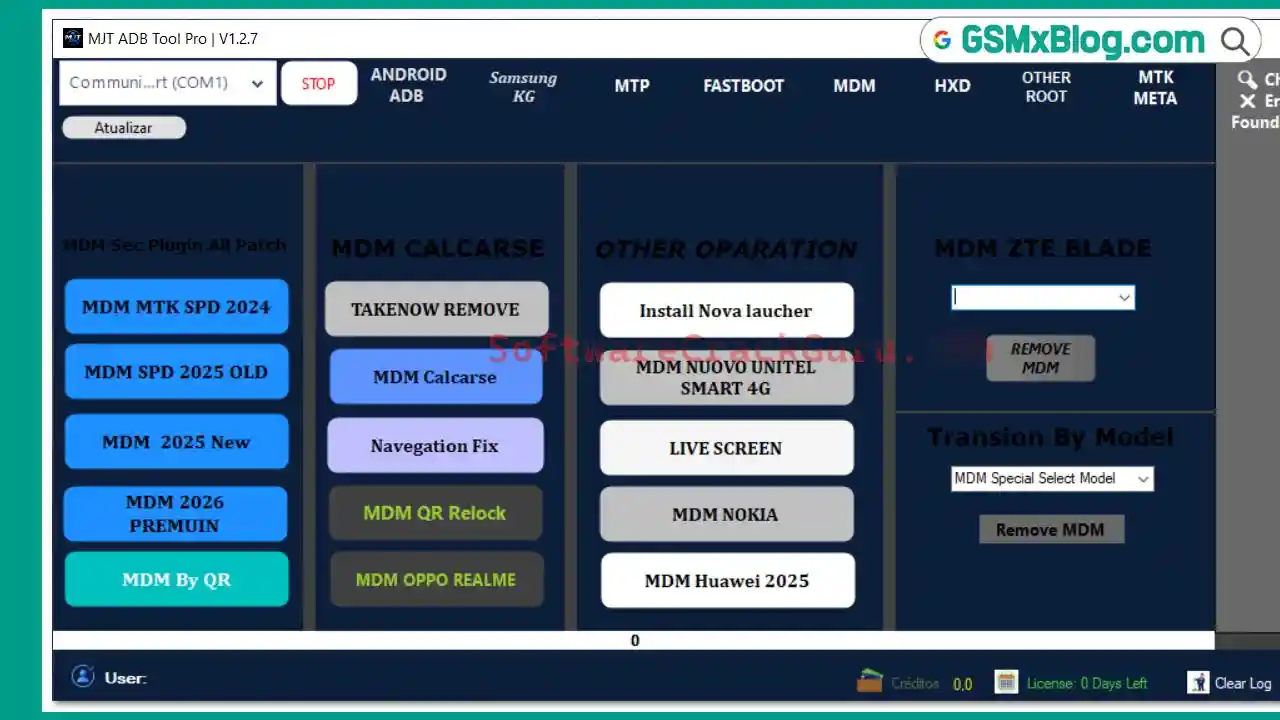
MJT ADB Tool Pro v1.2.7 is a free multi-brand Android servicing tool for Windows developed by the MJT Team. It brings together ADB, MTP, Fastboot, Samsung KG, MDM, HXD, and Extra diagnostic functions into one organized interface — covering FRP bypass, MDM removal, account resets, IMEI repair, SIM unlock, bootloader unlock, Super image editing, and much more. Version 1.2.7 is the latest release, adding several new brand account reset functions and MDM improvements. During testing, the installer ran correctly, the HWID activation worked without issues, and all tabs opened cleanly with no crashes.
MJT ADB Tool Pro v1.2.7 Key Features
Android ADB Functions
- Read Device Information
- Reset FRP (ADB)
- Reboot Recovery / Enter Download Mode
- Apps Manager / Clear Apps
- Bypass Xiaomi Mi Account (Method 1 & 2)
- Bypass Mi Account via Fastboot
- Fix Xiaomi DM-Verity Corruption
- Disable OTA Updates
- Add Language
- Unlock Network
- Backup & Restore Device Data
- Fix Google Play Store
- Reset Oppo ID / Realme ID / Vivo ID
- Reset Tecno ID / Infinix ID / itel ID
- Reset Huawei ID
Samsung KG Functions
- Check KG Status
- Remove KG Lock (Android 11–14)
- Enable ADB via QR (Android 15)
- Remove MDM (Android 11–13)
- Remove MDM (Android 14 — 2024)
- Remove MDM by App (2025)
- Remove MDM All Patch (Android 14–16)
- Backup & Restore EFS
- Root Device / Install MJT Guard / Install Test DPC
- Unlock SIM Card (Old & New Method)
- Live Screen
- Fix Install Apps
- Reboot Normal / Download Mode
- Read Samsung Info (ADB)
- Reset Samsung FRP (Exynos Android 11–14)
- Reset Samsung FRP (Exynos Android 15–16)
- Reset Samsung Account
MTP Functions
- Read Device Information (MTP)
- Open YouTube (MTP)
- Factory Reset (MTP)
- Enable ADB
- Remove FRP (MTP)
Fastboot Functions
- Read Fastboot Information
- Reboot Recovery (Nokia) / Normal Mode
- Universal FRP Removal
- Format Userdata / Erase Cache
- Fastboot Reboot EDL
- Flash Recovery / Flash Images
- Unlock Bootloader / Relock Bootloader
MDM Module
- MDM MTK SPD 2024
- MDM SPD 2025 (Old) / MDM 2025 New / MDM 2026 Premium
- MDM By QR / MDM QR Relock
- Takenow Remove / MDM Calcarse
- Navigation Fix / Install Nova Launcher
- MDM Oppo / Realme
- MDM Nokia / MDM Huawei 2025 / MDM ZTE Blade
- MDM Unitel Smart 4G
- Transsion MDM By Model
- Live Screen
HXD Tool
- Auto Edit Miscdata
- Auto Edit Proinfo
- Select Super.img or BIN File
- Write Super Image Automatically
- Automatic Super Image Editing
Extra Operations
- Read Device Information / Diagnostic Phone
- Enable DIAG Mode / Root Device
- List ADB Partitions
- SIM Unlock (DIAG Mode)
- Write IMEI A & IMEI B (ADB)
- Backup & Restore IMEI
Download MJT ADB Tool Pro v1.2.7
- File Name: MJT_TOOL_PRO.rar
- File Size: 172 MB
- Version: v1.2.7 Latest
- Platform: Windows
- License: Free
- RAR Password: gsmyogesh
How to Install MJT ADB Tool Pro v1.2.7
- Download the RAR package from the links above.
- Extract using WinRAR or 7-Zip with the password gsm.
- Right-click
MJT_TOOL_PRO.exeand select Run as Administrator. - Click Next on the welcome screen, keep the default installation folder, leave the desktop shortcut enabled, then click Install.
- Uncheck Visit product website and click Finish.
- Launch the Control Module as Administrator.
- Click Copy Hardware ID Key.
- Open the Get Free Activation Key page, paste your HWID, and click Generate Key Now.
- Copy the generated key and paste it into the License Token box in the Control Module.
- Click Register License, then log in with your account credentials.
- The tool opens and is ready to use.
MJT ADB Tool Pro v1.2.7 How to Use
- Login with your account after launching the tool.
- Enable USB Debugging on your Android phone from Developer Options.
- Connect your phone via USB cable and allow the ADB permission prompt on the device screen.
- Select the correct tab for your task:
- ADB → FRP reset, Mi Account bypass, ID resets, network unlock
- Samsung KG → KG/MDM removal, EFS backup, SIM unlock, FRP (Exynos)
- MTP → FRP remove, factory reset, ADB enable
- Fastboot → bootloader unlock, flash images, EDL reboot
- MDM → remove MDM locks across all supported brands
- HXD → edit Miscdata/Proinfo, auto Super image editing
- Extra → DIAG mode, IMEI write, SIM unlock, partition list
- Click your desired function and follow the on-screen instructions.
What’s New in MJT ADB Tool Pro v1.2.7
- Added Reset Huawei ID
- Added Reset Oppo ID
- Added Reset Vivo ID
- Added Reset Tecno ID
- Added Reset itel / Infinix ID
- Added Automatic Super Edition (HXD Tool)
- Fixed MDM SPD 2025 New
- Added support for new device models
- Updated user interface design
- Enhanced MDM functionalities
- Improved overall performance & fixed several bugs
Conclusion
MJT ADB Tool Pro v1.2.7 is one of the most complete free Android servicing tools available in 2026. With seven dedicated modules — ADB, Samsung KG, MTP, Fastboot, MDM, HXD, and Extra — it handles nearly every repair task a mobile technician encounters daily, from FRP bypass and MDM removal to IMEI repair, bootloader unlock, SIM unlock, and Super image editing. The HWID-based free activation means no paid subscription is needed, and the v1.2.7 update adds important new ID reset functions for Oppo, Vivo, Huawei, Tecno, Infinix, and itel. Installation and activation were tested and confirmed working. Download MJT ADB Tool Pro v1.2.7 today using the links above and put it to work in your repair shop.
Credits: All credits go to the MJT Team for developing and maintaining this tool. Disclaimer: For educational purposes only. Use responsibly and legally. Always back up data before running any repair operation. We are not liable for any device damage or data loss.