UnlockTool Free Download Latest Version via RE_GURU – No Login Required 2026
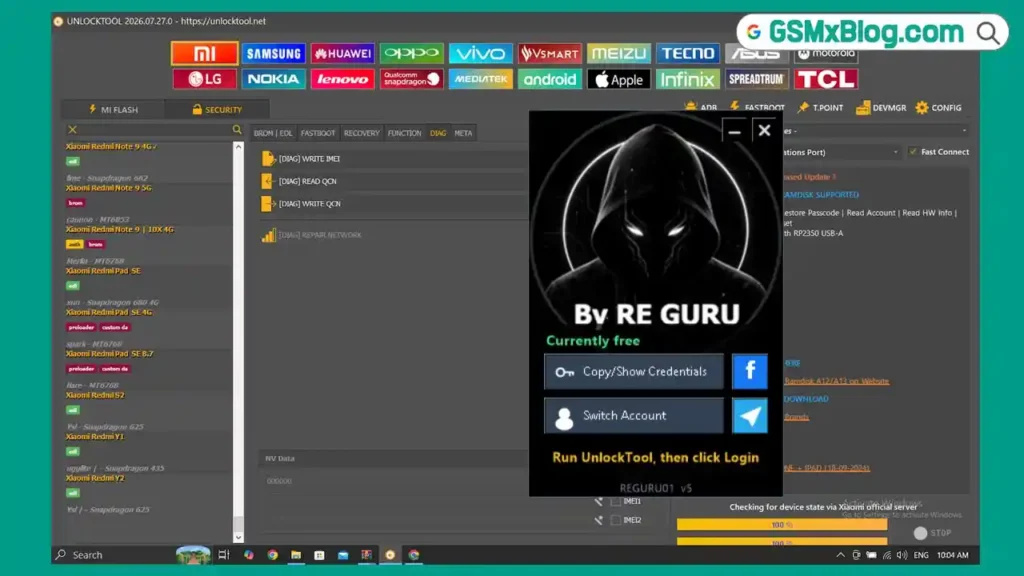
UnlockTool is one of the most widely used Android and iPhone servicing tools in the GSM community. It supports Qualcomm, MediaTek, Unisoc, Samsung, Xiaomi, Oppo, Vivo, Huawei, Motorola, Apple, Nokia, LG, Asus, Lenovo, Tecno, Infinix, and many more brands from a single interface. This article covers the free version shared via the RE_GURU launcher, which provides access to UnlockTool without a paid subscription. The launcher, activation process, and software interface were tested and confirmed working on a Windows PC.
⚠️ Server Migration Notice: UnlockTool is currently migrating from the free RE_GURU server to a premium server. The free server has reached its capacity limit and may be unstable. A new loader file is expected to be released soon with improved stability. Check the RE_GURU Telegram channel for the latest update.
Tool Information
| Detail | Info |
|---|---|
| Tool Name | UnlockTool |
| Latest Version | v2026.07.27.0 |
| Platform | Windows |
| Supported Chipsets | Qualcomm, MediaTek, Unisoc (Spreadtrum) |
| Activation Method | RE_GURU Launcher (Telegram Bot — Free) |
| License | Free (via RE_GURU Launcher) |
| Login Required | Yes — RE_GURU Telegram Activation |
| Server Status | Migrating to Premium Server (May Be Unstable) |
| Password | No Password |
UnlockTool Key Features
Supported Brands
- Xiaomi / Redmi / POCO
- Samsung
- Huawei / Honor
- Oppo / Realme / OnePlus
- Vivo
- Motorola
- Apple (iPhone / iPad)
- Nokia / LG / Asus / Lenovo
- Tecno / Infinix & many more
Core Functions
- FRP Removal
- Factory Reset
- Firmware Flashing
- Bootloader Operations
- Read Device Information
- Backup & Restore
- Remove Demo Mode
- Device Repair Options
Connection & Interface
- ADB, Fastboot, EDL connection modes
- Preloader Mode for supported devices
- BROM Mode for compatible MediaTek devices
- Test Point support for selected models
- MediaTek Custom DA support
- Separate Android & Apple modules
- Built-in device search box
- Dark interface with separate brand tabs
- USB connection status panel
- Communication port selection
- Fast Connect option
Newly Supported Apple Devices
| Device | Device |
|---|---|
| iPhone XS | iPhone XS Max |
| iPhone XR | iPhone 11 |
| iPhone 11 Pro | iPhone 11 Pro Max |
| iPhone SE (2020) | iPad Air (3rd Gen) |
| iPad mini (5th Gen) | iPad (8th Gen) |
| iPad (9th Gen) |
⚠️ Note: Boot Ramdisk functions require a USBLiter8 with RP2350 USB-A hardware device. Ramdisk files can be downloaded from the official UnlockTool website at files.unlocktool.net.
Download UnlockTool Free (RE_GURU Activator)
- Tool Name: UnlockTool (RE_GURU Free Version)
- Activation: RE_GURU Launcher via Telegram Bot
- License: Free
- Password: No Password
How to Install & Activate UnlockTool via RE_GURU
- Download the UnlockTool package and RE_GURU activator, then extract all files to a new folder.
- Temporarily disable Windows Defender or any antivirus before extracting — some launcher files may be flagged as false positives.
- Right-click the RE_GURU launcher and select Run as Administrator.
- Click Activate with a Code.
- Open the official RE_GURU Telegram bot link shown in the launcher.
- Press Start in the bot and generate a new 6-digit activation code.
- Copy the generated code and paste it into the activation window, then click Activate.
- Save the User ID and Password shown by the launcher — you will need them to log in.
- Click Run UnlockTool.
- Open Windows Task Manager, find UnlockTool.exe, go to Details, right-click and set the process priority to High.
- Return to the launcher and click Login.
- Accept the disclaimer window that appears.
- Wait until all modules finish loading — this may take a minute on first launch.
- Select your device brand from the left panel and start working.
Important Notes
- The RE_GURU free server has reached its capacity and is currently migrating to a premium server — expect some instability until the new loader is released.
- Always disable antivirus temporarily before extracting the launcher files to avoid false positive deletions.
- Set UnlockTool.exe to High priority in Task Manager after launching for better performance and stability.
- Boot Ramdisk functions for Apple A12/A13 require the USBLiter8 with RP2350 USB-A hardware — these will not work without it.
- Ramdisk files must be downloaded separately from files.unlocktool.net.
- For activation problems or launcher issues, contact RE_GURU directly via their Telegram channel.
What’s New in v2026.07.27.0
Apple A12 / A13 — Boot Ramdisk Support
- Added Boot Ramdisk support for Apple A12 and A13 devices
- Added Passcode Backup & Restore
- Added Read Account
- Added Read Hardware Information
- Added Read iOS Information
- Added Factory Reset
Conclusion
UnlockTool remains one of the most powerful and regularly updated Android and iPhone servicing tools in 2026. The RE_GURU free launcher gives you access to the full tool without a paid subscription, making it an excellent starting point for technicians who want to test its capabilities before committing. The v2026.07.27.0 update adds important Apple A12/A13 Boot Ramdisk support — covering iPhone XS through iPhone 11 and several iPad models — which is a significant addition for shops that handle iPhone repairs. Just keep in mind the ongoing server migration may cause temporary instability. Download the RE_GURU activator using the link above, follow the activation steps carefully, and you should be up and running in a few minutes.
Credits: All credits go to the UnlockTool development team and RE_GURU for making this version available. Disclaimer: For educational purposes only. Use responsibly and legally. Always back up data before running any repair operation. We are not liable for any device damage or data loss.
Related Tools
- MJT ADB Tool Pro v1.2.7 Free Download
- Muslim Odin v5.0 Latest Version Free
- GSTool V2026.05.02 Latest Version