MD UNLOCK PRO MDM TOOL Latest Version Free Download 2026
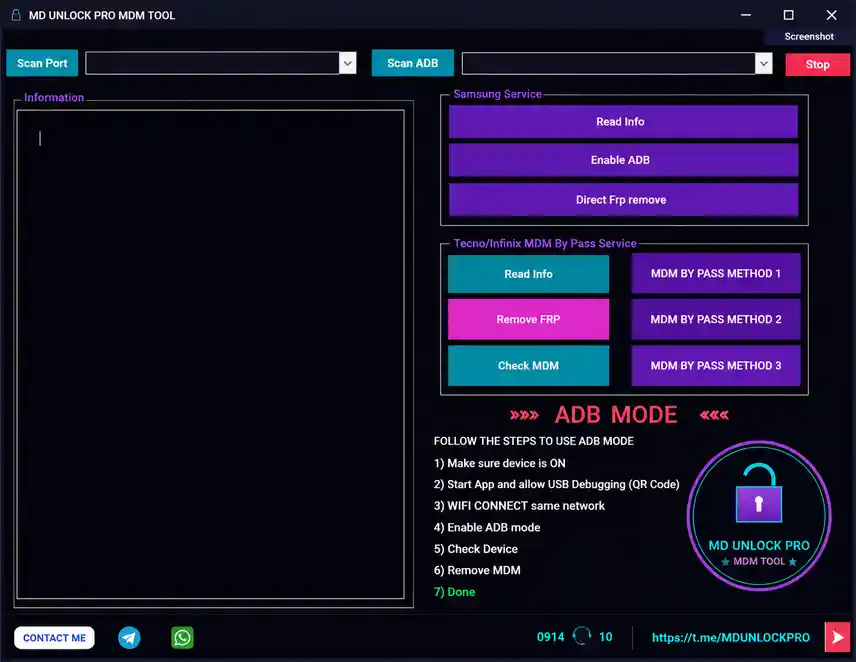
MD UNLOCK PRO MDM TOOL is a portable Windows utility for Samsung, Tecno, and Infinix MDM bypass and FRP removal. It provides separate service sections for Samsung and Tecno/Infinix, covering device information reading, ADB enabling, Direct FRP Remove, FRP removal, MDM status checking, and three separate MDM bypass method buttons. The tool requires no installation wizard — extract the RAR archive, keep the DATA folder intact, and run the MDM UNLOCKER EXE as Administrator.
⚠️ Security Notice: Always scan the downloaded archive with your antivirus before extracting. Keep all files together after extraction — do not move or delete files from the DATA folder, as the main program depends on them.
Tool Information
| Detail | Info |
|---|---|
| Tool Name | MD UNLOCK PRO MDM TOOL |
| Platform | Windows (Portable — No Install) |
| File Format | RAR Archive |
| Launcher | MDM UNLOCKER EXE (Run as Administrator) |
| Supported Brands | Samsung, Tecno, Infinix |
| License | Free |
| Password | No Password |
MD UNLOCK PRO MDM TOOL Key Features
Connection & Detection
- Scan Port — scan for available COM ports with a dropdown selector
- Scan ADB — detect connected ADB devices with a dropdown selector
Samsung Service
- Read Info — read device information from a connected Samsung device
- Enable ADB — enable ADB on Samsung devices
- Direct FRP Remove — remove FRP directly without extra steps
Tecno / Infinix MDM Bypass Service
- Read Info — read device information from Tecno or Infinix devices
- Remove FRP — remove FRP lock from supported Tecno/Infinix models
- Check MDM — check current MDM protection status on the connected device
- MDM Bypass Method 1 — first MDM bypass method
- MDM Bypass Method 2 — second MDM bypass method
- MDM Bypass Method 3 — third MDM bypass method
Interface
- Information Panel — large left-side panel for displaying device info and operation logs
- Stop Button — stop any running operation at any time
- Screenshot Button — capture a screenshot of the tool window directly from the top bar
Download MD UNLOCK PRO MDM TOOL
- File Name: MD UNLOCK PRO MDM TOOL.rar
- File Size: 5.0 MB
- Version: Latest 2026
- License: Free
- Password: No Password
How to Use MD UNLOCK PRO MDM TOOL
- Download the MD UNLOCK PRO MDM TOOL RAR file from the MEGA link above.
- Scan the downloaded RAR file with your antivirus before extracting.
- Extract the RAR file using WinRAR or 7-Zip — extract to a dedicated folder.
- Open the extracted folder and confirm the DATA folder and all its contents are present — do not move or delete any files from it.
- Locate the MDM UNLOCKER EXE file in the main extracted folder (outside the DATA folder).
- Right-click
MDM UNLOCKER.exeand select Run as administrator. - Connect your Samsung, Tecno, or Infinix device to the PC via USB and enable USB Debugging if required.
- Click Scan Port or Scan ADB to detect the connected device and select the correct port from the dropdown.
- For Samsung — use the Samsung Service section: Read Info, Enable ADB, or Direct FRP Remove.
- For Tecno / Infinix — use the Tecno/Infinix MDM Bypass Service section: Read Info, Remove FRP, Check MDM, or one of the three MDM Bypass Method buttons.
- Monitor the Information Panel on the left side of the window for live operation output.
Important Notes
- Always scan the RAR file with your antivirus before extracting — use trusted security software.
- Keep the DATA folder and all its files in the same location as the main EXE — the tool depends on them and will not run correctly if they are missing or moved.
- Run the MDM UNLOCKER EXE as Administrator — it may not function correctly without elevated permissions.
- For Tecno/Infinix MDM bypass, try all three methods if the first does not work — each method targets a different MDM security configuration.
- Always back up device data before running any FRP removal or MDM bypass operation.
Conclusion
MD UNLOCK PRO MDM TOOL is a focused portable utility for Samsung FRP and ADB operations and Tecno/Infinix MDM bypass. The three separate MDM bypass method buttons for Tecno and Infinix are a practical inclusion — when one method does not apply to a particular security configuration, switching to another takes one click. The tool is lightweight, requires no installation, and the DATA folder structure keeps all dependencies in one place. Scan the archive before use, run the EXE as Administrator, and keep all files together after extraction. Download it today using the MEGA link above.
Credits: All credits go to the MD UNLOCK PRO MDM TOOL development team. Disclaimer: For educational purposes only. Scan downloaded files before use. Use responsibly. We are not liable for any device damage or data loss.
Related Tools
- HSD AIO Tool v1.0.4 Free Download
- GSM SRINU TOOL v1.0.5 Free Download
- Aftersales Tool Box V4 2025 Free Download