HMD DeviceKit Tool Download (All Version) Official Nokia Flash Tool
HMD DeviceKit is the official service tool from HMD Global for Nokia Android devices. It supports flashing .nb0 and .mlf firmware files, performing factory resets, bypassing FRP locks, rebooting into EDL mode, and editing device identity data — all from a single Windows application.
This post covers the tool’s full feature set, supported Nokia models, all available version download links, and how to use it.
What Is HMD DeviceKit?
HMD DeviceKit is the official Nokia service and flashing utility developed by HMD Global. It is the primary tool used at Nokia Mobile Care service centers worldwide for firmware updates, factory resets, and device maintenance tasks.
Unlike third-party tools, DeviceKit communicates directly with Nokia’s firmware servers and supports the .nb0 and .mlf file formats native to Nokia devices. Access to the full tool requires Microsoft Active Directory credentials registered with HMD’s Service Center Portal (SCP) — typically issued to authorized Nokia repair partners and carrier service centers.
Note: If you do not have an HMD SCP account, some functions of the tool will be restricted. Access is granted only to Nokia Mobile Care partners and authorized carrier service providers.
Key Features of HMD DeviceKit
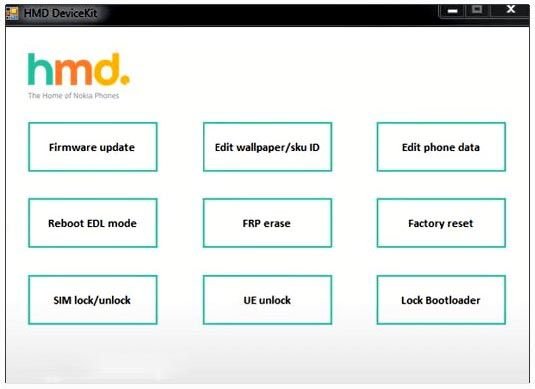
- Firmware Update (Flash): Flash the latest HMD stock firmware directly to your Nokia device using
.nb0or.mlfflash files. - Factory Reset: Perform a factory reset on Nokia devices that lack a native reset option in the settings menu — common on many recent Nokia models.
- Download Firmware: Download the latest available firmware for the connected device directly within the tool, without needing a separate download manager.
- Edit Wallpaper ID & SKU ID: Modify regional device identifiers. For example,
600WWis the global SKU used in most markets, while600RUis specific to Russia. - Reboot to EDL Mode: Restart the connected device into Qualcomm EDL (Emergency Download) mode — also known as Qualcomm 9008 mode — for deep-level repair operations.
- Edit Phone Data: Rewrite phone identity data including device ID fields.
Supported Nokia Models
HMD DeviceKit covers a wide range of Nokia Android smartphones and tablets:
| Series | Models |
|---|---|
| 1 Series | Nokia 1.4 |
| 2 Series | Nokia 2.2, 2.3, 2.4 |
| 3 Series | Nokia 3.2, 3.4 |
| 4 Series | Nokia 4.2 |
| 5 Series | Nokia 5.3, 5.4 |
| 6 Series | Nokia 6.2 |
| 7 Series | Nokia 7.2 |
| 8 Series | Nokia 8.3 5G, Nokia 8V UW 5G |
| C Series | Nokia C1, C2, C3, C01 Plus, C20, C20 Plus, C30, C1 2nd Gen |
| G Series | Nokia G10, G20, G300 |
| X Series | Nokia X10, X20, XR20 |
| T Series | Nokia T20 |
Download HMD DeviceKit — All Versions
Three versions are available below. Download the latest version unless you need an older one for compatibility with a specific device or firmware.
Latest Version — HMD DeviceKit v1.0.21.2
| Detail | Info |
|---|---|
| Version | 1.0.21.2 |
| File Size | 130 MB |
| Contents | Tool + USB Driver + Tutorial |
Download v1.0.21.2 from MediaFire
HMD DeviceKit v1.0.19.7
| Detail | Info |
|---|---|
| Version | 1.0.19.7 |
| File Size | 126 MB |
Download v1.0.19.7 from MediaFire
HMD DeviceKit v1.0.15.7
| Detail | Info |
|---|---|
| Version | 1.0.15.7 |
| File Size | 74 MB |
Download v1.0.15.7 from MediaFire
How to Use HMD DeviceKit
Step 1: Download and Install
Download the ZIP package from one of the links above. Extract it and run the installer. Install the included USB drivers when prompted.
Step 2: Log In with HMD SCP Credentials
Open the tool and log in using your Microsoft Active Directory credentials registered with HMD’s Service Center Portal. Without a valid account, advanced functions will not be available.
Step 3: Connect Your Nokia Device
Connect your Nokia phone to the PC via USB cable. Make sure USB drivers are installed so the tool can detect the device.
Step 4: Select the Operation
From the main interface, choose the task you need:
- Firmware Update — to flash or upgrade the stock firmware
- Factory Reset — to wipe the device and restore factory defaults
- Download Firmware — to pull the latest firmware for the connected model directly from HMD servers
- Reboot EDL — to enter Qualcomm 9008 mode for advanced repairs
Step 5: Follow On-Screen Prompts
Each function has guided on-screen instructions. Follow them through to completion and do not disconnect the device until the operation finishes.
Important Notes
✅ Install USB Drivers First: The ZIP package includes USB drivers. Install them before connecting your device or the tool won’t detect it.
✅ Charge Your Device: Keep the battery above 40% before starting any flash or reset operation to prevent interruptions.
✅ Back Up Your Data: Firmware flashing and factory reset will erase all user data. Back up contacts, photos, and files beforehand.
⚠️ Authorized Use Only: HMD DeviceKit is intended for Nokia Mobile Care service centers and authorized repair partners. Use it responsibly and only on devices you own or are authorized to service.
Related Tools
- GSM SRINU TOOL v1.0.5 Free Download
- HSD AIO Tool v1.0.4 Free Download
- Mysterious-Dev Tool V1.2.7 Free Download