HSD AIO Tool v1.0.4 Free Download – Multi-Brand Tool 2026
HSD AIO Tool v1.0.4 is a multi-brand Android servicing tool for Windows that covers Samsung KG/Knox Guard, MDM/IT Admin, MTP, ADB, Fastboot, and Xiaomi ADB operations in one interface. It supports Samsung, Xiaomi, Vivo, Oppo, Realme, Motorola, Infinix, Tecno, itel, POCO, Redmi, iQOO, and Nothing devices. The main interface and all tool sections were verified as functional during testing, but some operations triggered a loader server error — a known limitation of the current Beta Edition. Account registration is required before first use.
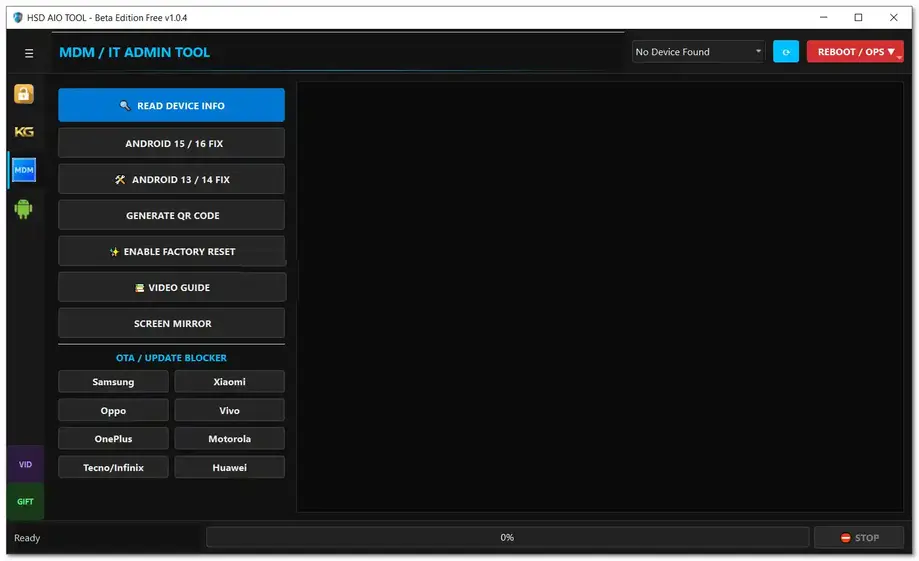
⚠️ Beta Notice: HSD AIO Tool v1.0.4 is a Beta Edition. Some server-dependent operations may show a loader download error when the required loader is not yet available on the server. This is expected behavior in the current release.
Tool Information
| Detail | Info |
|---|---|
| Tool Name | HSD AIO Tool |
| Version | v1.0.4 (Beta Edition) |
| Platform | Windows |
| Supported Brands | Samsung, Xiaomi, Vivo, Oppo, Realme, Motorola, Infinix, Tecno, itel, POCO, Redmi, iQOO, Nothing |
| Account Required | Yes — Free Registration |
| License | Free |
| Server Status | Beta — Some Loaders May Return Server Error |
| Password | No Password |
HSD AIO Tool v1.0.4 Key Features
KG Tool / Knox Guard (Samsung)
- Read Samsung Info via ADB
- Enable ADB via MTP Mode
- Enable ADB via Old Method
- Enable ADB via June 2023 Method
- Android 13 KG Lock / Knox Bypass — Method 1 & Method 2
- Android All Patch with QR and Auto ADB
- Android 14 Universal Method
- Remove Knox
- Fix Relock
- Android 13 QR Code ADB Enable
- UMT ADB QR
- OTA / Update Blocker for Samsung
MDM / IT Admin Tool
- Read Device Info
- Android 15 / 16 Fix
- Android 13 / 14 Fix
- Generate QR Code
- Enable Factory Reset
- Video Guide
- Screen Mirroring
OTA / Update Blocker
- Samsung / Xiaomi / Oppo / Vivo / OnePlus / Motorola / Tecno / Infinix / Huawei
Utility Tool (MTP Mode)
- Samsung MTP Read Info
- Universal MTP Read Info
- Open Browser via MTP Mode
- Enable ADB Old via MTP Mode
- Enable ADB New via MTP Mode
- Factory Reset via MTP Mode
- Android 16 FRP Option
ADB Mode
- Read Info (ADB)
- Remove FRP
- Reboot Device
- App Manager
- ADB FRP OS15
- Hardware Diagnostics
- List Packages
- Disable OTA
- Full Device Info
- Open Settings / Open Browser / Open Dialer
Fastboot Mode
- Read Info in Fastboot Mode
- Reboot Device from Fastboot
- Reboot to EDL Mode
Xiaomi ADB Mode
- View Phone IDs and Hardware Information
- View CPU, Brand, and Model Information
- View Bluetooth MAC and Wi-Fi MAC Address
- View ENG State
- View IMEI1 and IMEI2
- Read / Generate / Write Critical Data
- Reboot Xiaomi Device
Download HSD AIO Tool v1.0.4
- Tool Name: HSD AIO Tool
- Version: v1.0.4 Beta
- License: Free
- Password: No Password
How to Install HSD AIO Tool v1.0.4
- Download the HSD AIO Tool RAR file from the MediaFire link above.
- Extract the archive using WinRAR or 7-Zip.
- Locate
HSD_AIO_TOOL.exein the extracted folder. - Right-click the file and select Run as Administrator.
- Follow the installer instructions and enable the desktop shortcut option when asked.
- Before closing the installer, uncheck Launch HSD_AIO_TOOL, then click Finish.
- Open the HSD AIO Tool desktop shortcut.
- When the HSD LOGIN screen appears, click SIGN UP.
- Enter your Name, Phone Number, Email, and Password, then click CREATE ACCOUNT.
- Click CONTINUE TO LOGIN on the referral popup.
- Login — the main HSD AIO Tool interface will open.
- If Windows asks for permission, allow Windows Defender Firewall access for
adb.exeto enable ADB functions.
Important Notes
- This is a Beta Edition — some server-dependent operations may return a loader server error if the required loader is not yet available on the server. This is expected behavior and not a fault with your installation.
- Free account registration is required before using the tool — sign up from the login screen on first launch.
- Allow Windows Defender Firewall access for
adb.exewhen prompted — ADB functions will not work without it. - Uncheck Launch HSD_AIO_TOOL before clicking Finish during installation — launch the tool from the desktop shortcut as Administrator instead.
- Enable USB Debugging on your Android phone from Developer Options before connecting for ADB operations.
Conclusion
HSD AIO Tool v1.0.4 Beta packs a wide range of Samsung, Xiaomi, and multi-brand servicing functions into one organized interface — covering Knox Guard bypass, MDM removal, MTP utilities, ADB operations, Fastboot controls, OTA blockers for nine brands, and a dedicated Xiaomi ADB section for critical data and hardware info. The free account registration keeps the barrier to entry low, and the feature coverage is impressive for a beta release. The loader server errors on some operations are a known issue at this stage — the tool is still actively developed and should improve as the server database grows. Download it today using the MediaFire link and test it on your Windows PC.
Credits: All credits go to the HSD AIO Tool development team.
Disclaimer: For educational purposes only. This is a Beta Edition — some functions may not work as expected. Use responsibly. We are not liable for any device damage or data loss.