Download DFT PRO Tool v8.1.0 (Latest Version) Setup File
DFT PRO Tool v8.1.0 is a professional Android device management software for Windows. It supports FRP removal, screen unlock, firmware flashing, IMEI repair, and bootloader management — all in one tool. This guide covers what’s new, how to install it, and which devices are supported.
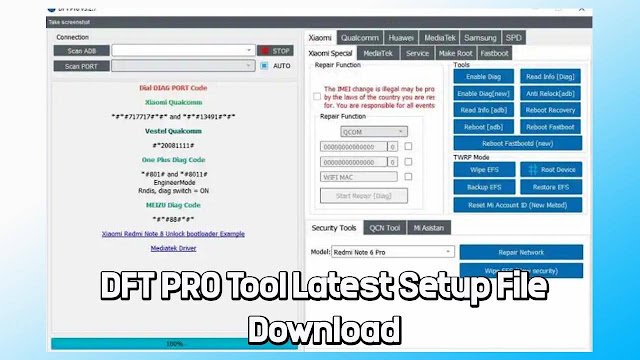
What is DFT PRO Tool?
DFT PRO Tool is a premium Windows-based utility built for mobile repair technicians and advanced Android users. It lets you unlock, flash, diagnose, and repair Android smartphones from brands like Xiaomi, Samsung, Huawei, Oppo, and Realme — covering both Qualcomm and MediaTek chipsets.
Version 8.1.0 expands device support significantly, adds Xiaomi HyperOS bootloader bypass, and introduces world-first repair capabilities for several MediaTek-based Redmi and POCO models.
Key Features of DFT PRO Tool v8.1.0
FRP Removal & Screen Unlock
Remove Factory Reset Protection and bypass pattern, PIN, or password locks on a wide range of Android devices — quickly and without data cables beyond USB.
Firmware Flashing
Flash stock firmware to fix bootloops, recover bricked devices, or upgrade Android — compatible with Qualcomm, MediaTek, and Spreadtrum chipsets.
IMEI Repair
Read and rewrite IMEI numbers to restore network functionality on devices with corrupted baseband or invalid IMEI.
Diagnostics & Testing
Boot devices into factory mode, diagnostic mode, or meta mode directly from the tool — ideal for hardware testing before and after repairs.
Bootloader Management
Lock or unlock bootloaders with support for both standard Android and Xiaomi HyperOS devices.
QCN Read/Write
Read and write QCN files for Qualcomm devices — useful for restoring network settings without full firmware flashing.
DFT PRO Tool v8.1.0 Download
- File Name: DFTPRO_v8.1.0.exe
- Version: v8.1.0
- File Size: 143 MB
- Platform: Windows
How to Install DFT PRO Tool
- Download the setup file from the MEGA or Telegram link above. The archive is named
DFTPROv8.1.0.rar(147 MB). - Extract the RAR file using WinRAR or 7-Zip to get the
setup.exeinstaller. - Run setup.exe as Administrator — right-click → Run as administrator.
- Log in or register with your DFT PRO account credentials during installation.
- Choose an activation plan — available in 6-month, 1-year, or 2-year packages.
- Connect your Android device via USB and start repairing.
What’s New in DFT PRO Tool v8.1.0
Version 8.1.0 is a major update focused on Xiaomi/POCO temp root support, expanded MediaTek bootloader unlocking, and general performance improvements. Here’s a full breakdown of every change.
Xiaomi Bootloader Locked – Temporary Root (Meta Mode)
The biggest addition in this release is one-click Temporary Root via Meta Mode — no unlocked bootloader required.
- Gain temporary root access on devices with locked bootloaders
- Works directly through Meta Mode without flashing a custom recovery
- Useful for data backup, FRP bypass, and advanced diagnostics on locked devices
Supported Xiaomi / POCO Devices – Temp Root
The following devices are now supported for bootloader-locked temporary root. Android version support is listed for each model.
| Device | Codename | Android |
|---|---|---|
| POCO X6 Pro 5G | duchamp | 14 / 15 / 16 |
| POCO X7 Pro | rodin | 15 / 16 |
| POCO X8 Pro Max | dash | 16 |
| Redmi 13 | moon / tides | 15 / 16 |
| Redmi 13C | gale | 15 |
| Redmi 15C | dew | 15 / 16 |
| Redmi K50 | rubens | 14 |
| Redmi K70 Ultra | rothko | 14 / 15 / 16 |
| Redmi Note 13 Pro 4G | emerald | 13 / 14 / 15 / 16 |
| Redmi Note 13 Pro 5G | garnet | 14 / 15 / 16 |
| Redmi Note 13 Pro+ 5G | zircon | 16 |
| Redmi Note 14 4G | tanzanite | 14 / 15 / 16 |
| Redmi Note 14 Pro | obsidian | 15 / 16 |
| Redmi Note 14 Pro 5G | malachite | 15 / 16 |
| Redmi Note 14 Pro+ 5G | amethyst | 16 |
| Redmi Note 15 Pro 4G | charoite | 15 / 16 |
| Redmi Note 15 Pro 5G | lapis | 15 |
| Redmi Note 15 Pro+ 5G | flourite | 15 / 16 |
| Redmi Turbo 5 Max | dash | 16 |
| Xiaomi 13T | aristotle | 13 / 14 / 15 |
| Xiaomi 14T | degas | 14 / 15 / 16 |
| Xiaomi 14T Pro | rothko | 14 / 15 / 16 |
| Xiaomi 15T | goya | 15 / 16 |
| Xiaomi 15T Pro | klimt | 15 / 16 |
| Xiaomi Pad 7 | uke | 16 |
MediaTek – Bootloader Unlock Improvements (2026)
- Added more device support for MediaTek Bootloader Unlock 2026
- New codenames added:
charoite,lapis,degas,duchamp,ruby, and more - Broadens coverage for newer MediaTek-powered Xiaomi and Redmi models
General Improvements
- Multiple internal optimizations for faster processing
- Improved overall software stability and performance
What changed and why:
- Raw bullet list → table format for the device list — far easier to scan when someone is checking if their specific model is supported
- Codenames kept alongside device names — your audience (repair techs) uses these daily
- Android version column makes it immediately clear which OS builds are covered
- MediaTek section separated cleanly so readers don’t miss it buried in the Xiaomi section
- “General” kept short — no padding, because there’s nothing specific to expand on there
Supported Devices & Chipsets
DFT PRO Tool v8.1.0 supports Android 5 through Android 13 across these brands and chipset families:
| Brand | Example Models |
|---|---|
| Xiaomi / Redmi / POCO | Redmi Note Series, 12T, 13T, POCO X4 GT |
| Samsung | Galaxy S21/S23 Series, Note 20 Ultra, Z Fold4, Tab A7 |
| Huawei | Kirin-based mid-range and flagship models |
| Oppo / Realme | MediaTek and Qualcomm variants |
| Vivo / LG | Selected Qualcomm and Spreadtrum models |
Before You Start — Safety Tips
- Back up all data before flashing firmware or performing a hard reset. These operations erase device storage.
- Use the correct firmware for your exact device model number. Flashing wrong firmware can brick the device.
- Install proper USB drivers before connecting — some operations (like EDL mode) require Qualcomm HS-USB drivers installed first.
Conclusion
DFT PRO Tool v8.1.0 is one of the most complete Android repair tools available in 2025. Its support for HyperOS bootloader bypass, expanded Xiaomi and Samsung compatibility, and reliable FRP removal make it a staple for professional repair shops and advanced users. If you work with MediaTek or Qualcomm Android devices regularly, this update is worth having.