Download UT Tool v2.0 (Latest Version) Free 2026
UT Tool Pro V2.0 is a multi-brand Android servicing tool for mobile technicians who work with a wide variety of devices on Windows PC. It covers FRP bypass, firmware flashing, factory reset, screen lock removal, and many other essential repair functions across Qualcomm, MediaTek, Samsung, Huawei, and more — all organized by brand and model in one clean interface. The developer offers a 10-day free trial login, which gives you enough time to test the tool before committing to it.
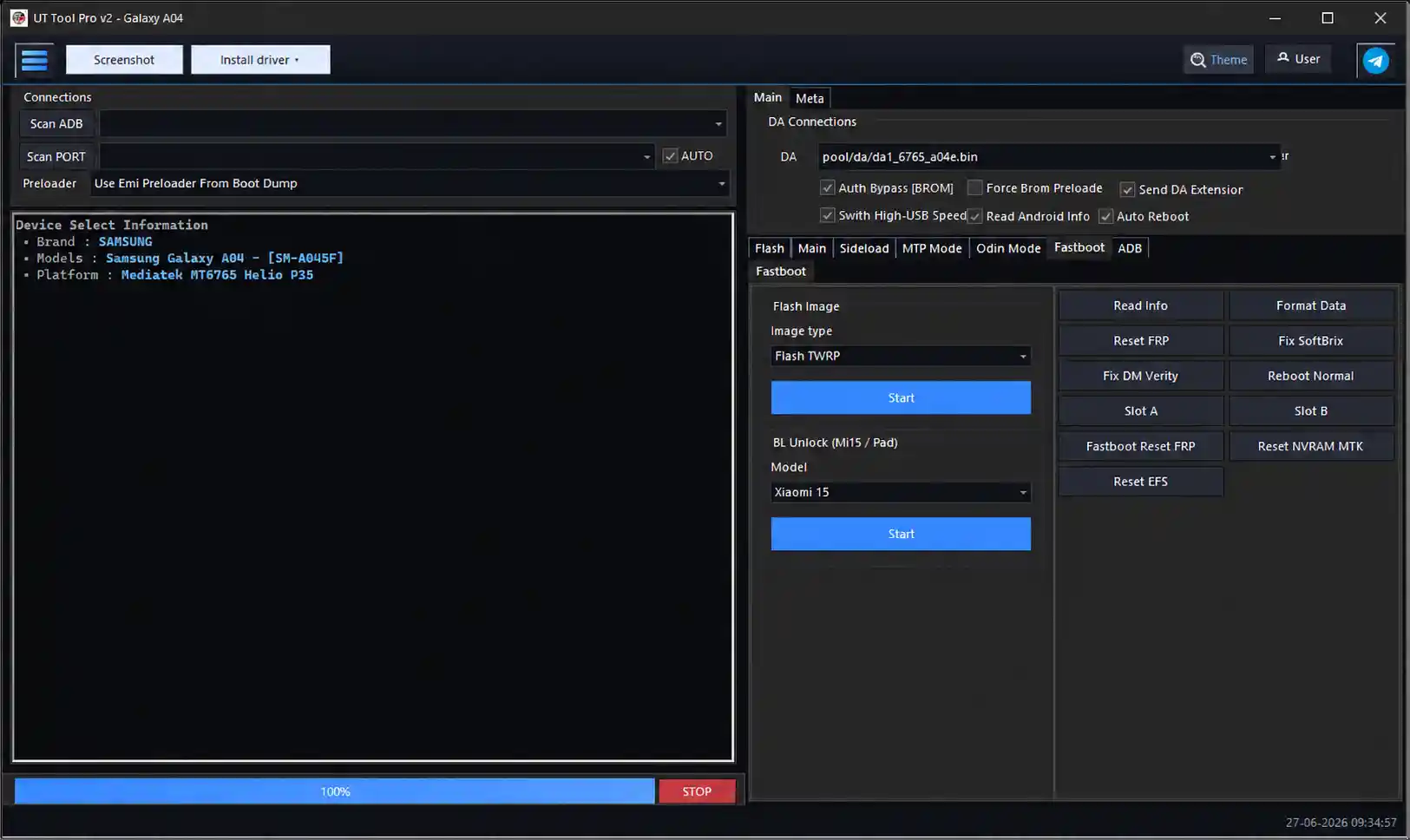
Tool Information
| Detail | Info |
|---|---|
| Tool Name | UT Tool Pro |
| Version | V2.0 |
| File Name | UT_Tool_Pro_v2_Setup.7z |
| File Size | 115 MB |
| Compatible OS | Windows (All Versions) |
| Supported Chipsets | Qualcomm, MediaTek, Samsung, Huawei & More |
| License | Free (Credits Required) |
| Password | N/A |
| Trial Login | 10-Day Free Trial (Request via Official Facebook Page) |
UT Tool Pro V2.0 Key Features
ADB Functions
- Read Device Information
- Reboot / Reboot to Recovery / Reboot to Fastboot
- Screenshot Capture
- Install & Uninstall APK
- Enable & Disable ADB Mode
- Open Browser / Open Dialer
Fastboot Functions
- Read Device Information
- Reboot / Reboot to Recovery / Reboot to Fastboot
- Bootloader Lock & Unlock
- Fastboot Detection
FRP Functions
- Remove FRP / Reset FRP
- Google Account Lock Removal
- Samsung, Huawei, Qualcomm & MediaTek FRP Support
Factory Reset & Screen Lock
- Factory Reset / Safe Format / Wipe Cache / Erase User Data
- Remove Pattern / PIN / Password / Screen Lock / Privacy Password
MediaTek Functions
- Read / Write / Backup / Restore Firmware
- Read / Write Partition
- Format Device / Factory Reset
- Preloader Mode & Meta Mode Support
- Security Operations
Qualcomm Functions
- EDL Mode Support
- Read / Write / Backup / Restore Firmware
- Partition Manager / Flash Operations
- Factory Reset / Security Operations
Samsung & Huawei Functions
- Samsung FRP Reset / Factory Reset / Download Mode / ADB Operations
- Huawei FRP Reset / Factory Reset / Fastboot Support / Security Operations
Firmware & Utility Functions
- Flash / Read / Backup / Restore Firmware
- Scatter File & XML Firmware Support
- Driver Installation / Device Detection / USB Port Detection
- Auto Device Recognition / Log Viewer / Operation History
- Multiple Theme Options (including Dark Mode)
Download UT Tool Pro V2.0
- File Name: UT_Tool_Pro_v2_Setup.7z
- Version: V2.0
- File Size: 115 MB
- License: Free (Credits Required)
- Password: N/A
UT Tool Pro V2.0 How to Use
- Download the setup file from the links above.
- Extract the 7z file and run the installer as Administrator.
- Accept the license agreement and proceed through the installation screens.
- Allow the installer to add drivers and create a desktop shortcut.
- Request trial login credentials from the official Facebook page if you don’t have an account yet.
- Open the tool and sign in with your login details.
- Select your phone brand from the brand list.
- Choose the correct device model — supported functions will appear automatically.
- Connect your Android phone via USB cable and enable USB Debugging.
- Select your desired function:
- FRP Bypass → remove Google account lock
- Flash Firmware → load and flash stock ROM
- Factory Reset → wipe device data
- Screen Lock Remove → remove PIN / pattern / password
- Click Start and wait for the process to complete.
- Reboot your device when done.
Supported Brands
| Brand | Coverage |
|---|---|
| Samsung | Galaxy A, J, M, S, Note, Tab, Z Fold/Flip Series |
| Huawei / Honor | P, Mate, Nova, Y, Honor X/V/Play Series |
| Xiaomi / Redmi / Poco | Redmi Note, Mi, Poco, K, Black Shark Series |
| Infinix | Hot, Note, Smart, Zero, GT Series |
| Tecno | Spark, Camon, Pova, Pop, Phantom Series |
| OnePlus | Nord, Nord CE, 7, 8, 9, 10 Series |
| Oppo / Realme | CPH, RMX Series |
| Asus | Zenfone, ROG Series |
| Hisense | F, H, U, KingKong Series |
| ZTE | Blade, Axon Series |
| Cubot | KingKong, Note, X Series |
Conclusion
UT Tool Pro V2.0 is a well-organized and feature-rich Android repair tool that covers a huge range of brands and chipsets in one place. The model-based layout keeps things clean — you pick a brand, select a model, and only the relevant functions show up. That alone saves a lot of time in a busy repair shop. With support for Qualcomm, MediaTek, Samsung, Huawei, Xiaomi, Infinix, Tecno, and many more, it handles most of the repair tasks a mobile technician encounters daily. The 10-day free trial makes it easy to test before deciding. Download it today and see how it fits your workflow.
Credits: All credits go to the UT Tool Team for developing and sharing this tool. Disclaimer: For educational purposes only. Use responsibly and legally. We are not liable for any device damage.
Related Tools
- MH Unlocker Pro V6.9 Free Download
- IML Tool PRO Free Download
- UnlockTool Latest Version