TF MTK Tool v1 Free Download – MediaTek Bootloader Unlock
TF MTK Tool v1 is a free MediaTek service tool developed by TechnoFayez.com for working with MTK chipset devices. It covers firmware flashing, BROM and Preloader operations, SLA/DAA and SBC bypass, FRP bypass, bootloader unlock and relock, partition management, GPT read/write, RPMB operations, NVItems read/write, and a built-in Xiaomi Chip Bootloader/LK Patcher — all accessible through a login-based interface. The latest update adds free account registration so users can create their own login, save their credentials, and access the tool without any paid license. Automatic device detection with brand selection covers Samsung, Motorola, Infinix, Honor, Vivo, Redmi, and TCL devices.
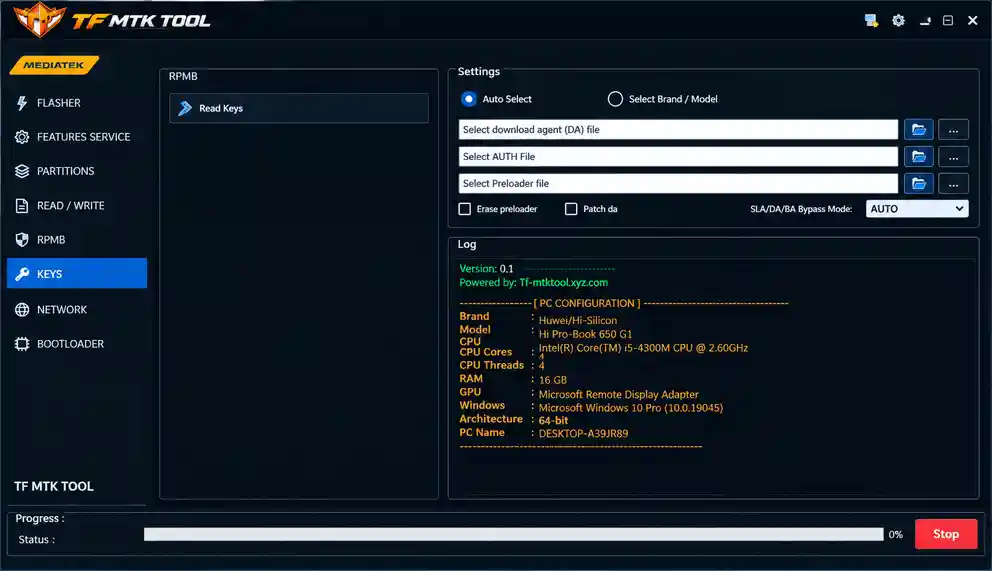
Tool Information
| Detail | Info |
|---|---|
| Tool Name | TF MTK Tool |
| Version | v1 (Latest) |
| Developer | TechnoFayez.com |
| Platform | Windows |
| Supported Chipset | MediaTek (MTK) |
| Supported Brands | Samsung, Motorola, Infinix, Honor, Vivo, Redmi, TCL |
| Login Required | Yes — Free Account Registration |
| License | Free |
| Password | No Password |
TF MTK Tool v1 Key Features
Flashing & Connection
- MediaTek firmware flashing
- Flash Mode and Download Only Mode
- Download Agent (DA) file support
- AUTH file support
- Preloader file support
- Crash Preloader
- Patch DA
- Auto device detection
- Brand and model selection — Samsung, Motorola, Infinix, Honor, Vivo, Redmi, TCL
Security & Bypass
- SLA/DAA Bypass Mode
- Bypass SLA/DAA and SBC
- Bypass FRP
- Unlock Bootloader
- Relock Bootloader
Partition & Storage Operations
- Format Device
- Read Partition Tables / Partitions List
- Read Partition / Erase Partition
- Read Raw Firmware / Write Raw Firmware
- Read GPT / Write GPT
- Read Preloader / Write Preloader
- Read RPMB / Write RPMB / Erase RPMB
- Read Keys
- Read NVItems / Write NVItems / Erase NVItems
- Write OemInfo
Advanced Tools
- Xiaomi Chip Bootloader / LK Patcher
- Patch Image
- Export Config
- Verify File
What’s New in v1
- Fixed all minor issues in the TF MTK Tool client
- Added free user registration — create your own account easily
- Added option to save login details (Remember Me)
- Improved MTK device support
- Added DA / AUTH / SLA support for more devices
- Added automatic device detection
- Added brand-based device detection and selection
- Added support for Samsung, Motorola, Infinix, Honor, Vivo, Redmi, and TCL devices
Download TF MTK Tool v1
- Tool Name: TF MTK Tool
- Version: v1 Latest
- Developer: TechnoFayez.com
- License: Free
- Password: No Password
How to Install TF MTK Tool v1
- Download the TF MTK Tool v1 package from the MEGA link above.
- Extract the downloaded ZIP file using WinRAR or 7-Zip.
- Open the extracted TF MTK Tool folder.
- Run the TF MTK Tool executable as Administrator.
- When the login window opens, click Register or Create Account if you do not already have one.
- Enter your username, email address, and password to complete registration.
- Return to the login screen after successful registration.
- Enter your login details — username and password.
- Check the Remember Login option if you want the tool to save your credentials for next time.
- Click Login — the main TF MTK Tool interface will open and the tool is ready to use.
Important Notes
- Free account registration is required before using the tool — sign up from the login screen on first launch.
- TF MTK Tool supports MediaTek devices only — it is not compatible with Qualcomm, Unisoc, or other chipsets.
- Install the correct MTK USB driver on your PC before connecting a device — without it the tool cannot detect the phone.
- Always use the correct DA file for your device — using the wrong DA can prevent the tool from connecting or cause flashing to fail.
- Always back up device data, GPT, RPMB, and NVItems before running any write, erase, flash, or format operation.
Conclusion
TF MTK Tool v1 by TechnoFayez.com is a comprehensive MediaTek servicing tool that covers the full range of MTK operations — from firmware flashing and BROM bypass to GPT, RPMB, and NVItems management, plus a built-in Xiaomi LK Patcher. The free account registration in v1 removes the main barrier to entry, making all functions accessible without any paid license. The brand-based auto-detection for Samsung, Motorola, Infinix, Honor, Vivo, Redmi, and TCL MTK devices is a practical addition that speeds up the identification step. If you work with MediaTek devices and need a well-rounded free tool, download TF MTK Tool v1 from the MEGA link above and register your free account to get started.
Credits: Developed by TechnoFayez.com. All credits go to the original developer. Disclaimer: For educational purposes only. Always back up data before any repair or flash operation. Use responsibly and legally. We are not liable for any device damage or data loss.