TCF China FRP Tool Download — TTA Temp Root & FRP Tool
TCF China FRP Tool (TTA Temp Root & FRP Tool) is a Windows utility for supported Xiaomi and Redmi China devices. It communicates with the phone over ADB with USB Debugging enabled and offers device checking, a temporary root workflow, and FRP-related servicing for compatible models running MIUI and HyperOS. A separate TCF Loader handles license registration and login before the main application opens, and the interface shows your login status and available account credits.
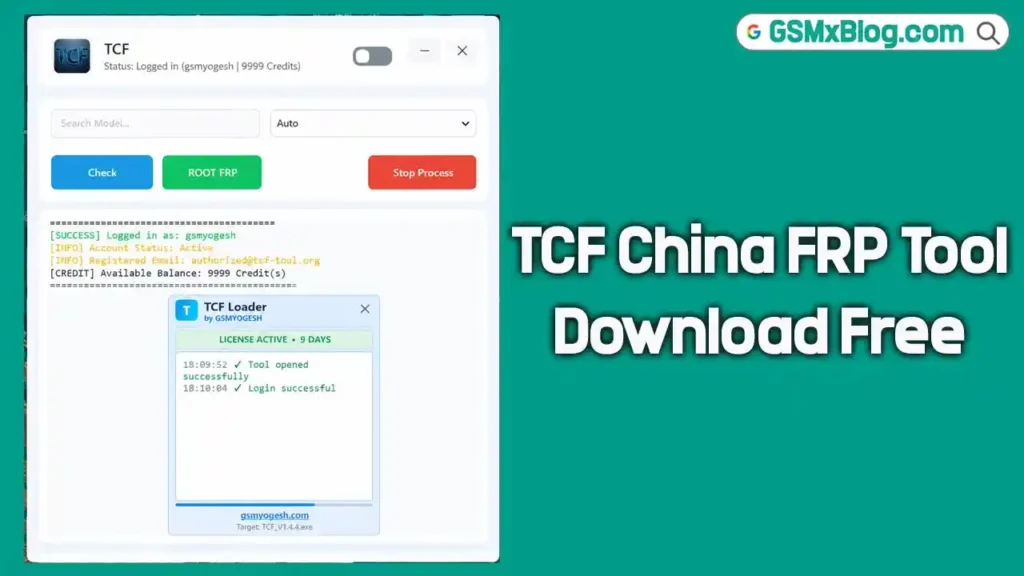
⚠️ Notice: The tool displays an account credit balance, so some operations may consume credits. The source does not say which functions are credit-based. Compatibility also depends on the device variant, kernel version, and installed software build, so confirm your exact model before running any operation. Scan the download with your antivirus before use.
Tool Information
| Detail | Info |
|---|---|
| Tool Name | TCF China FRP Tool (TTA Temp Root & FRP Tool) |
| File Name | TCF China FRP Tool.zip |
| File Size | 46.1 MB |
| Platform | Windows |
| Supported Devices | Selected Xiaomi & Redmi China Models (MIUI / HyperOS) |
| Connection | ADB (USB Debugging Required) |
| Launcher | TCF Loader (License Registration & Login) |
| ZIP Password | gsmyogesh. com |
| Login Username | gsmyogesh |
| Login Password | gsmyogesh |
TCF China FRP Tool Key Features
- Device detection through ADB connection
- Temporary root workflow for supported devices
- FRP-related servicing for compatible Xiaomi and Redmi models
- Model selection dropdown with an Auto option
- Check button — inspect the connected device before starting
- ROOT FRP button — runs the available root and FRP workflow
- Stop Process button — stop an active operation
- TCF Loader for license registration
- Account login system with login status and available credits displayed
- Operation log window for status messages
- Designed for supported MIUI and HyperOS devices
Supported Models
The tool lists the following Xiaomi and Redmi models. Actual compatibility depends on the device variant, kernel version, and installed software build.
| Series | Models |
|---|---|
| Redmi K | K50 Ultra, K60, K70, K70 Pro, K80 Ultra, K90, K90 Ultra, K90 Pro Max |
| Redmi Note | Note 12 Turbo, Note 13 Pro, Note 14 Pro, Note 14 Pro Plus, Note 15, Note 15 Pro, Note 15 Pro Plus |
| Redmi Turbo / Pad | Turbo 3, Turbo 4, Turbo 4 Pro, Pad Pro |
| Xiaomi Mi 13 | Mi 13, Mi 13 Pro, Mi 13 Ultra |
| Xiaomi 12 | 12S, 12S Pro, 12T Pro |
| Xiaomi 14 | 14, 14 Pro, 14 Ultra |
| Xiaomi 15 | 15, 15 Pro, 15 Ultra |
| Xiaomi 17 | 17, 17 Pro, 17 Max, 17 Ultra |
| Xiaomi Civi | Civi 2, Civi 5 Pro |
Download TCF China FRP Tool
- File Name: TCF China FRP Tool.zip
- File Size: 46.1 MB
- ZIP Password: gsmyogesh. com
- Login: gsmyogesh / gsmyogesh
How to Enable USB Debugging
- Open Settings on your Xiaomi or Redmi phone.
- Go to My Device and open OS version.
- Tap OS version seven times to enable Developer Options, if supported by your device.
- Return to Settings and open Additional Settings.
- Open Developer Options and enable USB Debugging.
- Connect the phone to your PC with a USB cable.
- When the permission prompt appears, verify the computer and tap Allow.
How to Install TCF China FRP Tool
- Download
TCF China FRP Tool.zipfrom the Google Drive or MEGA link above and scan it with your antivirus. - Right-click the ZIP file and extract it using WinRAR or 7-Zip. Enter the password gsmyogesh.com when prompted.
- Open the extracted folder and locate
TCF China FRP Tool.exe. - Open TCF Loader and follow the license registration instructions.
- If activation asks for a Hardware ID, follow the software provider’s registration procedure.
- Open the main TCF application after registration.
- Enter the login credentials: username gsmyogesh, password gsmyogesh.
- Connect your supported Xiaomi or Redmi device with USB Debugging enabled.
- Click Check and confirm the connected device is detected.
How to Use TCF China FRP Tool
- Enable USB Debugging on the supported phone and authorize the ADB connection.
- Open TCF China FRP Tool and click Check to confirm device detection.
- Confirm the device model and software build are compatible.
- Select the model from the dropdown if needed, or leave it on Auto.
- Review the status messages in the log window and follow the provider’s supported servicing instructions.
- Click ROOT FRP to run the available workflow. Use Stop Process if you need to cancel.
- Do not disconnect the phone during an active operation.
Important Notes
- The tool shows an account credit balance — check it before running an operation, since some functions may use credits.
- Compatibility depends on the device variant, kernel version, and installed software build. Being on the model list does not guarantee every variant works.
- FRP protects a device after a factory reset. Use this tool only on devices you own or have permission to repair. If a device needs the previous owner’s Google account, use the official account recovery process.
- Back up your data before running any root or FRP operation.
Conclusion
TCF China FRP Tool is a focused utility for Xiaomi and Redmi China devices. It pairs a temporary root workflow with FRP servicing across 37 listed models, from Redmi K50 Ultra and Xiaomi 12S through the Xiaomi 17 series. The interface is simple: Check, ROOT FRP, and Stop Process buttons, with a model dropdown and a live log. Confirm your exact model and build against the supported list first, keep an eye on the credit balance, and download it from the Google Drive or MEGA link above.
Credits: All credits go to the TTA / TCF China FRP Tool development team.
Disclaimer: For educational purposes only. Use only on devices you own or are authorized to service. Scan downloaded files and back up data before any operation. We are not liable for any device damage or data loss.
Related Tools
- Xiaomi DIAG Mode Tool v2.1 Free Download
- Venom Auth Tool Free Version Download
- QSM Unlock Tool V1.1 Free Download