KG Killer Tool v3.8.0 Latest Version Download 2026 – (Free login)
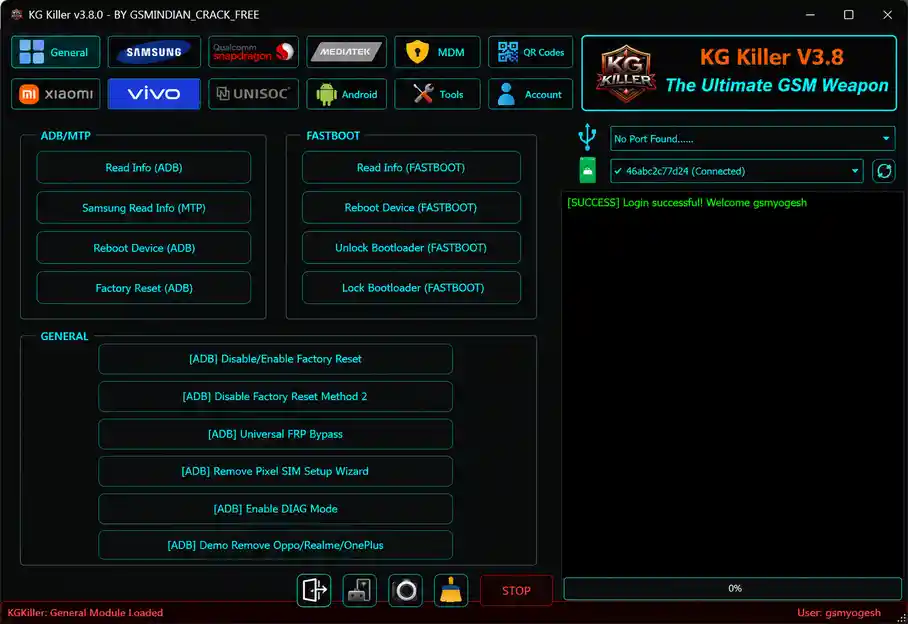
KG Killer Tool v3.8.0 is a free multi-brand Android servicing tool for Windows with dedicated modules for Samsung KG/MDM/FRP, Qualcomm, MediaTek, Xiaomi, Vivo, MDM/IT Admin, QR Code ADB enable, and an Android app manager. The V3.8 update adds 40 new Qualcomm devices — 28 ASUS models and 12 Huawei/Honor models — with FRP reset, factory reset, and full Qualcomm servicing support.
Tool Information
| Detail | Info |
|---|---|
| Tool Name | KG Killer Tool |
| Version | v3.8.0 (Latest) |
| Platform | Windows |
| Supported Brands | Samsung, Qualcomm Devices, Xiaomi, Vivo, Oppo, Realme, OnePlus, Tecno, Infinix, itel, Huawei, Honor, ASUS & More |
| Archive Password | gsmyogesh.com |
| Login Username | gsmyogesh |
| Login Password | gsmyogesh |
| License | Free |
KG Killer Tool v3.8.0 Key Features
General Module
- Read device info via ADB and Samsung MTP
- Reboot via ADB and Fastboot
- Factory Reset (ADB — 2 methods), Read Info (Fastboot)
- Unlock/Lock Bootloader (Fastboot)
- Enable/Disable Factory Reset (ADB)
- Universal FRP Bypass (ADB), Remove Pixel SIM Setup Wizard
- Enable DIAG Mode
- Oppo, Realme, OnePlus Demo Removal
Samsung Module
- Knox Guard — KG Android 14 (ADB), KG Android 13 All Patches, KG 07-23 (ADB), KG Android 14 All Patches, KG DNS Method, KG Android 15/16 Latest Patch, Set KG Active 01 by IMEI (India only)
- Samsung MDM — Remove MDM Lock (ADB), Disable Knox (ADB), Remove PayJoy, Remove Knox New Method
- Samsung FRP — Exynos FRP (1280/1380/1480), Remove FRP (Odin), Android 16 FRP (MTP), Android 16 FRP (ADB Method 2), Erase FRP New ADB Method
- Samsung Functions — Remove Samsung Account (ADB), Enable/Disable Updates, Enable OEM Unlock, Remove Bloatware, Change CSC, Enable Diag, Disable Service Provider, Remove Screen Lock
- Samsung Odin Flash — Load BL/AP/CP/CSC/PIT, Auto Reboot, Repartition, Clear EFS, Update Bootloader, Read PIT, Flash Firmware
Qualcomm Module
- Brand/Model Selection, Storage Type & Custom Loader
- Read/Write/Erase Partitions, Boot via Partition Manager
- Factory Reset, FRP Operations, Unlock/Lock Bootloader
- Change Serial Number, Erase Userdata
- KG Unload, KG Removal, Remove Lost Mode, Disable Mi Account
- Read Samsung Device Info, Reboot to Normal, Do Task
- Qualcomm Firmware Flashing — Select Firmware Files, Auto Reboot, Partition Flashing Table with Enable/Disable per Partition, View Partition Names/Files/Sectors, Flash
MDM Module
- Remove IT Admin — Android 15, Android 16
- IT Admin Android 15, Universal IT Admin
- IT Admin for Tecno, Infinix, itel
- Remove IT Admin — DPC Method 1 & Method 2
QR Codes Module
- Enable ADB QR — Android 14 Method 1 & Method 2, Android 13
- HyperOS QR Method 1 & Method 2
Xiaomi Module
- Unlock/Lock/Relock Bootloader (Fastboot), Remove FRP (Fastboot)
- Reboot to EDL (Method 1 & 2), Set Active A/B Slot, Erase Userdata, Remove Mi Cloud (Fastboot)
- Anti Relock (ADB), Enable DIAG (ADB), Disable OTA
- Xiaomi IT Admin/MDM — IT Admin HyperOS Android 15, Remove Redmi Axio Lock (ADB Jul 2025), Xiaomi Axio MDM QR (Latest Patch), Xiaomi Axio Removal Android 15 (ADB), Remove IT Admin (All Models), Fix Axio Calls (ADB)
Vivo Module
- Remove Vivo IT Admin — Latest Method
- Erase Exception (Vivo)
- Disable Demo Mode (Older Vivo Models)
Android App Manager & Tools
- Search/Filter Apps — System, Disabled, User; Save APK, Install APK/APKS, Enable/Disable, Uninstall
- Live Screen (ADB), Disable/Enable OTA, Download Drivers, Hide Developer Options
- Launch Samsung Flash Tool (Odin), Switch Carrier (Oppo — ADB)
- Disable OTA (Oppo/ColorOS)
What’s New in v3.8.0
- 40 new Qualcomm devices added — 28 ASUS models and 12 Huawei/Honor models
- New Qualcomm operations — FRP Reset and Factory Reset for all newly added devices
New ASUS Models (28 Announced — 22 Listed)
ROG Phone 2 ZS660KL, ROG Phone 3 ZS661KS, Zenfone 2 Go ZB500KG, Zenfone 3 Deluxe ZS570KL, Zenfone 3 Max ZC553KL, Zenfone 4 Max ZC554KL, Zenfone 5 Lite ZC600KL, Zenfone 5 ZE620KL, Zenfone 6 ZS630KL, Zenfone Go 4.5 ZB452KG/ZB450KL, Zenfone Lite L1 ZA551KL, Zenfone Live L1 ZA550KL, Zenfone Live ZB501KL, Zenfone Max M1 ZB555KL, Zenfone Max M1 ZQL1830, Zenfone Max M2 ZB632KL, Zenfone Max ZB556KL, Zenfone Max Plus M2 ZB634KL, Zenfone Max Pro M1 ZB602KL/ZB601KL, Zenfone Max Pro M2 ZB630KL, Zenfone Max Shot ZB634KL, Zenfone Max ZC550KL.
New Huawei / Honor Models (12)
Honor 50 Lite NTN-L22, Honor 6A Pro DLI-TL20, Honor 6A DLI-AL10, Honor 7A AUM-L29, Huawei Enjoy Max, MediaPad M3 Lite 10 BAH-L09, MediaPad T3 8.0 KOB-L09, Nova 2 Lite LDN-LX2, Nova 8i NEN-L22, Y7 2019 DUB-LX1, Y7 Prime 2018 LDN-L21, Y7 Pro 2018 LDN-LX2.
Download KG Killer Tool v3.8.0
- File Name: KK_V3.8.0.rar
- File Size: 89.3 MB
- Archive Password: gsmyogesh.com
- Login Username: gsmyogesh
- Login Password: gsmyogesh
- License: Free
How to Install KG Killer Tool v3.8.0
- Download the KG Killer Tool archive from the Google Drive or MEGA link above.
- Locate the downloaded RAR file and right-click it.
- Select Extract Here or Extract to KG Killer using WinRAR or 7-Zip.
- When prompted for a password, enter gsmyogesh.com and click OK.
- Open the extracted folder and locate
KG_Tool_Latest.exe. - Right-click
KG_Tool_Latest.exeand select Run as administrator. - When the login screen appears, enter Username: gsmyogesh and Password: gsmyogesh.
- Read and accept the terms and conditions.
- Wait for the main interface to load — select your required module from the top navigation.
- Connect your device in the correct mode and install the necessary drivers before starting any operation.
Important Notes
- The RAR archive password is gsmyogesh.com — include the period, enter it exactly as shown.
- Login credentials are gsmyogesh / gsmyogesh for both username and password.
- The v3.8 release notes state 28 ASUS models were added — 22 model entries are listed in the release documentation; the remaining model names were not provided in the changelog.
- KG removal for Android 14 All Security Patches is marked as broken in the current release — use an alternative KG method for Android 14 devices until a fix is issued.
- Always back up device data before running any FRP reset, factory wipe, firmware flash, bootloader unlock, or partition operation.
Conclusion
KG Killer Tool v3.8.0 covers a broad range of daily Android repair tasks — Samsung KG bypass across seven methods and Android versions, Knox Cloud removal, Samsung FRP for Android 16, Qualcomm EDL firmware flashing and partition management, Xiaomi Axio MDM removal, Vivo IT Admin, QR Code ADB enable for Android 13–16 and HyperOS, and a full Android app manager. The v3.8 expansion of 40 new Qualcomm devices — particularly the 28 ASUS Zenfone models and 12 Huawei/Honor models — makes it more useful for shops that work with these brands. Download KG Killer Tool v3.8.0 using the Google Drive or MEGA link above. Archive password: gsmyogesh.com. Login: gsmyogesh / gsmyogesh.
Credits: All credits go to the KG Killer Tool development team. Disclaimer: For educational purposes only. Always back up data before any repair operation. Use responsibly and legally. We are not liable for any device damage or data loss.