LazyUnlocker Tool V2.0.92 Free Download – Latest Version 2026
Welcome to our blog post, where we will discuss the LazyUnlocker Tool V2.0.92 and provide you with all the information you need about this powerful Android unlock utility. If you’re a mobile technician or enthusiast looking for a reliable tool to unlock FRP, MDM, and Bootloader locks on Vivo and other Android devices, LazyUnlocker Tool is one worth knowing about.
In this article, we’ll cover everything you need to know about LazyUnlocker Tool V2.0.92, including its features, supported chipsets, service pricing, and how to download and use it effectively. Whether you’re a professional repair technician or a beginner, this guide will help you understand the full potential of this tool.
What Is LazyUnlocker Tool?
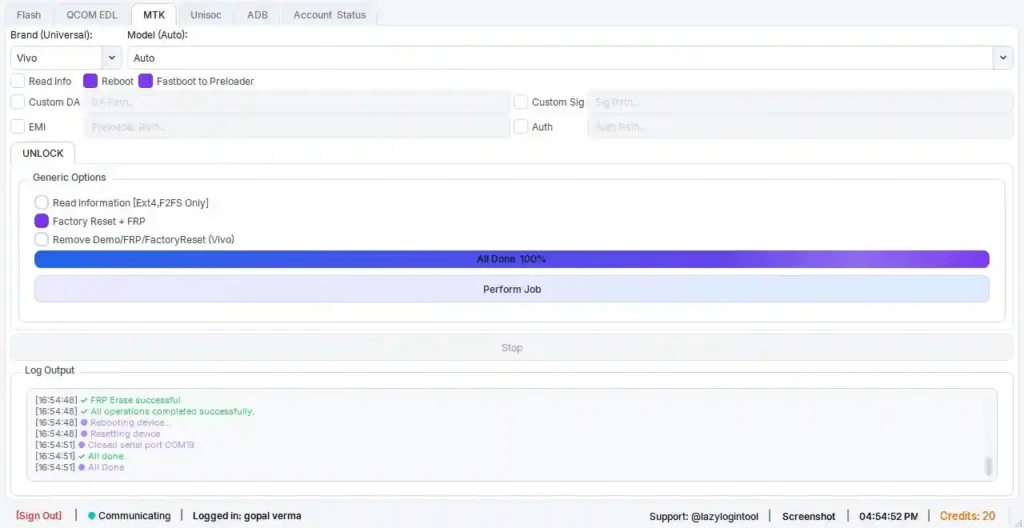
LazyUnlocker Tool is a Windows-based credit-operated software designed for Android device unlocking and repair. It works particularly well on Vivo smartphones and supports a wide range of Android devices powered by MediaTek (MTK) and Qualcomm chipsets.
The tool allows technicians to remove FRP (Factory Reset Protection) locks, perform MDM unlocks, reset network/carrier locks, and much more — all via a clean, modern Windows interface without requiring any ISP (In-System Programming) or hardware work.
⚠️ Note: LazyUnlocker Tool requires credits to perform most operations. You will need to register an account and purchase credits before using the tool’s paid features.
Key Features of LazyUnlocker Tool V2.0.92
Here’s a quick look at what makes the LazyUnlocker Tool V2.0.92 stand out:
🔓 Unlock & Service Functions
- Vivo FRP Reset (Factory Reset Protection Remove)
- Vivo Format / Hard Reset via Server
- Network / Carrier Unlock (Select Models)
- Fastboot to Preloader Mode Support
- Android MDM (Mobile Device Management) Unlock
- Bootloader Unlock Support
📱 Supported Chipsets
- MediaTek (MTK)
- Qualcomm
🔧 Connection Method
- USB Cable Connection
- Fastboot Mode Connection
- Server-Based Online Processing
- No ISP or Hardware Work Required
🖥️ Interface Features
- CPU Type Selection (MTK / Qualcomm)
- Vivo Device Category Navigation
- Clean Modern Windows Interface
- Online Account Login System
🔐 Account & Security
- Free Account Registration
- Email + Password Login
- Credits-Based Operation System
- Operational Logging (Device Model, Operation Type, Timestamp)
Tool Information
| Detail | Info |
|---|---|
| Tool Name | LazyUnlocker Tool |
| Version | V2.0.92 |
| Supported OS | Windows 7 / 8 / 10 / 11 |
| Connection | USB / Fastboot |
| Operation Type | Credits-Based |
| Developer | LazyUnlocker Team |
| Last Updated | 2026 |
Download LazyUnlocker Tool V2.0.92
Click the download button below to get the latest version of LazyUnlocker Tool V2.0.92 for free.
⬇ Download LazyUnlocker Tool V2.0.92
How to Download & Activate LazyUnlocker Tool
- Download the LazyUnlocker Tool V2.0.92 using the download link provided below.
- Extract the downloaded ZIP file to a folder on your Windows PC.
- Run the tool as Administrator.
- Register a free account using your email and password at the official LazyUnlocker website.
- Purchase Credits by contacting the tool owner or using the in-app recharge option.
- Connect your Android device via USB cable and follow the on-screen instructions.
- Select your device chipset (MTK or Qualcomm) and perform the desired operation.
✅ Tip: Always install the correct USB drivers for your device before connecting it to ensure proper detection.
Service Status & Pricing (2026)
| Service | Cost |
|---|---|
| Vivo (IN) FRP | 140 Credits |
| Realme FRP & Flash | 5 Credits |
| Xiaomi FRP | 50 Credits |
| Nothing Phone FRP | 5 Credits |
| No Auth FRP | FREE ✨ |
Conclusion
The LazyUnlocker Tool V2.0.92 is a professional and reliable solution for Android FRP, MDM, and Bootloader unlocking — especially for Vivo devices. Its server-based approach means no complicated hardware setup is needed, making it an excellent choice for both beginner and advanced mobile repair technicians.
If you found this article helpful, feel free to share it with others and leave a comment below with your experience using the tool!