TROJAN ADB FRP Tool v1.3 Free Download – Android Root & FRP Tool 2026
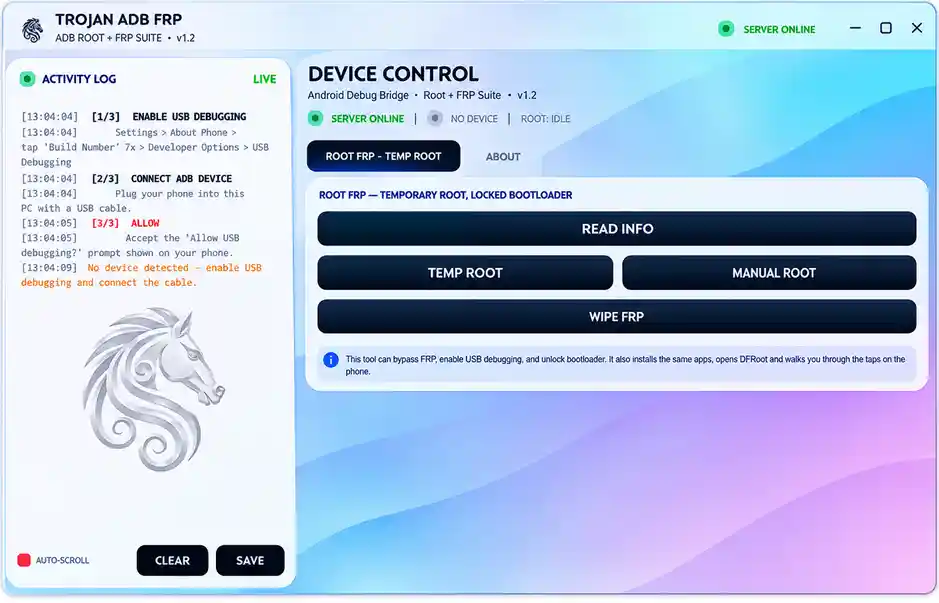
TROJAN ADB FRP Tool v1.3 is a free, small Windows ADB utility covering device information reading, temporary root, manual root, and FRP-related operations. It bundles four root methods — OpenRoot/OpenRootGUI, DFRoot 4.7 (DirtyFrag exploit, CVE-2026-43284), KernelSU, and awesome-temporary-root — in a single simple dashboard with dedicated Read Info, Temp Root, Manual Root, and Wipe FRP buttons. The v1.3 update adds Multi Kernel Root and a no-root Wipe FRP option, and fixes all previously reported errors from earlier versions.
Tool Information
| Detail | Info |
|---|---|
| Tool Name | TROJAN ADB FRP Tool |
| Version | v1.3 (Latest) |
| File Name | TROJAN-ADB-FRP-v1.3.zip |
| File Size | 34.8 MB |
| Platform | Windows |
| Connection | ADB (USB Debugging Required) |
| Root Methods | OpenRoot, DFRoot 4.7, KernelSU, awesome-temporary-root |
| License | Free |
| Password | No Password |
TROJAN ADB FRP Tool v1.3 Key Features
Core Functions
- Read Info — read device information from a connected Android device via ADB
- Temp Root — temporary root option for compatible devices
- Manual Root — manual root option
- Wipe FRP — FRP-related wipe operation (No Root option added in v1.3)
Root Methods
- OpenRoot / OpenRootGUI — OpenRoot root method
- DFRoot 4.7 — DirtyFrag exploit (CVE-2026-43284)
- KernelSU — KernelSU root method
- awesome-temporary-root — temporary root method
- Multi Kernel Root — added in v1.3
- Locked Bootloader Support — compatibility depends on the connected device
Status & Interface
- ADB Device Detection
- Server Online Status indicator
- Root Status Monitor
- Live Activity Log with Auto-Scroll
- Clear Log and Save Log options
What’s New in v1.3
- Added Multi Kernel Root
- Added Wipe FRP (No Root)
- Fixed all previously reported errors
Download TROJAN ADB FRP Tool v1.3
- File Name: TROJAN-ADB-FRP-v1.3.zip
- Version: v1.3
- File Size: 34.8 MB
- License: Free
- Password: No Password
How to Install TROJAN ADB FRP Tool v1.3
- Download
TROJAN-ADB-FRP-v1.3.zipfrom the MEGA link above. - Open your Downloads folder and locate the downloaded ZIP file.
- Right-click the ZIP file and extract it using WinRAR or 7-Zip.
- Open the extracted TROJAN ADB FRP folder.
- Right-click
TROJAN ADB FRP.exeand select Run as administrator. - If Windows displays a security warning, verify the file source before deciding whether to run it.
- Once the program opens, enable USB Debugging on your Android device if required for the selected function.
- Connect your phone via USB cable and authorize the ADB connection on the device when prompted.
- Select your required function — Read Info, Temp Root, Manual Root, or Wipe FRP — and choose a root method if applicable.
Important Notes
- Verify the file source and check for a Windows security warning before running the executable.
- Locked Bootloader Support compatibility depends on the specific device — not all locked-bootloader devices are guaranteed to work with every root method.
- DFRoot 4.7 uses the DirtyFrag exploit (CVE-2026-43284) — compatibility depends on the Android version and security patch level of the target device.
- Enable USB Debugging on your Android phone from Developer Options before connecting for ADB-based operations.
- Always back up device data before running any root, Temp Root, or FRP wipe operation.
Conclusion
TROJAN ADB FRP Tool v1.3 packs a useful mix of root exploits — OpenRoot, DFRoot 4.7, KernelSU, awesome-temporary-root, and the newly added Multi Kernel Root — alongside device info reading and FRP wipe functions in one lightweight Windows dashboard. The v1.3 update’s no-root Wipe FRP option and the general bug fixes make this release more reliable than the previous v1.2 build. For technicians who need a quick ADB-based root or FRP tool with several fallback methods, download TROJAN ADB FRP Tool v1.3 using the MEGA link above.
Credits: All credits go to the TROJAN ADB FRP Tool development team.
Disclaimer: For educational purposes only. Use only on devices you own or are authorized to service. Always back up data before any root or FRP operation. We are not liable for any device damage or data loss.