ADBTool Beta v1.3.2 (Latest Version) Free – Android App Manager
ADBTool Beta v1.3.2 is a free Windows-based Android management utility that brings the most common ADB functions into one clean interface — no command line needed. It lets mobile technicians and regular users manage apps, run backups, scan for malware, and control system apps on any Android phone with USB debugging enabled. If you work with Android devices daily and want a faster, simpler way to handle basic repair tasks, this free GSM tool is worth adding to your Windows PC toolkit.
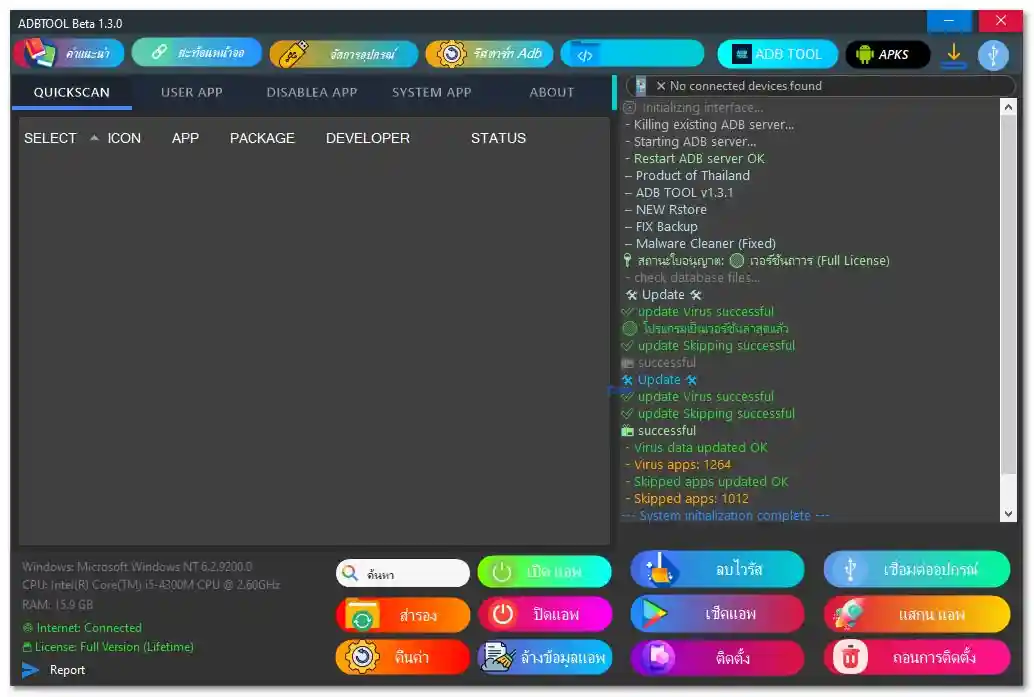
Tool Information
| Detail | Info |
|---|---|
| Tool Name | ADBTool Beta |
| Version | v1.3.2 |
| File Name | ADB TOOL 1.3.2 NEW.rar |
| File Size | 58.3 MB |
| Compatible OS | Windows 10 / 11 (32-bit & 64-bit) |
| Connection | USB (ADB Mode) |
| License | Free (Full License Included) |
| Password | No Password |
ADBTool Beta v1.3.2 Key Features
QuickScan Module
- Scan all installed applications
- View app icon, name, package name, developer, and status
- Built-in malware and virus detection
- Virus database with 1,264 known threat definitions
- Skipped apps database with 1,012 entries
- One-click Delete Virus function
App Management
- View and manage user-installed apps
- Backup and restore applications
- FIX Backup option for corrupted backup files
- Uninstall unwanted user apps
- Clear app data function
- APK installation and management
- NEW RStore integration
System App Control
- View all system applications
- Disable system apps via ADB method
- Re-enable disabled apps at any time
- Remove unwanted system apps
ADB & Security Functions
- Start, restart, and kill ADB server
- Auto device detection and ADB initialization
- Malware Cleaner (fixed in v1.3.2)
- Virus database auto-update on startup
- Real-time console logging
- Report generation built in
- Windows version, CPU, and RAM info on main screen
- Internet status and license status shown in real time
System Requirements
| Component | Requirement |
|---|---|
| OS | Windows 10 / 11 (32-bit or 64-bit) |
| RAM | 2 GB minimum |
| CPU | Intel / AMD Dual-Core or faster |
| Storage | 100 MB free space |
| USB Port | USB 2.0 or 3.0 |
| Android | USB Debugging must be enabled |
| Internet | Required for virus database updates |
Download ADBTool Beta v1.3.2
- File Name: ADB TOOL 1.3.2 NEW.rar
- Version: v1.3.2
- File Size: 58.3 MB
- License: Free (Full License Included)
- Password: No Password
ADBTool Beta v1.3.2 How to Use
Installation
- Download the RAR file from the link above.
- Extract the archive using WinRAR or 7-Zip.
- Right-click the main executable and select Run as Administrator.
- Allow any Windows security prompts that appear — no installation wizard required.
Connecting Your Android Device
- Go to Settings → About Phone and tap Build Number seven times to enable Developer Options.
- Open Developer Options and turn on USB Debugging.
- Connect the phone to your Windows PC via USB cable.
- Open ADBTool Beta v1.3.2 and click Connect Device — the tool detects your phone automatically.
Using the Tool
- QuickScan — Click QuickScan to list all installed apps. Select any app and use buttons to Open, Backup, Uninstall, or Check. Click Delete Virus to remove flagged apps.
- Backup & Restore — Select an app, click Backup to save it to your PC. Click Restore to bring it back. Use FIX Backup for corrupted backups.
- Disable System Apps — Go to the Disable App or System App tab, select the app, and click Disable. Re-enable anytime from the same section.
Conclusion
ADBTool Beta v1.3.2 is a practical and lightweight free download for mobile technicians and Android users who want to manage apps, handle backups, and scan for malware without touching the command line. The interface keeps all key functions in one place — QuickScan, User App, Disable App, System App, and APK tabs — so there is no need to jump between different GSM tools for basic Android repair work. With a built-in virus database of over 1,264 threat definitions and real-time console logging, it is more capable than it looks. If you regularly work on Android devices and need a no-fuss ADB solution for your Windows PC, download ADBTool Beta v1.3.2 today and add it to your repair toolkit.
Credits: All credits go to the ADBTool Beta development team for building and maintaining this tool. Disclaimer: For educational purposes only. Always scan files before use. We are not liable for any device damage.