Shelby Recovery Tool V3.0.1.0 Free Download – Open Source MediaTek Tool
Shelby Recovery Tool V3.0.1.0 is a free, open-source, portable Windows utility for MediaTek device flashing and recovery, developed by Shelby. It supports MediaTek Preloader and BROM connection modes, scatter firmware loading, GPT partition reading and writing, custom Download Agent selection, and ADB/Fastboot integration, all running through the Antumbra flashing backend. No installation wizard is required — the EXE is portable and runs directly. The project is open-source and still under active development, so some features and device connections may not work correctly on every supported device.
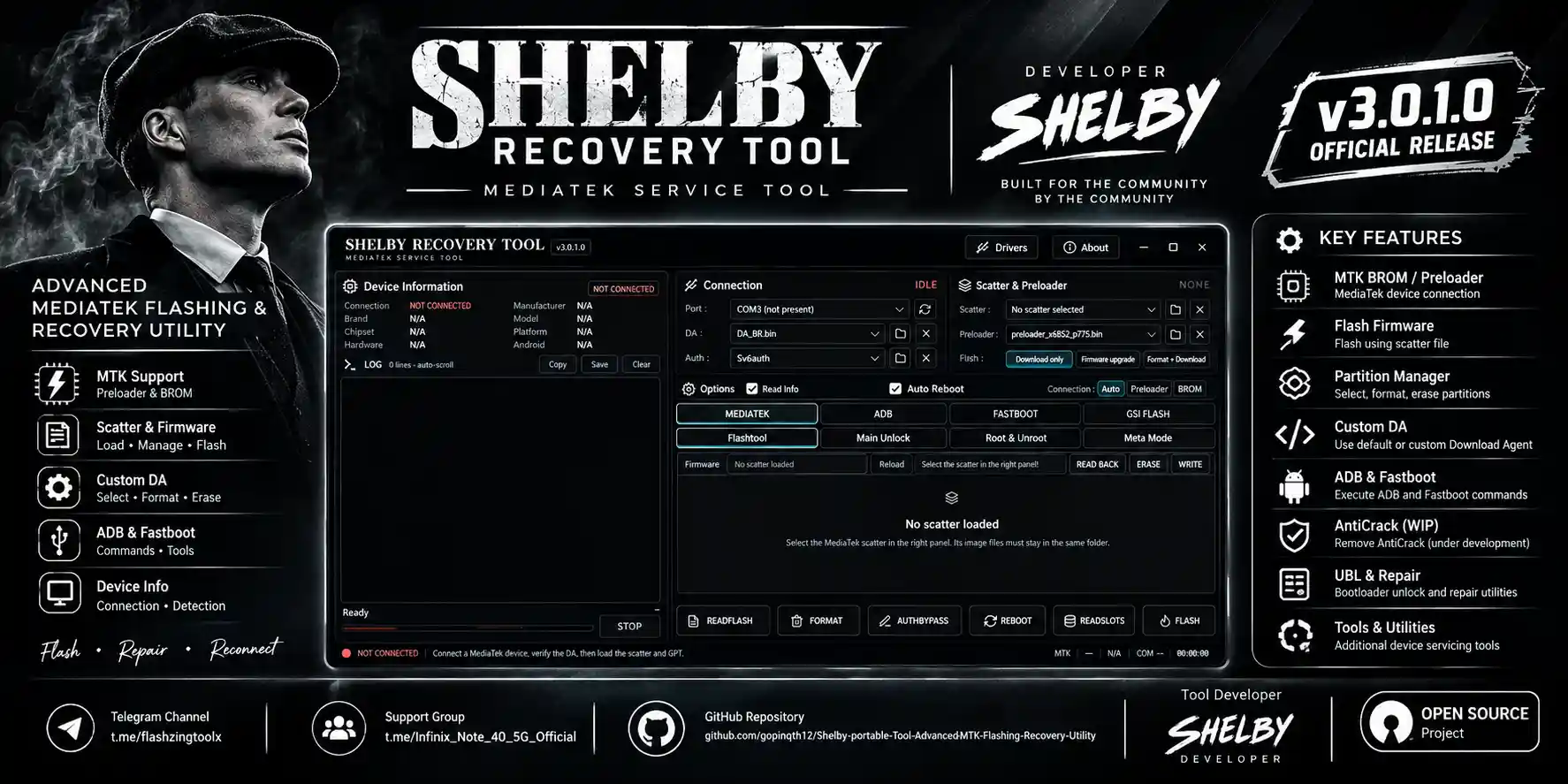
⚠️ Development Notice: Shelby Recovery Tool is actively being developed. Known issues include devices that may not connect or be detected correctly, and an AntiCrack removal issue that has not yet been fixed according to the project information. Test on a non-primary device first.
Tool Information
| Detail | Info |
|---|---|
| Tool Name | Shelby Recovery Tool |
| Version | V3.0.1.0 (Latest) |
| Developer | Shelby |
| Platform | Windows (Portable — No Install) |
| Supported Chipset | MediaTek (Preloader & BROM Modes) |
| Backend | Antumbra Flashing Backend |
| Source | Open Source (GitHub) |
| Status | In Active Development |
| License | Open Source — Check Project Release for Details |
| Password | No Password |
Shelby Recovery Tool V3.0.1.0 Key Features
Connection & Flashing
- MediaTek Preloader connection mode support
- BROM mode support for supported MediaTek devices
- Scatter firmware loading for compatible MediaTek firmware packages
- Firmware flashing through the integrated Antumbra backend
- Custom Download Agent selection for compatible operations
Partition Management
- Partition-related operations for supported devices and workflows
- GPT Partition Reading — read GUID Partition Table information where supported
- GPT Partition Writing — write partition data (use with caution; incorrect data can make a device unusable)
Device Communication
- ADB integration for supported device communication and servicing tasks
- Fastboot integration for compatible devices and operations
- Device detection and connection probing
- Device information checking during supported connection workflows
- Connection status indicator
Interface & Tools
- Operation logging — follow progress and review messages during tasks
- Process control — manage running operations
- Driver-related functionality and utilities for preparing a compatible Windows system
- Portable application — no traditional installation wizard required
- Open-source project — code available for inspection and contribution
What’s New in V3.0.1.0
- MediaTek Preloader and BROM connection modes available for supported workflows
- Scatter firmware loading for compatible MediaTek firmware packages
- Firmware flashing through the integrated Antumbra backend
- Partition operations including GPT reading and writing where supported
- Custom Download Agent selection for compatible flashing operations
- ADB and Fastboot integration for supported device communication
- Device probing and connection detection functionality
- Operation logging to monitor supported tasks
- Process control for managing operations
- Driver-related utilities for preparing the Windows environment
- Project remains open-source and under active development
Known Issues & Limitations
- Some MediaTek devices may not connect or be detected correctly
- The AntiCrack removal issue has not been fixed according to the project information available
- Some operations and features are still under development
- Certain functions may not work as expected on all devices
- Device compatibility depends on the chipset, connection mode, drivers, firmware, and device security configuration
Download Shelby Recovery Tool V3.0.1.0
- Tool Name: Shelby Recovery Tool
- Version: V3.0.1.0
- Developer: Shelby
- License: Open Source
- Password: No Password
How to Install Shelby Recovery Tool V3.0.1.0
- Download Shelby Recovery Tool V3.0.1.0 from the GitHub link above.
- If the download is a ZIP or other archive, extract its contents to a folder on your Windows PC.
- Locate
Shelby Recovery Tool.exein the extracted folder or downloaded release files. - Right-click the executable and select Run as administrator if administrator permissions are required.
- If Windows reports missing device drivers, install the appropriate drivers for your device and Windows version.
- Open the tool and select the appropriate connection mode — Preloader or BROM — for your supported MediaTek device.
- Load the correct scatter firmware file or configure the required options for your intended operation.
- Check the device model and firmware compatibility before starting any flashing or partition operation.
- Follow the messages displayed by the tool and review the operation log for errors or connection problems.
Important Notes
- This project is under active development — check the GitHub release page and project information before running the executable.
- Use GPT Partition Writing carefully — incorrect partition data can make a device unusable.
- Device compatibility depends on the chipset, connection mode, drivers, firmware, and device security configuration — being on a general compatibility list does not guarantee success on your exact model.
- The AntiCrack removal issue is a known, unresolved limitation in this release — do not rely on this function working correctly.
- Always back up device data and partitions before running any flashing, partition write, or recovery operation.
Conclusion
Shelby Recovery Tool V3.0.1.0 is an open-source, portable MediaTek flashing and recovery utility built around the Antumbra backend, covering Preloader and BROM connection modes, scatter firmware loading, GPT partition read/write, custom Download Agent selection, and ADB/Fastboot integration. Being open-source and actively developed by Shelby, it is best suited for users comfortable working with a tool that still has known issues — particularly device detection inconsistencies and an unresolved AntiCrack removal limitation. If you want to follow the project’s progress or contribute, the source is available on GitHub. Download Shelby Recovery Tool V3.0.1.0 using the GitHub link above and review the release notes before use.
Credits: Developed by Shelby. All credits go to the original developer and contributors. Disclaimer: For educational and development purposes only. This is an actively developed open-source project with known issues. Always back up data before any flashing or partition operation. We are not liable for any device damage or data loss.
Related Tools
- TF MTK Tool v1 Free Download
- Bader MediaTek V5 Tool Free Download
- AKS Fastboot Firmware Flasher v1.0 Free Download