Muslim Apple Tool V20 Free Download – iPhone Hello, MDM, Checkm8 & Purple Mode
Muslim Apple Tool V20 is a free Windows-based iPhone servicing tool developed by Ali Hassani and shared free by RE GURU. It supports Hello Activation, MDM Activation, Checkm8 Ramdisk, Purple Mode, and several iCloud-related functions — all without requiring online registration once the activation is complete via Muslim Odin. Testing confirmed the tool opens correctly on Windows and all menus function as expected, though actual device operations were not tested on a live iPhone during the review.
Muslim Apple Tool V20 Key Features
Activation Functions
- Hello Activation (No Jailbreak)
- MDM Activation (No Jailbreak)
- Checkm8 Ramdisk Activation
- Checkm8 Jailbreak Activation
Purple Mode (Magic CFG) Functions
- Read SYSCFG
- Save SYSCFG
- Fix Camera
- Fix FaceTime
- Unbind WiFi
- Factory Reset
- Exit Purple Mode
- DCSD Cable List
- Write Serial Number
- Write Model
- Write Region
- Write WiFi Data
- Write MLB
- Read DFU Device
- Boot Purple
- Connect Serial Port
Utility & Device Functions
- Purple Mode
- Device Manager
- Backups Folder
- Ramdisks Folder
- Win Test Mode
- Fix Drivers
- Fix iCloud Login
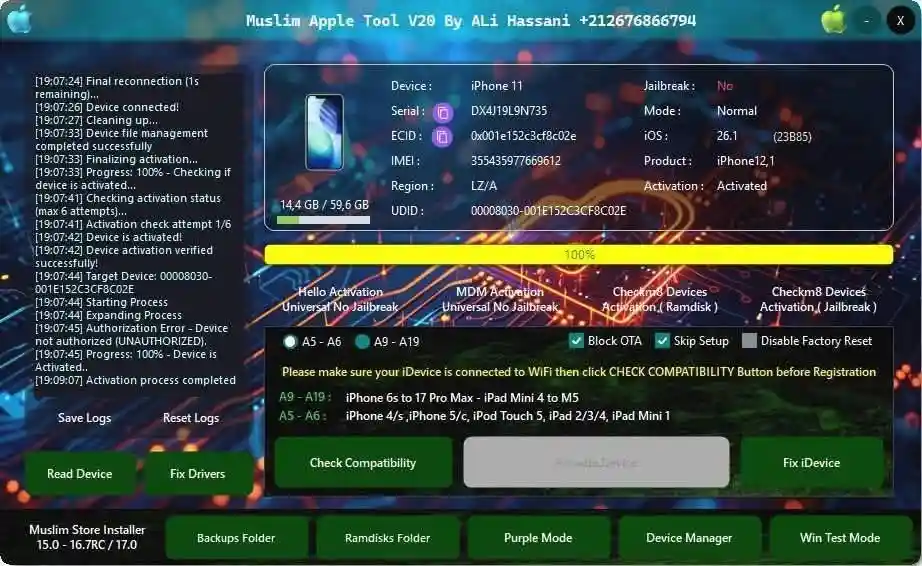
Device Info Displayed (When iPhone Connected)
| Field | Description |
|---|---|
| Device | iPhone model name |
| Serial Number | Device serial number |
| ECID | Unique chip identifier |
| IMEI | Device IMEI number |
| Region | Device region/market |
| UDID | Unique device ID |
| Jailbreak Status | Jailbroken or not |
| Mode | Normal / Recovery / DFU |
| iOS Version | Current iOS version |
| Activation Status | Activated / Not Activated |
Download Muslim Apple Tool V20
- Tool Name: Muslim Apple Tool V20
- Developer: Ali Hassani
- File Size: 250 MB
- License: Free
- RAR Password: gsmyogesh
- Installer Password: 123456
How to Install Muslim Apple Tool V20
- Create an exclusion folder in Windows Security before extracting — Windows Defender may delete some files during extraction if you skip this step.
- Extract
installer_Muslim_Apple_Tool_V20_By_Ali_Hassani.zipusing the password 123456. - Run the installer (.exe) as Administrator.
- Click More Info → Run Anyway if Windows SmartScreen appears.
- Extract
RE GURU.zipseparately and run the RE GURU application. - Click Allow Access if Windows Security asks. Keep RE GURU running in the background.
- Open Command Prompt and generate the SHA256 hash:
- Copy
certutil -hashfilefrom the Command text file and paste it into CMD - Drag the Muslim Apple Tool shortcut into CMD and press Enter
- Repeat with the actual .exe file after opening the shortcut location
- Copy
- Extract the Muslim ODIN package and run Muslim Odin v3.0.
- Login to Muslim Odin using email:
m****@gmail.com/ password:1337(credentials included in the package). - Wait until Muslim Odin shows “Normal use was successfully tested.”
- Keep Muslim Odin running and open the Muslim Apple Tool V20 desktop shortcut — it will now open without any activation error.
Muslim Apple Tool V20 How to Use
- Make sure Muslim Odin is running before opening Muslim Apple Tool — the tool will not open without it.
- Connect your iPhone via USB cable.
- Check the home screen — Device, Serial, ECID, IMEI, iOS Version, and Activation Status will populate automatically.
- Select your desired function:
- Hello Activation → activate without jailbreak
- MDM Activation → remove MDM without jailbreak
- Checkm8 Ramdisk → ramdisk-based activation
- Purple Mode → access SYSCFG, write serial, fix camera/FaceTime, etc.
- Fix iCloud Login → login via App Store first, press Fix iCloud Login, let device reboot, then open iCloud settings again
- Wait for the process to complete and reboot your device when done.
Important Notes
- Muslim Odin must be running in the background before opening Muslim Apple Tool V20 — otherwise you will get an activation error.
- Add the tool folder as a Windows Security exclusion before extracting to prevent Defender from deleting files.
- The SHA256 hash generation step via Command Prompt is required during setup — follow the included Command text file carefully.
- The download contains multiple ZIP files — extract each one separately and keep them in the same folder.
- Device operations were not tested on a live iPhone in the original review — all menu and button functions were confirmed working on Windows only.
Conclusion
Muslim Apple Tool V20 is a capable iPhone servicing tool that covers Hello Activation, MDM Activation, Checkm8 Ramdisk, Purple Mode, and iCloud-related functions — all for free once activated through Muslim Odin. The setup process is a bit involved compared to most Android tools, requiring a Windows Security exclusion, SHA256 hash generation, and Muslim Odin running in the background, but it is manageable with the included instructions. Once running, all menus open cleanly with no crashes. If you work with iPhones alongside Android devices, Muslim Apple Tool V20 is worth downloading and testing on your repair PC. Just keep in mind that device operations on a live iPhone still need to be verified in your own environment.
Credits: Developed by Ali Hassani, shared free by RE GURU. All credits go to the original developers. Disclaimer: For educational purposes only. Use responsibly and legally. We are not liable for any device damage or data loss.
Related Tools
- Muslim Odin v5.0 Latest Version Free Download
- MOBILedit Forensic ULTRA v9.0.3.5178 Free
- UnlockTool Latest Version