Download MTK Flash Tool v5.1624 Latest Version (All Versions)
Are you struggling to flash stock firmware on your MediaTek feature phone or button phone? The MTK Flash Tool is the official and most trusted lightweight utility for flashing .cfg and .txt based stock firmware on all MediaTek (MTK) feature phone devices. In this guide, we’ll walk you through everything you need to know about Download MTK Flash Tool v5.1624 Latest Version, including its features, all previous versions, and step-by-step flashing instructions — no technical skills required.
What is MTK Flash Tool?
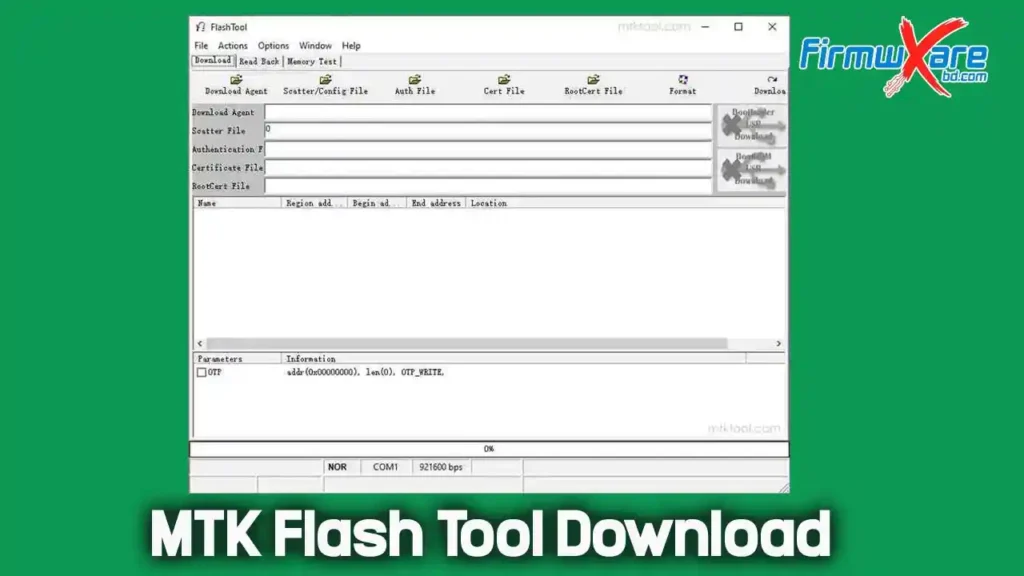
The MTK Flash Tool is an official portable flashing utility developed by MediaTek Inc. It is specifically designed to flash .cfg and .txt based stock firmware on Android and feature phones powered by MediaTek (MTK) chipsets. The latest version, v5.1624, supports all MTK feature phones and button phones and provides a fast and reliable flashing experience.
Unlike SP Flash Tool which is designed for Android smartphones, MTK Flash Tool is purpose-built for MediaTek feature phones and keypad mobiles. It is completely free to download, requires no installation, and is distributed directly by MediaTek Inc.
Key Features of MTK Flash Tool
Here are some of the most notable features of the latest MTK Flash Tool:
🔧 Flash & Firmware Functions
- Flash Stock Firmware: Easily install or reinstall stock firmware on any MediaTek feature phone.
- Supports .cfg & .txt Format: Compatible with both .cfg and .txt based firmware files.
- Upgrade or Downgrade: Freely move between firmware versions on your MTK feature phone.
🛠️ General Features
- Portable Application: No installation required — just extract and run
flashtool.exedirectly. - MediaTek Chipset Support: Specifically built for all MediaTek (MTK) feature phones and keypad devices.
- User-Friendly Interface: Clean and simple layout — anyone can use it without prior experience.
- Lightweight Package: Only 7–8 MB in size, occupying minimal storage space on your PC.
- Windows Compatible: Supports Windows XP, Vista, 7, 8, 10, and 11 (32-bit & 64-bit).
Download MTK Flash Tool — All Versions Download
- Tool Name: MTK Flash Tool
- Latest Version: v5.1624
- File Size: 8 MB
- Developer: MediaTek Inc.
- Compatibility: Windows 32 & 64 bit
- Password: N/A
| Version | Download Link 1 | Download Link 2 |
|---|---|---|
| v5.1624 (Latest) | Mega | MediaFire |
| v5.1420 | Mega | MediaFire |
| v5.1416 | Mega | MediaFire |
| v5.1320 | Mega | MediaFire |
| v5.1316 | Mega | MediaFire |
| v5.1312 | Mega | MediaFire |
| v5.1308 | Mega | MediaFire |
| v3.1016 | Mega | MediaFire |
| v3.1012 | Mega | MediaFire |
| v3.0952 | Mega | MediaFire |
| v3.0948 | Mega | MediaFire |
| v3.0936 | Mega | MediaFire |
| v3.0920 | Mega | MediaFire |
| v3.0912 | Mega | MediaFire |
Prerequisites
Before using MTK Flash Tool, make sure you have the following:
- ✅ Install the correct USB Driver:
- ✅ Download the correct .cfg or .txt firmware for your MTK feature phone
- ✅ Have a working USB data cable
- ✅ Use a Windows PC (32-bit or 64-bit)
How to Install & Use MTK Flash Tool
🖥️ Installation
- Download and extract the MTK Flash Tool
.zipfile on your PC. - Install the MTK USB VCOM Driver on your computer before proceeding.
- Open the extracted folder and launch flashtool.exe — no installation required.
⚙️ Flashing the Firmware
- Once the tool opens, click the Scatter/Config File button.
- Browse to the extracted firmware folder and select the .cfg or .txt firmware file for your device.
- Click the Download button in the tool.
- Connect your feature phone to the PC via USB cable.
- The tool will automatically detect your device and begin the flashing process.
- Do not disconnect the USB cable during flashing — it may cause the device to go into dead mode.
- Wait for the process to complete — a Success message will appear when done.
- Disconnect your device and power it on. Your device is now running the new firmware.
Device Compatibility
MTK Flash Tool supports a wide range of feature phones and keypad devices powered by MediaTek chipsets:
- ✅ Chipsets: MediaTek (MTK) — all feature phone series
- ✅ Device Types: MTK feature phones, keypad phones, button phones
- ✅ Firmware Format: .cfg and .txt
- ✅ OS: Windows XP, Vista, 7, 8, 10, 11 (32-bit & 64-bit)
USB Driver & Also See
Conclusion
If you’re looking for the most reliable and official tool to flash stock firmware on your MediaTek feature phone or keypad device, the MTK Flash Tool v5.1624 is the best choice available. It supports .cfg and .txt firmware formats, is completely portable, covers all MTK feature phone chipsets, and is entirely free to download — making it an essential tool for every mobile technician.
👉 Download MTK Flash Tool v5.1624 Latest Version today and flash your MediaTek feature phone safely and easily in just a few minutes!