Download LU WiFi A12+ Tool Free (Latest Version) – iPhone Activation Bypass
If your iPhone or iPad is stuck on the iCloud Activation Lock, Hello Screen, or facing a No Signal issue, the LU WiFi A12+ Tool can help resolve the problem. This lightweight Windows utility is widely used by mobile repair technicians to bypass activation locks and restore basic device functionality.
The tool is known for its simple interface and one-click operation, making it accessible even for beginners. With support for multiple iOS versions and several iPhone and iPad models, LU WiFi A12+ Tool provides a practical solution for activation-related issues.
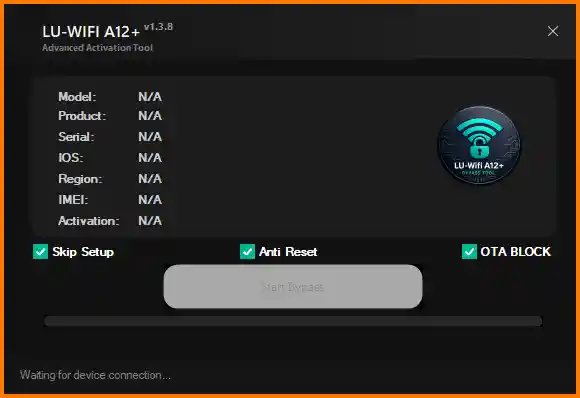
In this guide, you will learn about the features, supported devices, system requirements, download process, and how to use the LU WiFi A12+ Tool.
Features of LU WiFi A12+ Tool
Activation Lock Bypass
The tool can bypass the iCloud Activation Lock on supported iPhone and iPad devices.
Hello Screen Bypass
Helps remove the Hello setup screen that appears when a device is locked during the activation process.
No Signal Fix
Provides an option to fix No Signal problems that may occur after bypassing the activation screen.
Multi iOS Support
Supports a wide range of firmware versions including iOS 15, iOS 16, iOS 17, and newer versions up to iOS 26.1.
Device Support Checker
Before running the bypass process, you can check whether your device is compatible with the tool.
One-Click Operation
Most processes can be started with just one click, which reduces complexity and saves time.
How to Download LU WiFi A12+ Tool
Follow these simple steps to download the tool:
- Click the download link provided below.
- The file will download in ZIP format.
- After downloading, extract the ZIP file using WinRAR or 7-Zip.
- Open the extracted folder and run the tool.
How to Install & Use LU WiFi A12+ Tool
Follow the step-by-step guide below to use the tool.
Step 1: Download the Tool
Download the LU WiFi A12+ Tool from the link above.
Step 2: Extract the File
Use WinRAR or another extraction tool to extract the downloaded ZIP file.
Step 3: Run the Tool
Open the extracted folder and launch the tool as Administrator.
Step 4: Connect Your Device
Connect your iPhone or iPad to the computer using a USB cable.
Step 5: Check Device Compatibility
Use the Device Support Checker to verify if your device is supported.
Step 6: Start the Bypass Process
Click the Start Bypass button and wait for the process to complete.
After completion, the device should bypass the activation screen.
Supported Devices
iPhone
- iPhone 6s
- iPhone 7 / 7 Plus
- iPhone 8 / 8 Plus
- iPhone X
- iPhone XR
- iPhone XS / XS Max
- Some A12+ devices and newer iPhone models
iPad
- Checkm8 supported iPad models
- Selected WiFi iPad devices
Note: Device compatibility may vary depending on firmware and security patches.
Conclusion
LU WiFi A12+ Tool is a useful Windows utility for bypassing iCloud Activation Lock and fixing Hello Screen or No Signal issues on supported iPhones and iPads. Its simple interface, quick bypass process, and multi-device support make it a popular choice among mobile repair technicians.
Before using the tool, always verify device compatibility and system requirements to ensure a smooth bypass process.