FalconMulti Tool V13.0 Free Download – Xiaomi, Samsung, Apple
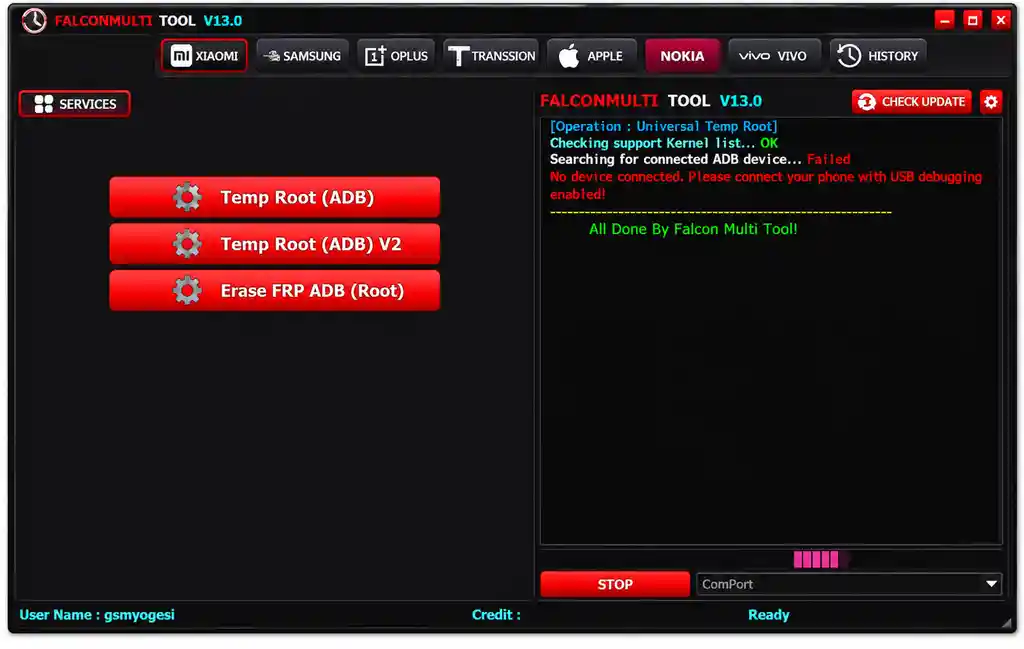
FalconMulti Tool V13.0 is a free multi-brand Android and Apple servicing platform with dedicated tabs for Xiaomi, Samsung, Realme/OnePlus/Oppo (Oplus), Tecno/Itel/Infinix (Transsion), Apple, Nokia HMD, and Vivo. It covers MTK and Qualcomm flashing, Fastboot operations, FRP removal, ADB/root functions, partition management, firmware downloads, and a full Apple device services module including Hello Bypass and MDM removal. V13.0 adds two brand-new tabs — Vivo and Nokia HMD — along with additional bug fixes. Login accepts any username and password.
⚠️ Important Xiaomi Warning: FMI ON, CN, and MDM-locked devices are NOT supported for Auth Flash. The developer explicitly warns that attempting Auth Flash on FMI ON or CN devices can result in a permanent account ban, with no refund provided. Do not attempt this operation on unsupported Xiaomi device states.
Tool Information
| Detail | Info |
|---|---|
| Tool Name | FalconMulti Tool |
| Version | V13.0 (Latest) |
| Platform | Windows |
| Supported Brands | Xiaomi, Samsung, Realme, OnePlus, Oppo, Tecno, Itel, Infinix, Apple, Nokia HMD, Vivo |
| File Name | FalconMultiTool-V13.0_FREE.rar |
| File Size | 154.0 MB |
| Archive Password | gsmyogesh. com |
| Login | Any username and password accepted |
| License | Free |
FalconMulti Tool V13.0 Full Features
Xiaomi
- MTK — Flash MTK, Server DA, Custom DA, Custom EMI, Auto SV5, Xiaomi Auth, Dump Preloader, Crash Brom, Bypass Auth, Auto Reboot, Flash
- Qualcomm — Flash QC, Auto Reboot, Flash
- Fastboot — Read Info, Flash, Fastboot to EDL
- MI Assistant — Reset/Format (Sideload FRP + Userdata), Xiaomi FRP (Reset FRP Only)
- MI China — Read Info (ADB), Temp Root (ADB), Reset FRP (China Devices)
Samsung
- Reset FRP
Oplus (Realme / OnePlus / Oppo)
- Service — Oplus Token Decrypt, One Click, Custom Sig, Use Server Data, Auto Reboot, Factory Reset + FRP, Oplus Demo Remove (ADB)
- Partition Manager — Custom DA, Custom SIG, Use Server Data, Read, Write, Erase, Load, Disconnect & Reboot
- IMEI Checker — IMEI Info Query
- ADB / Root Service — Root ADB, Temp Root (ADB & V2), Erase FRP ADB (Root), Read, Write, Read GPT
Transsion (Tecno / Itel / Infinix)
- Service — Server FDL, FDL 1/FDL 2, Reset FRP, Factory Reset + FRP
- META — Reboot to Meta, Read Info, Remove PayJoy Lock, Unlock BL (Beta), Read, Write, Erase, Read GPT
- Anti-Crack — Remove Anti-Crack (MediaTek), Remove Anti-Crack (Spreadtrum)
- RPMB — Disable RPMB (MTK)
- Flash — Firmware Upgrade, Flash, Firmware Download, Transsion Firmware Download
Apple
- General / Device Info — Copy ECID, Register ECID
- Hello — Boot Ramdisk, New Hello No SN, Change Serial, Bypass Hello Change SN
- Utility — Read Info, Reboot Device
- Passcode — Boot Ramdisk, Backup Passcode, Activate Passcode, Factory Reset
- MDM — Remove MDM
Nokia HMD (New in V13.0)
- Read Info, Factory Reset + FRP, Reboot to Bootloader
Vivo (New in V13.0)
- Temp Root (ADB & V2), Erase FRP ADB (Root)
Download FalconMulti Tool V13.0
- File Name: FalconMultiTool-V13.0_FREE.rar
- File Size: 154.0 MB
- Archive Password: gsmyogesh. com
- Login: Any username and password
- License: Free
How to Install FalconMulti Tool V13.0
- Download
FalconMultiTool-V13.0_FREE.rarfrom the MEGA link above. - Right-click the downloaded archive and extract all files into a folder.
- If the package includes a setup file, right-click it and select Run as administrator.
- Follow the setup wizard’s instructions and wait for installation to complete.
- Launch FalconMultiTool V13.0 from the installation folder or desktop shortcut.
- At the login screen, enter any username and password — all credentials are accepted.
- Once the main interface opens, select your mobile brand tab and access the available service options.
What’s New in V13.0
- Added a new dedicated Vivo tab with Temp Root and FRP erase functions
- Added a new dedicated Nokia HMD tab with Read Info, Factory Reset + FRP, and Reboot to Bootloader
- Fixed additional bugs across the tool
Important Notes
- Never attempt Auth Flash on Xiaomi FMI ON, CN, or MDM-locked devices — the developer warns this can trigger a permanent account ban with no refund. Verify the device’s FMI/CN/MDM status before using any Xiaomi Auth function.
- The login screen accepts any username and password — no specific credentials are required.
- Transsion Unlock BL via META Mode is marked as Beta — use with caution and test on a non-primary device first.
- Always back up device data before running any FRP reset, factory wipe, partition operation, or Apple passcode/MDM operation.
Conclusion
FalconMulti Tool V13.0 continues to grow as a genuinely multi-brand servicing platform, now covering Xiaomi, Samsung, the Oplus family (Realme/OnePlus/Oppo), Transsion brands (Tecno/Itel/Infinix), Apple, and — new in this release — Nokia HMD and Vivo. The dedicated Apple module with Hello Bypass, ECID management, and MDM removal stands out alongside the comprehensive Xiaomi MTK/Qualcomm flashing and Transsion META Mode tools. The tool is free with any-credential login, making it quick to set up. Just remember the critical Xiaomi warning — never run Auth Flash on FMI ON, CN, or MDM-locked devices. Download FalconMulti Tool V13.0 using the MEGA link above.
Credits: All credits go to the FalconMulti Tool development team.
Disclaimer: For educational purposes only. Never attempt Auth Flash on FMI ON, CN, or MDM-locked Xiaomi devices. Always back up data before any repair operation. Use responsibly and legally. We are not liable for any device damage, account bans, or data loss.
Related Tools
- mdUnlockerMainTool V2.6 2026 Free Download
- DM-GSM Latest Version Download
- HSD AIO Tool v1.0.8 (Latest Version)