mdUnlockerMainTool V2.6 2026 Free Download – MTK, Qualcomm, Unisoc
mdUnlockerMainTool V2.6 2026 is a comprehensive Windows Android servicing tool covering MediaTek, Qualcomm, SPD/Unisoc, MTP, ADB, Fastboot, and META operations. It handles FRP removal, factory reset, bootloader unlock/relock, firmware flashing, MDM bypass, IMEI repair, and device information reading across an enormous device list spanning Realme, Samsung, Tecno, Infinix, iTel, Motorola, ZTE, Nokia, Blackview, Doogee, Oukitel, Ulefone, Hotwav, Hisense, Benco, Gionee, Lenovo, Cubot, Umidigi, and more. This release adds Samsung MTK V6 Download Mode support, Motorola Auto Server functions (announced with 100% free credit), and MDM BlackScreen Fix options. Login credentials are already pre-filled on the login screen.
Tool Information
| Detail | Info |
|---|---|
| Tool Name | mdUnlockerMainTool |
| Version | V2.6 2026 (Latest) |
| Platform | Windows |
| Supported Platforms | MTK, Qualcomm, SPD/Unisoc, MTP, ADB, Fastboot, META |
| File Name | mdUnlockerMainTool V2.6 2026 Setup.7z |
| File Size | 266.6 MB |
| Login | Pre-filled on login screen |
| License | Free |
mdUnlockerMainTool V2.6 2026 Key Features
MediaTek (MTK)
- Auto Detect, Auto Erase FRP, Factory Reset, Safe Format
- Read Device Info, Bootloader Unlock/Relock
- DM-Verity Fix, Recovery Loop Fix, SLA/DAA Authentication Bypass
- NVRAM Backup/Restore/Erase, NVDATA Backup/Restore/Erase
Qualcomm
- Auto Detect, Auto FRP Removal, Factory Reset
- Firehose Programmer Support, EDL Safe Format
- Bootloader Unlock/Relock, QCN Backup/Restore, EFS Backup/Restore
- Modem Partition Operations, VIP Server Authentication Loader
SPD / Unisoc
- Auto Detect Chipset, BROM Mode, ADL Mode Operations
- FRP Operations, Factory Reset, Recovery Operations, Read Device Info
MTP, ADB & Fastboot Modes
- MTP — Launch YouTube/Maps/Browser, Samsung FRP Methods, Read Info, Reboot, Factory Reset
- ADB — Universal/Samsung FRP, Screen Lock Reset, Disable Factory Mode, Fix SMS/Call/Navigation, Reboot System/Recovery/Bootloader/EDL
- Fastboot — Read Info, FRP, Factory Reset, BL Unlock/Relock, Fastbootd Mode, Anti-Crack Flash, Firmware Flashing
Flash Functions
- MTK Scatter Firmware Flashing, Partition Flashing, Download Agent Support, Authentication Support, Read MTK Dump
- Samsung Odin Flashing
- SPD/Unisoc PAC Flashing
- Fastboot Firmware Flashing
Android 16 MTK BROM
- Android 16 SLA/DAA 56-Chip Universal Auth Bypass, Preloader Crash, FRP Removal
- Permanent MDM Unlock/Bypass/Override (BROM)
- Tecno/Infinix/iTel MDM & FRP Operations
- Samsung MTK BROM Universal, Xiaomi/Redmi MTK BROM Universal
- Factory Reset, Safe Format, Baseband IMEI Repair
- PROINFO Backup, Read GPT, Partition Backup/Write/Erase
- Transsion Anti-Crack Auto Fix, Partition Manager
MTK BROM MDM & Anti-Crack
- Android 16 Permanent MDM Remove/Bypass, One-Click Anti-Crack MDM, BROM Suite GUI
- Transsion Engine P7, Bootloader Unlock/Fix, DM-Verity Fix, Bootloop Fix, Fastbootd Operations
META Mode
- Balla MDM USB/File Dump Bypass, Tecno/Infinix PROINFO Patcher
- Factory Reset variants — eMMC, UFS, Android 11, Auto Safe, SPMETA MT6580
- FRP Operations & Variants, Mi Cloud Unlock
- Transsion Device Operations, Enable ADB, PayJoy/MDM Patch, Permanent MDM Unlock
Custom Preloader & MDM ADB/SPD Modules
- Custom Preloader — Factory Reset, FRP, Safe Format (PARA/MISC), Dump, BL Operations, Remove Demo, DM-Verity Fix
- MTK/SPD MDM ADB — BlackScreen Fix, MDM Bypass 2025, Uninstall Overlay/Updaters, Disable Scorpio Security, Fix Black Screen, Private DNS Anti-Relock
- SPD MDM Auto Bypass — Automatic FDL Dump/Patch/Flash, PRODNV Patcher, Automatic BROM Bypass
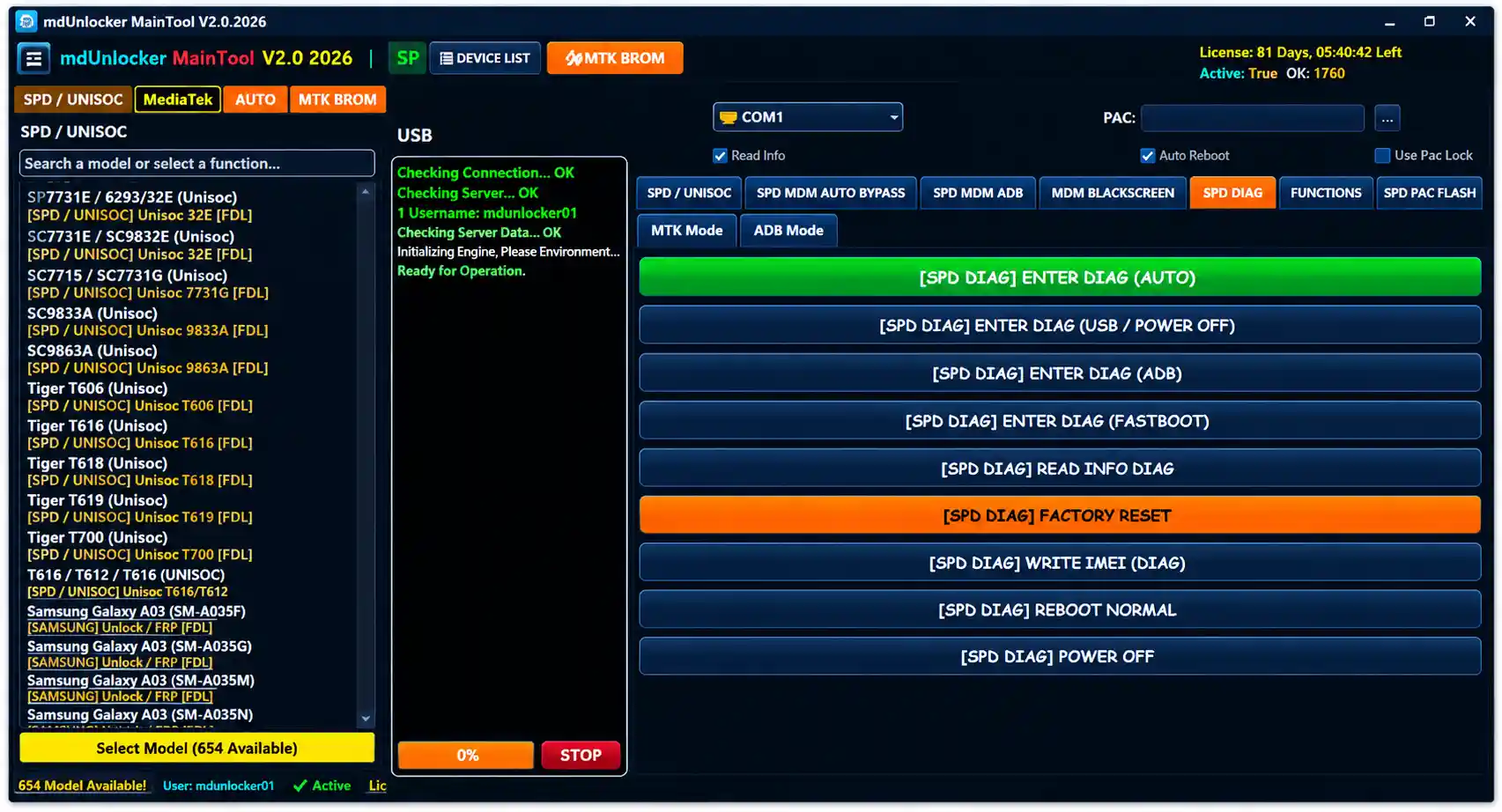
- SPD DIAG — Enter DIAG (multiple methods), Read Info, Factory Reset, Write IMEI
- SPD PAC Flash — BROM/ADL/FDL Erase FRP, Factory Reset, Recovery, Read Info, PAC Firmware Flashing
What’s New in V2.6 2026
- Added MTK Model Security Plugin
- Added Samsung MTK V6 support, including MT6878 and MT6789 chipsets
- Added Samsung 2026 Download Mode MTK V6 and FRP removal via Download Mode using CTRL 1 and CTRL 0
- Listed Samsung Galaxy A06, A15, A16, A24, Tab A9, F15, and M15 support
- Added Motorola Auto Server functions — Fastboot Server Auth FRP, Bootloader Unlock via Auto Server, PayJoy MDM Removal, Whitescreen DIMO Bypass, OTA Disabler (announced with 100% free credit)
- Released MDM BlackScreen Fix
- Added Tecno, Infinix, and iTel Android 16 FRP support
- Added Unisoc SPD support
Download mdUnlockerMainTool V2.6 2026
- File Name: mdUnlockerMainTool V2.6 2026 Setup.7z
- File Size: 266.6 MB
- Login: Pre-filled — click Login
- License: Free
How to Install mdUnlockerMainTool V2.6 2026
- Download the setup file from the MEGA link above.
- Open the folder containing the downloaded setup.
- Right-click
mdUnlockerMainTool V2.6 2026 Setup.exeand select Run as administrator. - On the Welcome screen, click Get started.
- Choose the installation location, or keep the default folder.
- Click Install to begin.
- Wait for the installer to extract and install the program files.
- When finished, click Close or Launch & Close if available.
- If the program does not open automatically, launch it from the desktop shortcut.
- The Username and Password fields on the login window are already filled in — click Login.
- Choose the required chipset or model from the device list on the left (e.g. SPD/UNISOC Auto-Detect Chipset).
- Open the required section on the right side of the program and select your operation.
Example: MDM BlackScreen Fix (SPD Devices)
- Select SPD / UNISOC (AUTO-DETECT CHIPSET) from the left device list.
- Select the MDM BLACKSCREEN 1 tab.
- Click [SPD MDM ADB] MDM BLACKSCREEN FIX 1.
- Click OK on the confirmation popup to continue.
Supported Models & Chipsets (Summary)
The full compatibility list is extensive. Below is a condensed summary by brand and platform — see the installed tool’s device list for the complete model/variant breakdown.
| Platform / Brand | Coverage Summary |
|---|---|
| Realme — MTK BROM/Preloader | 70+ models including C-series, Narzo series, Realme 3–13 series, GT series, and Dimensity Auth Server chipsets (MT6835/37, MT6877, MT7300, MT6895/93) |
| Realme — Qualcomm EDL 9008 | 50+ models including Realme 7 Pro–16 Pro+, GT series, X-series, and P-series |
| Android 16 MTK BROM Chipsets | MT6735 through MT6985 (Dimensity 9200) — 20 chipsets covering Helio A22 to Dimensity 9000/9200 |
| SPD / Unisoc Generic Chipsets | SC7731E/C/G, SC9832E, SC9863A, SC9820E, Tiger T603–T700 (UMS9230/UMS512 family), Tanggula T760/T820 5G |
| Samsung — SPD/Unisoc | Galaxy A03/A03 Core series, Galaxy Tab A8 10.5 (2021) |
| Tecno — SPD/Unisoc | Spark 7–20C, Pop 4–8, Pova Neo series |
| Infinix — SPD/Unisoc | Hot 10i–40i, Smart 5 Pro–8 Plus |
| iTel — SPD/Unisoc | 150+ models — A, S, P, Vision series and feature phones |
| Realme — SPD/Unisoc | C11–C53, Narzo 50i/N53/N55, Pad Mini |
| Motorola — SPD/Unisoc | Moto E13–E40, G04–G20 series |
| ZTE — SPD/Unisoc | Blade A3–A73, Blade V30–V50 series |
| Nokia — SPD/Unisoc | C01 Plus–C32, G11–G22, T10–T21 |
| Blackview — SPD/Unisoc | A52–A85, BV4800–BV6200, Oscal C20–Pad 15, Tab 7–16 |
| Doogee — SPD/Unisoc | N50–N55, S41 series, T10–T20 series, X96/X97/X98 |
| Oukitel, Ulefone, Hotwav, Hisense, Benco, Gionee, Lenovo, Cubot, Umidigi | Multiple T606/T610/T616/T618/SC9863A-based models across each brand |
| Other Brands | Wiko, Symphony, Swisscom, Vodafone, Meizu, Andromax — selected SPD/Unisoc models |
Important Notes
- Login credentials are pre-filled on the login screen — simply click Login after launching the tool.
- The supported device list is extensive but not universal — always confirm your exact model, chip revision, and security patch before running an operation.
- Motorola Auto Server functions are announced with 100% free credit in this release — check the tool’s dashboard for the current status of this offer.
- Samsung MTK V6 FRP removal through Download Mode uses the CTRL 1 and CTRL 0 key combination — follow the on-screen guide for the exact sequence on your model.
- Always back up device data, NVRAM, NVDATA, EFS, and QCN before running any FRP reset, factory wipe, bootloader unlock, or partition write operation.
Conclusion
mdUnlockerMainTool V2.6 2026 is one of the broadest free Android servicing tools available, spanning MediaTek, Qualcomm, Unisoc, MTP, ADB, Fastboot, and META workflows across dozens of brands and hundreds of models. The V2.6 update’s Samsung MTK V6 Download Mode support, Motorola Auto Server functions with free credit, and the new MDM BlackScreen Fix make it especially useful for technicians handling Samsung A-series, Motorola, and Transsion devices. With pre-filled login credentials and a 266.6 MB package, getting started takes just a few minutes. Download mdUnlockerMainTool V2.6 2026 using the MEGA link above.
Credits: All credits go to the mdUnlockerMainTool development team.
Disclaimer: For educational purposes only. Always back up data before any repair operation. Use responsibly and legally. We are not liable for any device damage or data loss.