DM-GSM Latest Version Download — Free COM Port & Driver Repair Tool
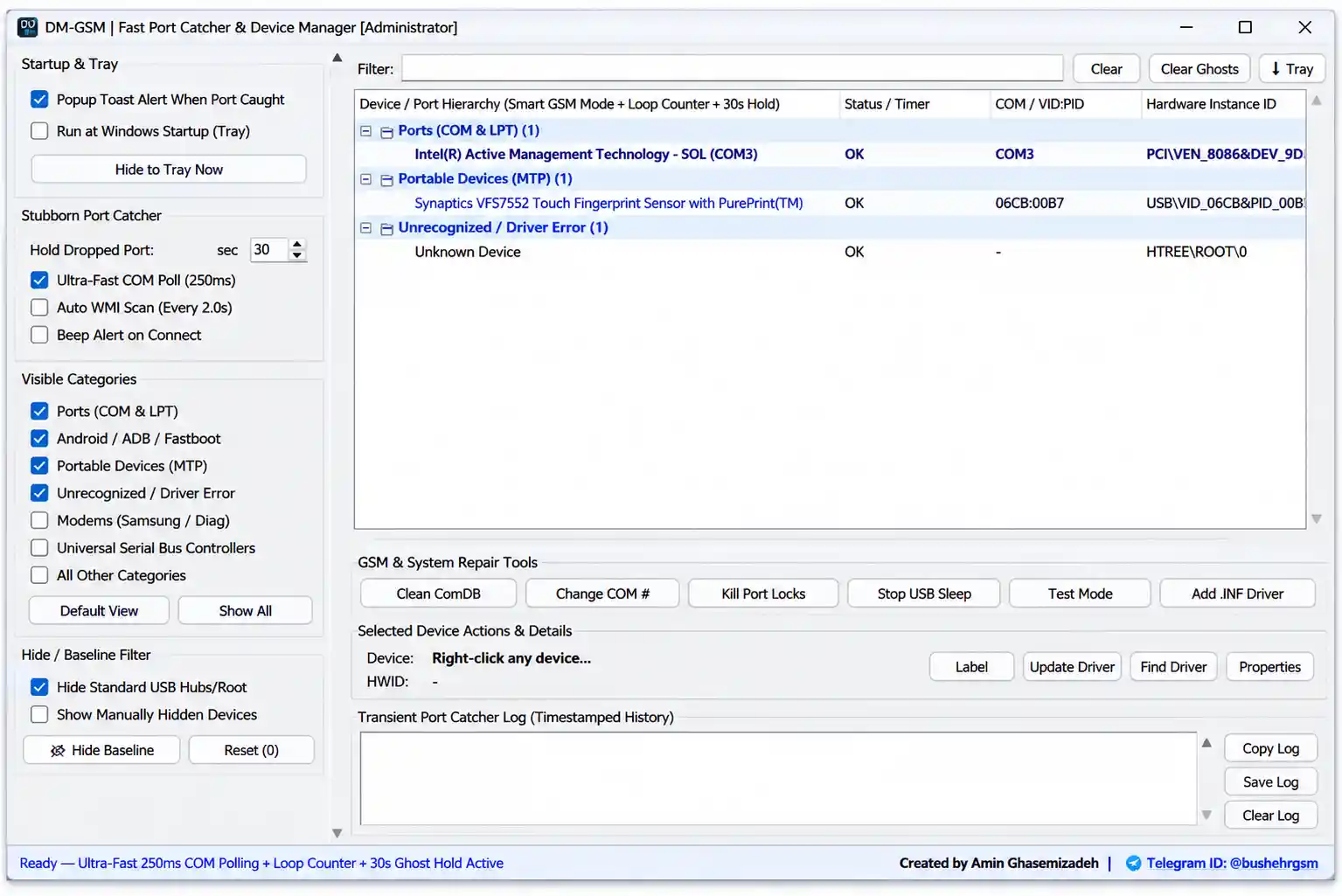
DM-GSM is a free, portable Windows utility built by Amin Ghasemizadeh for mobile repair technicians who deal with COM port and driver issues every day. It automatically recognizes connection modes across Qualcomm, MediaTek, Unisoc, Samsung, Android, and Apple devices — EDL, Diag, BROM, Preloader VCOM, Odin, Download Mode, ADB, Fastboot, DFU, and Recovery — and includes a 30-second Ghost Hold feature for catching COM ports that disappear quickly. It also bundles a set of driver and port repair tools: Clean ComDB, Change COM Number, Kill Port Locks, Stop USB Sleep, Windows Test Mode activation, and direct INF driver installation. No installation is required — the tool is a single portable EXE. During testing, it tracked active COM ports smoothly and displayed connection details in real time.
Tool Information
| Detail | Info |
|---|---|
| Tool Name | DM-GSM |
| Developer | Amin Ghasemizadeh |
| Platform | Windows (Portable — No Install) |
| File Name | DM-GSM.exe |
| File Size | 14 MB |
| Supported Chipsets | Qualcomm, MediaTek, Unisoc/SPD, Samsung |
| Supported Modes | Android ADB/Fastboot, Apple DFU/Recovery |
| License | Free |
| Password | No Password |
DM-GSM Key Features
Smart Device & Mode Detection
- 30-Second Ghost Hold technology — catches short-lived COM ports before they disappear
- Displays disconnected ports for a configurable period
- Smart GSM device detection system
- Automatic Qualcomm EDL 9008 detection
- Automatic Qualcomm Diag mode detection
- Automatic MTK BROM detection
- Automatic MTK Preloader VCOM detection
- Automatic Unisoc/SPD Boot mode detection
- Automatic Unisoc Diag mode detection
- Samsung Odin mode and Download mode recognition
- Android ADB and Fastboot mode detection
- Apple DFU and Recovery mode recognition
Monitoring & Diagnostics
- Real-time COM port monitoring
- Device hierarchy view
- COM and LPT port monitoring
- MTP device monitoring
- Unrecognized device detection
- Driver error detection
- Loop Counter — counts repeated disconnect/reconnect events to help identify faulty USB cables or driver issues
Port & Driver Repair Tools
- Clean ComDB — removes ghost COM port entries and frees occupied COM port numbers
- Change COM Number — quick COM port reassignment
- Kill Port Locks — terminates processes locking serial ports; compatible with ADB-locked, Fastboot-locked, and FH Loader locked ports
- Stop USB Sleep — prevents Windows USB power-saving interruptions, useful during long flashing operations
- Windows Test Mode activation — supports installation of unsigned drivers
- Add .INF Driver — direct INF driver installation, with driver backup and removal support
Interface & Usability
- Custom device labeling — assign names to boxes, dongles, and UART cables for easy identification
- Popup notification when a port is detected
- Startup with Windows option
- System tray support with real-time port notifications
- Ultra-Fast COM polling mode — 250ms port scanning support
- Filter and category management options
- Portable single-file executable — no installation required, lightweight design
What’s New
- Introduced 30-Second Ghost Hold functionality for temporary port detection
- Added Smart GSM Detection for multiple phone chipsets and modes
- Added Loop Counter for connection stability monitoring
- Integrated Clean ComDB utility
- Added Change COM Number feature
- Added Kill Port Locks utility
- Added Stop USB Sleep function
- Integrated Test Mode activation option
- Added direct INF driver installation support
- Added custom labels for boxes, UART devices, and dongles
- Added system tray support and connection notifications
Download DM-GSM
- File Name: DM-GSM.exe
- File Size: 14 MB
- Developer: Amin Ghasemizadeh
- License: Free
- Password: No Password
How to Install DM-GSM
- Download the DM-GSM package from the Google Drive link above.
- Extract the downloaded archive to a folder on your PC.
- Open the extracted folder.
- Run
DM-GSM.exeas Administrator — no installation wizard is required. - Allow Windows permissions if prompted.
- The software starts immediately and is ready to monitor and manage connected devices.
Important Notes
- Run DM-GSM as Administrator — port management, driver installation, and the Clean ComDB tool require elevated permissions.
- Enabling Windows Test Mode allows installation of unsigned drivers — only enable this if you understand the security implications, and disable it again when no longer needed.
- The Kill Port Locks tool terminates processes holding a serial port open — close any active flashing operation first to avoid data loss or a corrupted flash.
- Use Stop USB Sleep before starting long flashing sessions to prevent Windows from interrupting the connection mid-operation.
- The Loop Counter is useful for diagnosing unstable connections — a high repeat count on disconnect/reconnect events usually points to a faulty cable or driver conflict rather than the tool itself.
Conclusion
DM-GSM by Amin Ghasemizadeh is a purpose-built diagnostic companion for GSM repair workshops that deal with COM port chaos daily. The automatic detection across Qualcomm EDL/Diag, MTK BROM/Preloader, Unisoc Boot/Diag, Samsung Odin/Download, ADB/Fastboot, and Apple DFU/Recovery modes removes the guesswork from identifying a connected device’s state, while the Ghost Hold feature catches ports that would otherwise vanish before you can read them. The bundled repair tools — Clean ComDB, Kill Port Locks, Stop USB Sleep, and direct INF driver installation — address the most common driver and port headaches technicians face. Being a lightweight, no-install portable EXE makes it easy to keep on a USB drive for any repair PC. Download DM-GSM using the Google Drive link above.
Credits: Developed by Amin Ghasemizadeh. All credits go to the original developer. Disclaimer: For educational purposes only. Use responsibly. We are not liable for any device or system issues resulting from driver or port modifications.