Download 007 Ramdisk Tool V6.6 (Latest Version) 2026 Free
If you’re dealing with a disabled, iCloud-locked, or passcode-forgotten iPhone, the 007 Ramdisk Tool V6.6 is one of the most capable free solutions available in 2025. Built around the checkm8 bootrom exploit, it boots supported iPhones into a custom Ramdisk environment where you can bypass the iCloud Activation Lock, remove forgotten passcodes, and restore cellular signal — all from a Windows PC.
This guide covers everything you need: what the tool does, which iPhone models it supports, download details, system requirements, and a clear step-by-step usage guide.
What is the 007 Ramdisk Tool?
The 007 Ramdisk Tool is a Windows-based iPhone service utility that uses the checkm8 hardware-level bootrom exploit — a permanent vulnerability present in iPhones from the 4s through the X — to gain low-level access to the device.
Once the device boots into the Ramdisk environment, the tool can bypass the iCloud Activation Lock (Hello Screen), clear a forgotten passcode, and in many cases restore the cellular network signal, making the device usable again. It is designed for legitimate device repair and should only be used on phones you own or have authorization to service.
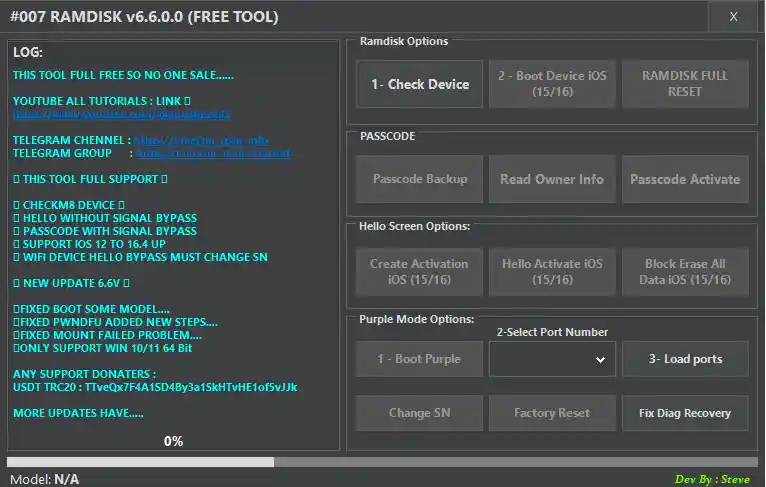
Key Features & Highlights of Version 6.6.0.0
The V6.6.0.0 update focuses on stability, broader model support, and higher success rates across its core functions.
- checkm8 Exploit Support: Uses a hardware-level bootrom vulnerability for deep device access on supported models (iPhone 4s through iPhone X and beyond).
- Hello Screen (iCloud) Bypass: Removes the iCloud Activation Lock. Note: Signal bypass on Wi-Fi-only devices may require a serial number change.
- Passcode Bypass with Signal: Clears a forgotten passcode while preserving cellular network functionality where possible.
- Broad iOS Compatibility: Works on devices running iOS 12 through iOS 16.4 and later.
- Enhanced Stability: Resolves boot issues on specific models, fixes pwndDFU process errors, and addresses Ramdisk mounting failures from previous versions.
- Higher Success Rates: Improved logic for both the Passcode/Hello Screen bypass and Signal Restore feature.
Supported iPhone Models
007 Ramdisk Tool V6.6 supports a wide range of iPhone models:
| Generation | Models |
|---|---|
| Early Models | iPhone 3G, 3GS, 4, 4s |
| iPhone 5 Series | iPhone 5, 5c, 5s |
| iPhone 6 Series | iPhone 6, 6 Plus, 6s, 6s Plus |
| iPhone SE | SE (1st Gen), SE (2nd Gen) |
| iPhone 7 Series | iPhone 7, 7 Plus |
| iPhone 8 / X Series | iPhone 8, 8 Plus, X, XR, XS, XS Max |
| iPhone 11 Series | iPhone 11, 11 Pro, 11 Pro Max |
| iPhone 12 Series | iPhone 12, 12 mini |
| iPhone 13 Series | iPhone 13, 13 Pro, 13 Pro Max |
| iPhone 14 Series | iPhone 14, 14 Pro, 14 Pro Max |
Download 007 Ramdisk Tool V6.6 Free
The latest version (V6.6.0.0) is available for free download via the link below, hosted on the reliable MediaFire platform.
- Tool Name: 007 Ramdisk Tool
- Version: V6.6
- File Size: 52 MB
- Supported OS: Windows 32bit-64bit
System Requirements
Before downloading, confirm your PC meets these requirements:
- Operating System: Windows 10 or Windows 11 — 64-bit only. The tool does not support 32-bit systems or older Windows versions.
- Storage: At least 52 MB of free disk space.
- Privileges: Must be run as Administrator.
- Antivirus: Temporarily disable antivirus software and Windows Defender during installation — security tools may incorrectly flag the application due to its low-level driver components.
How to Use 007 Ramdisk Tool V6.6 — Step-by-Step
Step 1: Download the Tool
Get the latest V6.6.0.0 version from the MediaFire link above.
Step 2: Extract to the C: Drive
Extract the downloaded ZIP directly to the root of your C: drive (e.g., C:\007RamdiskTool). Extracting to the desktop or a subfolder can cause file path errors.
Step 3: Disable Antivirus
Temporarily turn off your antivirus software and Windows Defender before proceeding. The tool’s drivers may be flagged as a false positive, which will block installation.
Step 4: Install the Tool
Open the extracted folder and run the setup file. Follow the on-screen installation prompts.
Step 5: Launch & Install Drivers
Open the 007 Ramdisk Tool application. If it’s your first time running it, the program will prompt you to install required drivers — including iTunes drivers and libusb. Install all of them before continuing.
Step 6: Enter DFU Mode and Connect Your iPhone
Put your iPhone into DFU Mode (the tool provides model-specific instructions on screen). Connect the device to your PC using a quality USB cable.
Step 7: Select Your Operation
Choose the function you need — Hello Bypass, Passcode Remove, or Signal Restore — and follow the on-screen prompts carefully.
Step 8: Wait for Completion
The process can take several minutes depending on your device and the selected operation. Do not disconnect the phone until the tool confirms it is finished.
Important Notes
⚠️ Legal Use Only: This tool is intended for use on devices you legally own. Using it to bypass iCloud on a lost or stolen iPhone is illegal and may violate local laws.
✅ Back Up First: Where possible, back up the device before performing any operation that modifies system partitions.
✅ Use a Quality USB Cable: A damaged or low-quality cable is one of the most common causes of failed DFU connections.
Disclaimer
This article is for educational and informational purposes only. The 007 Ramdisk Tool must only be used on devices you own or have explicit authorization to service. Bypassing security features on a lost or stolen device is illegal. The user assumes full responsibility for any outcomes, including data loss or device damage. Always comply with your local laws and Apple’s terms of service.