Infinity CM2SCR V1.02 Download (All Version) Setup File
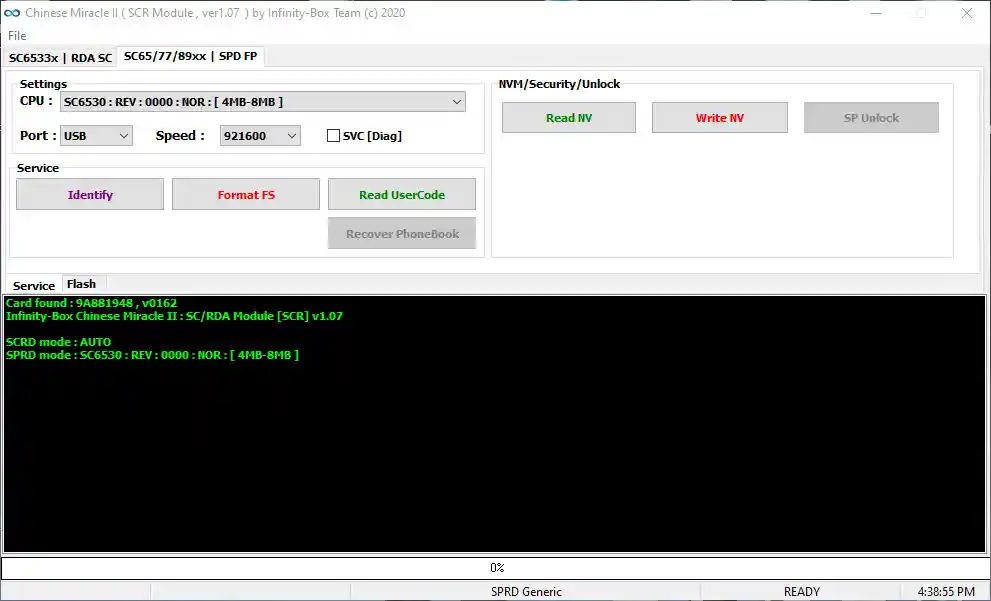
Infinity CM2SCR V1.02 is a free Spreadtrum (SPD) and Coolsand (RDA) CPU phone flashing tool for Windows, developed by the Infinity-Box team. It combines firmware flashing, lock reset, and dead device repair into a single lightweight interface — supporting .BIN, .PAC, and .ilod firmware formats. The CM2 SCR Module handles everything from writing and reading firmware to formatting file systems on SPD-based feature phones. The ZIP package includes the SPD USB Driver and a full setup guide, so everything you need is in one place.
Infinity CM2SCR V1.02 Key Features
Firmware Flash Functions
- Flash .BIN Firmware Files
- Flash .PAC Firmware Files
- Flash .ilod Firmware Files
- Read Firmware from Device
- Write Firmware to Device
- Select CPU Model Before Flashing
Service & Repair Functions
- Format File System (Format FS)
- Reset Phone Lock
- Dead Device / Dead Issue Repair
- Boot Key Connection Support
Supported CPU List
Infinity CM2SCR V1.02 supports the following Spreadtrum and RDA chipsets:
- SC6533x (RDA / Coolsand CPU)
- SC6530
- SC6531
- SC6531DA
- SC6531C
- SC6531E
Download Infinity CM2SCR V1.02
- File Name: InfinityBox_install_CM2SCR_v1.02.zip
- File Size: 12 MB
- Version: V1.02
- Platform: Windows
- License: Free
- Password: Not Required
⬆️ Latest Version: CM2 SCR V1.07 (Recommended)
- File Size: 12.2 MB
- Password: Not Required
How to Install Infinity CM2SCR Tool
- Download the ZIP package from the links above.
- Extract the ZIP file using WinRAR or 7-Zip (no password required).
- Install the SPD USB Driver included in the package. Skip this step if the driver is already installed.
- Run the CM2SCR installer and follow the on-screen setup steps.
- Launch the tool after installation is complete.
How to Use Infinity CM2SCR Tool
- Open the CM2SCR tool on your PC.
- Select the correct CPU model for your device.
- Choose the tab for your task:
- Flash Tab → Write or Read firmware (.BIN / .PAC / .ilod)
- Service Tab → Format FS, Reset Lock, Dead Repair
- Connect your phone via USB cable and press the Boot Key on the device.
- Click the desired function button and wait for the process to complete.
Write (Flash) Firmware
- Open the tool → Select CPU Model → Go to Flash tab
- Click Choose Flash File and select your firmware
- Click Write Flash → Connect device via USB → Press Boot Key
Read Firmware
- Open the tool → Select CPU Model → Go to Flash tab
- Click Read Flash → Connect device via USB → Press Boot Key
Reset Lock / Format FS
- Open the tool → Go to Service tab → Select CPU Model
- Click Format FS → Connect device via USB → Press Boot Key
Dead Device Repair
- Open the tool → Go to Service tab
- Click Format FS → Connect device via USB → Press Boot Key
Conclusion
Infinity CM2SCR V1.02 is a reliable and lightweight flashing tool for Spreadtrum and Coolsand CPU-based phones. Whether you need to write firmware, read a backup, reset a lock, or revive a dead device, this tool covers all the essential repair tasks for SPD feature phones. The included SPD USB Driver and straightforward interface make it easy to use even for beginners. If you want the most up-to-date chipset support and bug fixes, we recommend downloading the latest CM2 SCR V1.07. Use the download links above to get started.
Credits: All credits go to the Infinity-Box team for developing and maintaining this tool. Disclaimer: For educational and repair purposes only. Always back up your device data before flashing. We are not responsible for any device damage or data loss resulting from the use of this tool.
Related Tools
- SamFw FRP Tool v5.9 – Free Download
- RDA Coolsand USB Driver – Free Download
- SPD USB Driver – All Versions