Download MTK INJECTOR TOOL v4.0 Free (Latest Version) Working 100%
Servicing Android smartphones can sometimes be difficult, especially when a device is locked by Factory Reset Protection (FRP) or affected by security restrictions after a reset. Many technicians face delays when trying to fix these issues manually.
MTK Injector Tool v4.0 offers a simple and effective solution for these problems. It is designed specifically for MediaTek (MTK) powered Android devices, allowing technicians to remove FRP locks, format userdata, and perform several advanced servicing operations quickly.
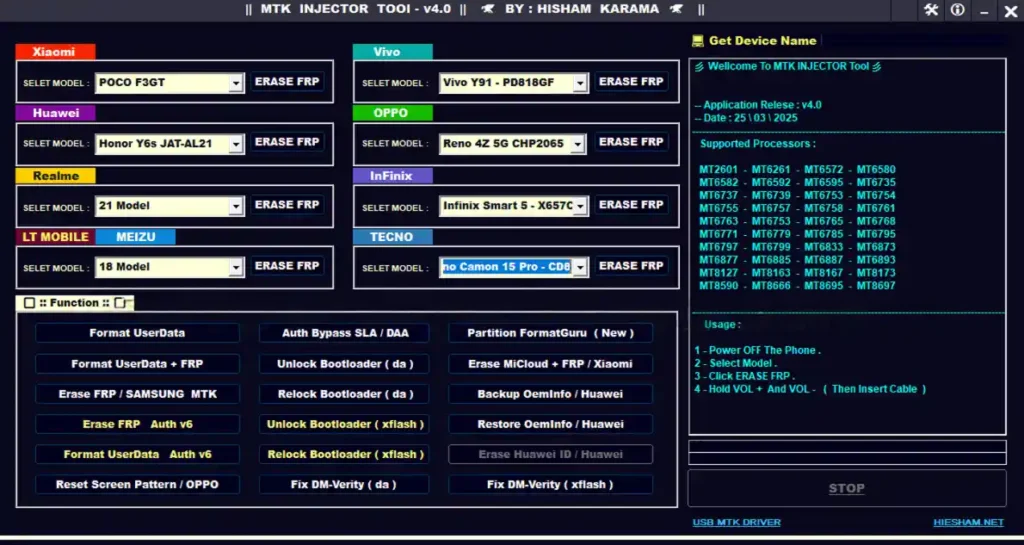
What is MTK Injector Tool v4.0?
MTK Injector Tool v4.0 is a Windows-based Android repair utility designed to work with MediaTek chipset smartphones.
The tool helps users perform important operations such as FRP removal, userdata formatting, bootloader unlock/relock, and security fixes. Its model-specific functions make it easier to perform repairs without complicated steps.
Because of its fast operation and wide brand support, it is widely used by technicians who repair MTK-based smartphones.
Key Features of MTK Injector Tool v4.0
1. FRP Erase for MTK Phones
- Remove Factory Reset Protection (FRP)
- Combined FRP + Userdata format option
- Model-wise FRP solutions
- Supports old and new MTK security versions
2. Userdata Format
- Format userdata separately
- Format FRP + userdata together
- Helps fix bootloop issues on older security devices
3. Advanced Security Options
- Auth Bypass v6 supported
- Partition Format Guru (new feature)
- Unlock bootloader (DA & xFlash)
- Relock bootloader (DA & xFlash)
- Fix DM-Verity issues
4. Brand-Specific Tools
The tool includes dedicated options for multiple smartphone brands:
- Xiaomi / Redmi FRP Remove
- POCO FRP Remove
- Realme FRP Remove
- OPPO FRP Remove
- Vivo FRP Remove
- Tecno & Infinix FRP Remove
- Huawei / Honor FRP Remove
- Meizu FRP Remove
- LT Mobile FRP Remove
How to Download MTK Injector Tool v4.0
- File Name: MTK_INJECT_v4.0.rar
- Version: v4.0
- File Size: 127.08 MB
How to Install MTK Injector Tool v4.0
You cannot run the tool normally because it is a time-limited build. You must run it using a workaround method.
Steps:
- Download and extract the RAR file.
- Open the folder and locate runasdate.exe.
- Launch runasdate.exe.
- Browse and select MTK INJECTOR-v4.exe.
- Set the date to 25 March 2025.
- Click Run.
The tool will now open successfully.
Note: The tool may not run if you open it directly without using this method.
How to Use MTK Injector Tool v4.0
Basic steps to perform FRP or format operations:
- Power off the Android device.
- Open the tool using the runasdate method.
- Select the brand or model.
- Choose the required operation (FRP Remove / Format).
- Connect the phone via USB while holding Volume + or Volume –.
- Wait for the process to complete.
After the process finishes, the device should reboot without the lock.
Conclusion
MTK Injector Tool v4.0 is a powerful and convenient solution for technicians working with MediaTek Android smartphones. It simplifies complex servicing tasks like FRP removal, userdata formatting, bootloader unlocking, and security fixes.
With its easy interface, wide device support, and advanced features, the tool is a useful addition to any Android repair toolkit. If you frequently work with MTK-based devices, downloading this tool can help speed up your repair process and save valuable time.