FRT Tool V1.7.0 (Flash Repair Tool) Free Download – Full Guide & Features
If you work in mobile repair or often unlock Android phones, the FRT Tool V1.7.0 is one of the most discussed utilities today. Its updated features, reliable performance, and broad device compatibility have made it a favorite among technicians. In this guide, you’ll discover what the FRT Tool is, its key features, how to download it safely, and how to use it effectively. Before you start, there is an important security warning you must read.
What Is FRT Tool?
FRT Tool (Flash Repair Tool) is a professional mobile unlocking and flashing software designed for Android smartphones. Technicians use it for factory resets, FRP removal, firmware flashing, reading device information, and solving common issues on Qualcomm and MediaTek devices.
It operates on a 1-year subscription and offers premium features at a fair price. While it’s not a free tool, it is far safer and more reliable than cracked versions circulating online.
Key Features of FRT Tool
The FRT Tool is known for its simplicity, efficiency, and wide brand support. Below are the highlights that make it a preferred tool in mobile repair:
1. Auto Device Detection
You don’t always need to manually select the exact model. Simply choose the brand or chipset, and the tool automatically detects the connected device.
2. Wide Brand Compatibility
FRT Tool supports a wide range of commonly repaired smartphone brands, including:
- Oppo
- Vivo
- Xiaomi / Redmi
- Samsung
- Infinix
3. Working MDM Fixes
Recent updates provide stable and effective MDM unlock solutions, especially for devices with higher security levels.
4. All-in-One Dashboard
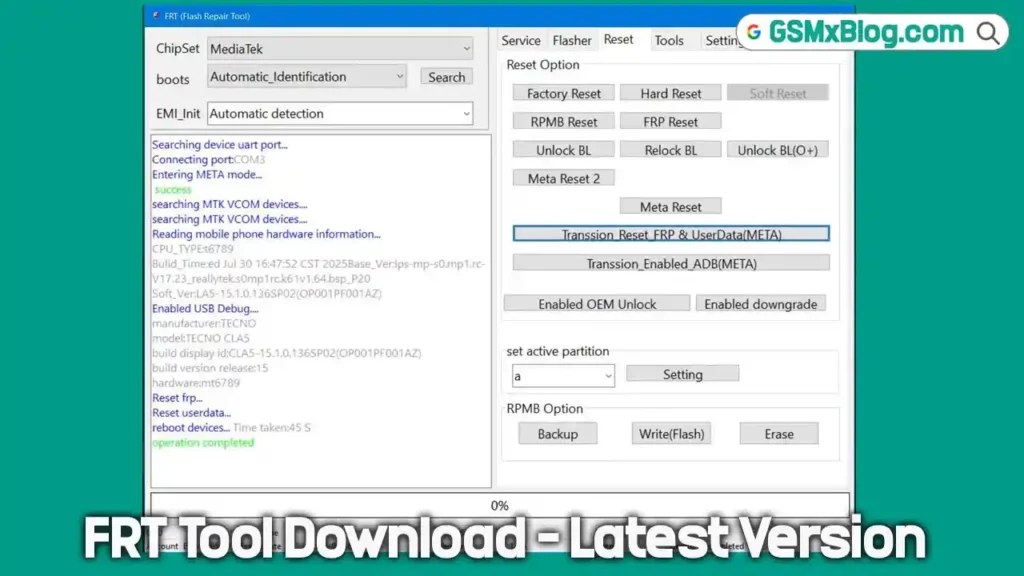
All major functions—FRP, Reset, Flash, Read Info—are accessible from a clean, user-friendly dashboard. No hidden menus, no complicated navigation.
5. Test Point Mode Support
For some high-security devices (like newer Oppo and Vivo models), Test Point mode is required. This involves:
- Opening the device
- Shorting the test point pins on the motherboard
- Connecting the phone to the PC in flashing mode
This allows deeper system access for advanced repairs.
Download FRT Tool V1.7.0
- File Name: FRT_V1.7.0_lastupdate
- Version: V1.7.0
- File Size: 154 MB
How to Use FRT Tool
Using the FRT Tool is straightforward. Follow these steps:
Step 1: Install and Launch
Download the file, install it on your Windows PC, and open the program.
Step 2: Connect Your Device
Turn off your phone and connect it via USB. Depending on the device, you may need to use:
- Fastboot mode
- EDL mode
- Test Point mode
Step 3: Select the Desired Operation
From the main dashboard, choose:
- FRP Removal
- Factory Reset
- Flash Firmware
- Read Info
- MDM Unlock
Step 4: Let the Tool Process the Task
The tool will automatically detect the device and carry out the selected action. Wait for the completion message.
Step 5: Reboot the Device
After the process is complete, reboot the smartphone. It should now be repaired, flashed, or unlocked.
FRT Tool V1.7.0 Changelog
The latest version delivers major improvements and bug fixes:
- Added Oplus SDM480 / 750 FRP + Factory Reset
- Fixed Oplus Qualcomm Super Partition Flash bug
- Fixed One-click FRT Reset issues
- Fixed OPPO MTK6877 Test Point BROM problem
- MRT Dongle Free for 1 year with FRT Tool (valid until 01/01/2026)
Important Warning Before Downloading
Many users search for MRT cracks, but these cracked files are extremely dangerous. Most contain harmful viruses, and some even display a “Game Over” message after installation—indicating your PC has already been compromised.
If you are a professional technician, do not risk your system or clients’ data.
Always use official or verified tools only.
Conclusion
The FRT Tool V1.7.0 is a powerful and dependable solution for unlocking, flashing, and repairing Android devices. With improved support for new chipsets, enhanced performance, and a clean interface, this version stands out as one of the best releases yet. Whether you are a beginner or an experienced technician, this tool can save time and simplify your workflow.