Cheetah Tool Pro V2026.01.27.171.0 (Latest Version) Setup File – Download
Cheetah Tool Pro V2026.01.27.171.0 is one of the most powerful and stable updates released to date. This version is faster, smoother, and supports a wider range of devices, including new Oppo, Realme, OnePlus, Samsung, and Nothing Phone models. Designed for both beginners and professionals, the tool allows users to perform complex mobile repair tasks with just a few clicks. With improved stability, new chipset support, and bug fixes, this update delivers a more reliable phone servicing experience.
What Is Cheetah Tool Pro?
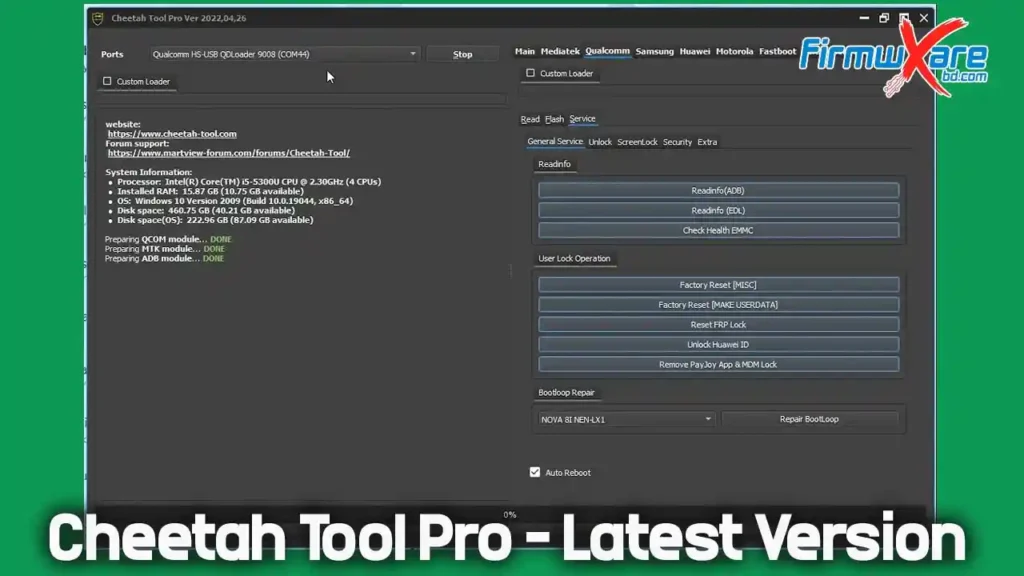
Cheetah Tool Pro is an easy-to-use mobile phone repair and servicing tool that does not require professional skills. Most functions are automated, allowing users to fix common phone problems quickly and efficiently. There is no need for lengthy or complicated procedures, as all essential repair options are organized in a simple application interface.
Key Features of Cheetah Tool Pro
Cheetah Tool Pro Activation offers a complete set of phone repair features, including:
- Repair IMEI – Fix IMEI-related issues and restore proper network functionality
- Reset Screen Lock – Remove forgotten screen locks quickly
- Read / Write QCN – Manage Qualcomm Network Configuration files
- Factory Reset (Diag Port) – Restore devices using diagnostic mode
- Read / Write Security – Manage security data for stable operation
- Repair Network – Fix signal and connectivity issues
- Reset FRP (ADB) – Bypass Factory Reset Protection using ADB
- Decode Network – Analyze and decode network configuration data
- Flash Firmware – Install or update firmware to resolve software issues
- Reset EFS – Restore EFS to fix network and security problems
Cheetah Tool Pro Download
- File Name: setup_cheetah_tool_pro_ver_2026.01.27.171.1.exe
- File Size: 107 MB
- Release Date: January 27, 2026
- Version: V2026.01.27.171.0
- Download Link:
How to Use Cheetah Tool Pro
- Download and install the setup file on your Windows PC
- Run Cheetah Tool Pro as administrator
- Connect your device using a USB cable
- Select the device brand, model, and required function
- Click Start and wait for the process to complete
Most operations are automatic, making the tool simple and beginner-friendly.
Cheetah Tool Pro V2026.01.27.171.0 What’s New – Changelog
🔹 Qualcomm Snapdragon Chipset Support
Oppo / Realme / OnePlus (VIP Auth – 9008 Mode)
VIP Authorization in 9008 mode now supports the following Qualcomm Snapdragon SoCs:
- Snapdragon 480 5G (SM4350)
- Snapdragon 460 (SM4250)
- Snapdragon 662 (SM6115)
- Snapdragon 665 (SM6125)
- Snapdragon 680 (SM6225)
- Snapdragon 695 5G (SM6375)
- Snapdragon 7+ Gen 2 (SM7475)
- Snapdragon 7+ Gen 3 (SM7675)
- Snapdragon 888 (SM8350)
- Snapdragon 8 Gen 1 (SM8450)
- Snapdragon 8+ Gen 1 (SM8475)
- Snapdragon 8 Gen 2 (SM8550)
- Snapdragon 8 Gen 3 (SM8650)
- Snapdragon 8s Gen 3 (SM8735)
- Snapdragon 8 Elite (SM8750)
✅ These chipsets now fully support Qualcomm VIP authorization and 9008 mode operations on Oppo, Realme, and OnePlus devices.
🔹 Qualcomm VIP Auth (9008 Mode) – Newly Supported Models
📱 OPPO
- Oppo A1 5G (PHS110)
- Oppo A1 Pro (PHQ110)
- Oppo A5i Pro (CPH2821)
- Oppo A6 GT (PLL110)
- Oppo A98 (CPH2529)
- Oppo F21 Pro 5G (CPH2341, CPH2455)
- Oppo F23 (CPH2527)
- Oppo Find N5 (CPH2671, PKH110, PKH120)
- Oppo Find X2 Lite (CPH2005)
- Oppo Find X2 Neo (CPH2009)
- Oppo Find X7 Ultra (PHY110, PHY120)
- Oppo Find X8 Ultra (PKJ110, PKU110)
- Oppo K10x (PGGM10)
- Oppo K11x (PHF110)
- Oppo K12 (PIR110)
- Oppo K12 Plus (PKS110)
- Oppo K12x China (PJT110)
- Oppo Pad Air (OPD2102, X21N2)
- Oppo Reno 7 Lite 5G (CPH2343)
- Oppo Reno 7Z 5G (CPH2343)
- Oppo Reno 8 Lite 5G (CPH2343)
- Oppo Reno 8T 5G (CPH2505)
📱 REALME
- Realme 9 Pro 5G (RMX3471, RMX3472)
- Realme 10 Pro 5G (RMX3663, RMX3660, RMX36xx series)
- Realme GT Neo 5 SE (RMX3700)
- Realme GT Neo 6 SE (RMX3850)
- Realme GT5 240W (RMX3823)
- Realme GT5 Pro (RMX3888)
- Realme GT8 (RMX6699)
- Realme Pad X (RMP2107, RMP2108)
- Realme Q5 5G (RMX3478)
- Realme V25 (RMX3475)
📱 ONEPLUS
- OnePlus 9 Pro (LE2120, LE2121, LE2123, LE2125)
- OnePlus 9RT 5G (MT2110, MT2111)
- OnePlus 12 (PJD110, CPH2573, CPH2581, CPH258x series)
- OnePlus 13 (CPH2655, CPH2653, PJZ110, CPH2649)
- OnePlus 13R (CPH2645, CPH2691, CPH2647)
- OnePlus 13S (CPH2723)
- OnePlus 13T (PKX110)
- OnePlus Ace 3 Pro (PKR110)
- OnePlus Ace 3V (PJF110)
- OnePlus Ace 5 (PKG110)
- OnePlus Ace 5 Pro (PKR110)
- OnePlus Ace 6 (PLQ110)
- OnePlus Nord 4 (CPH2663, CPH2661)
- OnePlus Nord CE 2 Lite (CPH2381, CPH2409)
- OnePlus Nord CE 3 Lite (CPH2465)
- OnePlus Nord CE 4 (CPH2613)
- OnePlus Nord CE 4 Lite (CPH2619, CPH262x series)
- OnePlus Nord N20 (GN220, CPH2459)
- OnePlus Pad 2 (OPD2403)
- OnePlus Pad 3 (OPD2415)
- OnePlus Pad Pro (OPD2404)
🔹 Samsung – FRP / Factory Reset Support
- SM-A025U1 (BIT 6)
- SM-F7000 (BIT B)
- SM-F9160 (BIT 8)
- SM-G781N (BIT D)
- SM-G781V (BIT L)
- SM-G781W (BIT L)
- SM-G990U2 (BIT I)
- SM-M236B (BIT C)
- SM-T636B (BIT 9)
- SM-T638U (BIT 9)
- SM-T735 (BIT 9)
- SM-W9023 (BIT 8)
- SM-X210 (BIT 9)
- SM-X216C (BIT 9)
- SM-X216N (BIT 9)
🔹 Carrier Relock Support
- Added carrier relock support for Android 16 devices
⚠️ Android 16 security patch 2026 is not yet supported
🔹 Samsung Tools
- Added Check Info by IMEI for Samsung devices
🔹 Oppo / Realme / OnePlus Enhancements
- Direct network unlock added for all security levels on MediaTek chipsets
- Online region unlock code reading added for Oppo devices
🔹 Nothing Phone Support
Supported CPUs: MT6886 / MT6877 / MT6878
- Nothing Phone 2a
- Nothing Phone 3a Lite (Galaxian)
⚠️ Bootloader unlock and IMEI repair are not supported for these models
🔹 New Brand Support
- AGM G2
🔹 Improvements & Fixes
- Fixed reported bugs
- Optimized model selection interface
- Improved overall stability
Conclusion
Cheetah Tool Pro V2026.01.27.171.0 is a powerful all-in-one mobile repair solution with expanded device support, faster performance, and improved stability. Whether you are a beginner or an experienced technician, this version simplifies mobile servicing and saves time. Download the latest Cheetah Tool Pro now and take your phone repair work to the next level.
Related Tools