Download BimraTool 2025.09.18 (Latest Version) Free
If you’re serious about Android servicing, you already know BimraTool. The latest 2025.09.18 update takes things to the next level — faster performance, a cleaner UI, improved chipset support, and stronger authentication handling. Built for GSM professionals, BimraTool handles everything from flashing and unlocking to partition management and critical data repair. Whether you work with Qualcomm, MediaTek, or Xiaomi devices, this update gives you the professional control every technician needs.
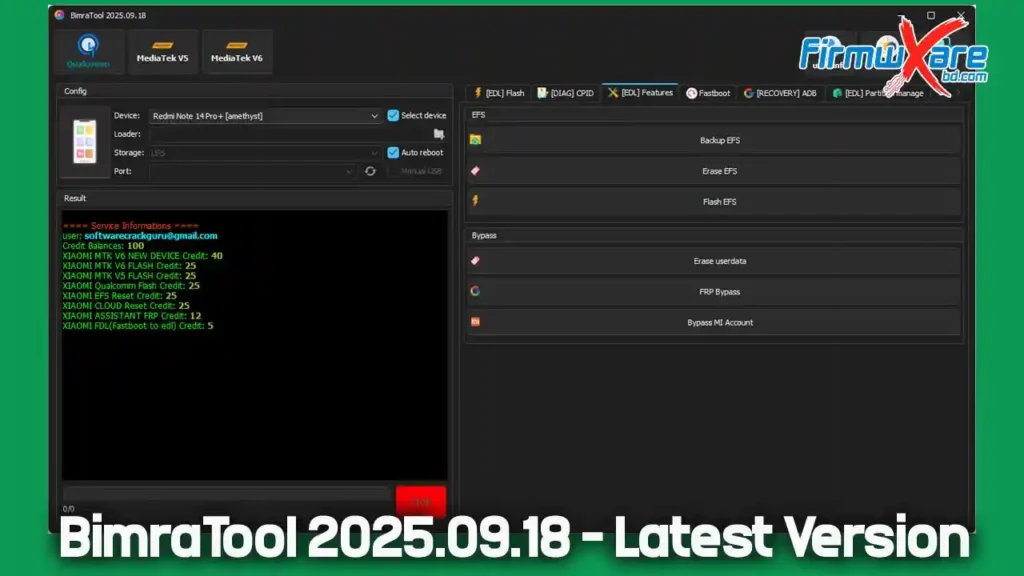
What Is BimraTool?
BimraTool is a professional Android servicing utility designed for flashing, unlocking, authentication, and diagnostics. It supports all major chipsets — Qualcomm, MTK, Xiaomi, Poco, Redmi, and more.
The 2025 version is optimized for speed, reliability, and stability, making it one of the most trusted tools in the GSM industry today. If you regularly perform flashing or account services, this software will save you hours of manual work. It’s lightweight, fast, and supports EDL, ADB, Fastboot, and Recovery modes — all from a single interface.
Key Features of BimraTool
🔸 Qualcomm Section
The Qualcomm section is the heart of BimraTool and includes several essential service tabs:
[EDL] Flash Tab
- Select device model (e.g. Redmi Note 14 Pro+ [amethyst])
- Choose storage type (UFS or eMMC)
- Configure loader and port
- Perform XML firmware flashing
- Enable auto-reboot or manual USB options
[DIAG] CPID Tab
- Read device info (ADB mode)
- Parse critical files (critical.bin, NVdata, LDDB)
- Generate or edit IMEI, Product, SN, MAC, and MEID fields
- Read/write QCN and Critical partitions
- One-click IMEI write (for authorized repair only)
[EDL] Features Tab
- Backup, erase, or flash EFS
- Erase userdata
- FRP and Mi Account bypass (authorized service only)
Fastboot Tab
- Read fastboot info
- Reboot device to EDL mode
[RECOVERY] ADB Tab
- Perform ADB sideload operations
- FRP reset and info read
[EDL] Partition Management Tab
- View partition details (LUN, sector, size)
- Read or erase partitions individually
🔸 MediaTek (V5) Section
The MediaTek V5 module is designed for modern MTK-powered devices with secure boot.
Configuration Panel:
- Add DA (Download Agent) file
- Load Auth and Cert files
- Secure flashing with SLADAA bypass support
Flashing Panel:
- View partition list with base addresses
- Choose flashing mode: Download Only, Format + Download, or Firmware Upgrade
- Track progress and logs in real-time
Service Credit System
BimraTool uses a credit-based system for selected operations. Below are example rates (may vary by server):
| Operation | Credit Cost |
|---|---|
| Xiaomi MTK V5 Flash | 30 |
| Xiaomi Qualcomm Flash | 30 |
| Xiaomi Cloud Reset | 30 |
| EFS Reset | 30 |
| FRP Assistant | 12 |
| FDL (Fastboot to EDL) | 1 |
| Xiaomi MTK New Device | 50 |
You can monitor your balance and operation cost directly in the Service Info Panel during runtime.
BimraTool 2025.09.18 Download Information
- File Name: TsToolV1.10..zip
- File Size: 8.90 MB
- Download Link: Click Here to Download
System Requirements
- Operating System: Windows 10 or Windows 11 (32-bit or 64-bit)
- Drivers: Install the latest Qualcomm and MediaTek USB drivers
- Additional Tools: ADB, Fastboot, and EDL drivers installed
- Backup: Always back up user data, NVRAM, and EFS before flashing
Installation Guide
Follow these steps to correctly install and set up BimraTool 2025.09.18 on your PC:
Step 1: Download and Extract
- Download the ZIP package from the official or verified link above.
- Right-click the downloaded file and select “Extract Here” or “Extract to Folder” using WinRAR or 7-Zip.
Step 2: Install Drivers
- Install Qualcomm HS-USB QDLoader and MediaTek USB VCOM drivers.
- Also install ADB and Fastboot drivers for Android communication.
- Restart your PC after installation for the drivers to initialize properly.
Step 3: Launch the Tool
- Open the extracted BimraTool folder.
- Run the main executable file (
BimraTool.exe) as Administrator. - Wait for the tool interface to load and connect to the server if required.
Step 4: Log In / Activate (If Required)
- Some builds may ask for a username or activation key.
- Enter your registered credentials or select “Free Mode” (if available).
Step 5: Connect Device
- Connect your phone via USB in the correct mode:
- EDL Mode for Qualcomm
- Preloader / Brom Mode for MediaTek
- ADB or Fastboot Mode for other operations
- Make sure the device is detected in the tool before performing any action.
Step 6: Perform Operation
- Choose your desired operation (e.g., Flash, FRP, EFS Backup).
- Double-check configurations before starting.
- Wait until the log shows “Operation Done” before disconnecting.
✅ Tip: Keep your internet connection stable for server-based tasks (authentication, credit verification, etc.).
What’s New in Version 2025.09.18
- Rewritten flashing engine for higher transfer speed
- Enhanced authentication handling for newer Xiaomi and MTK devices
- Improved UI and partition management feedback
- Expanded support for new chipsets and models
- More stable flashing and better error recovery during long operations
Important Notes
BimraTool provides powerful service-level access. Use it only for authorized device repair, servicing, or research.
Unauthorized use (such as illegal unlocking or FRP bypass) is prohibited and may lead to legal action.
Expert Tips
- Keep DA and Auth files updated to avoid “Authentication Failed” errors.
- Disable Driver Signature Enforcement on Windows before installing unsigned USB drivers.
- Use a good-quality USB cable and avoid USB hubs during flashing for maximum stability.
- Always back up QCN, NVData, and EFS before writing new firmware.
Conclusion
For GSM technicians and professional service engineers, BimraTool 2025.09.18 is an indispensable solution. With its improved flashing engine, robust authentication, and support for the latest Xiaomi, MTK, and Qualcomm devices, it delivers both speed and reliability.