U-FRP UNISOC Loader v1.0.0 Latest Version Free Download 2026
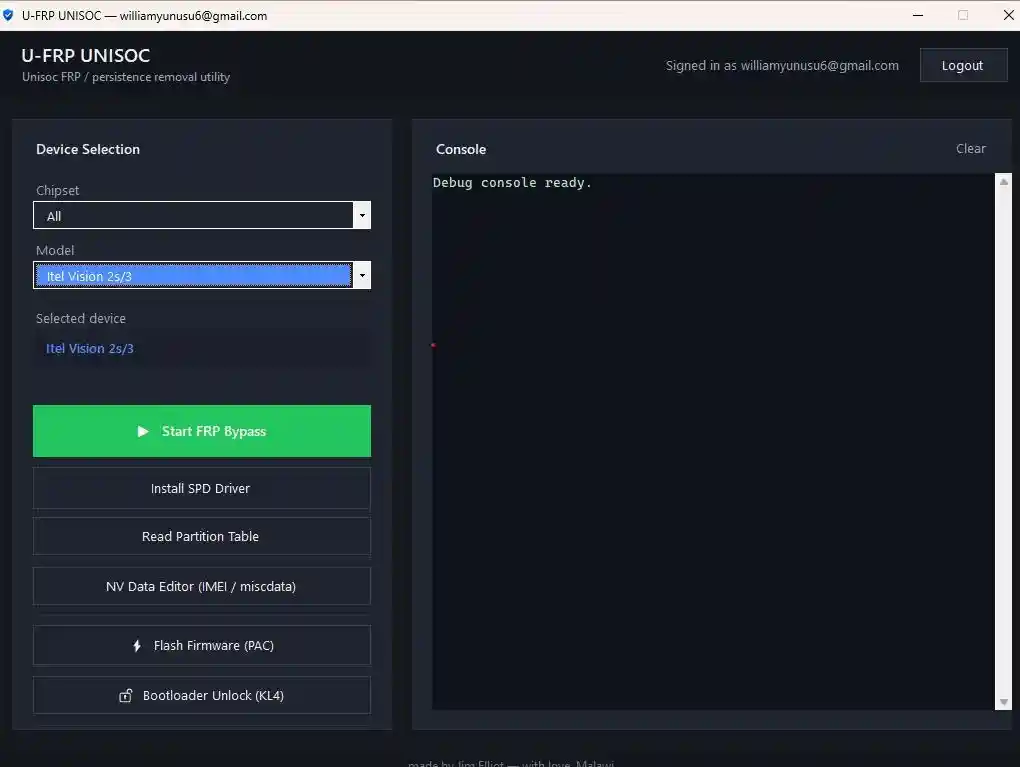
U-FRP UNISOC Loader v1.0.0 is a single EXE launcher that opens the main U-FRP UNISOC tool without a login prompt, using a hardware-bound license with automatic local routing setup. It supports UNISOC chipsets UD710, UMS312, UMS512, UMS9230, UMS9620, and UMS9230E, covering FRP unlock in BROM mode, bootloader unlock, PAC firmware flashing, partition read/write/erase, NV Data editing, SPD driver installation, and more — across 50+ Transsion, Nokia, Realme, Motorola, Lava, and ZTE devices. The loader was tested on Windows 10 across several UNISOC phones by the developer and confirmed working. No installation wizard — just place the loader EXE in the same folder as the main tool files and run as Administrator.
Tool Information
| Detail | Info |
|---|---|
| Tool Name | U-FRP UNISOC Loader |
| Version | v1.0.0 |
| Developer | GSMYOGESH.COM |
| Platform | Windows 10 / Windows 11 (Single EXE — No Install) |
| Supported Chipsets | UD710, UMS312, UMS512, UMS9230, UMS9620, UMS9230E |
| Activation | Hardware-Bound License (16-Character Hardware ID) |
| Tested | Yes — Windows 10, Multiple UNISOC Phones |
| License | Free (with License Token from Developer) |
| Password | No Password |
U-FRP UNISOC Loader v1.0.0 Key Features
Main Tool Functions (via Loader)
- FRP Unlock for UNISOC phones in BROM mode
- Bootloader Unlock on supported chipsets with built-in Restore step
- BROM Tools panel for low-level boot ROM operations
- PAC Flash — full firmware restore via PAC file
- Partition Table Reader — dump full partition list from the device
- Partition Read — dump a single partition to a file
- Partition Write — push an image back to the device (chunked in 64 MB steps for large images)
- Partition Erase — wipe a single partition
- Partition Size Query — check partition size without reading data
- NV Data Editor — open miscdata partition and write back changes
- SPD Driver Installer shortcut for the correct Windows version
- Chipset filter dropdown and model filter dropdown (updates after chipset selection)
- Live console log showing every command and exit code
- Process cleanup on close — kills spd_dump, ADB, and Fastboot automatically
Loader-Specific Features
- Hardware-bound license using a 16-character Hardware ID
- Duration-based license token
- One-click Copy Hardware ID button
- Automatic local routing setup — no manual configuration steps
- Live status dashboard showing remaining license days
- Scrollable log showing each routing step in real time
- Auto cleanup of hosts file, port forwarding rule, and certificate on close
- Automatic Administrator elevation prompt on launch
- Single EXE — no installer, no background services
Supported Chipsets & Models
UMS9230 (T606 / T612 / T616)
Itel Vision 3, Itel S23, Itel P40, Itel A60, Itel A70, Itel P55, Tecno Spark Go 2023, Tecno Spark 10, Tecno Spark 10C, Tecno Pop 8, Tecno Pop 7 Pro, Infinix Smart 7, Infinix Smart 8, Infinix Hot 30i, Nokia C32, Nokia C22, Lava Blaze 2, Lava Yuva 2, Realme C51, Motorola Moto E13
UMS512 (T610 / T618)
Tecno Camon 18, Tecno Camon 19 Neo, Tecno Pova Neo, Infinix Hot 11S, Infinix Note 11, Itel Vision 2, Nokia T20, Realme C30, Realme Narzo 50A, ZTE Blade A71
UMS312 (T310)
Itel Vision 1, Itel A48, Itel A49, Tecno Spark 7, Tecno Spark Go 2021, Infinix Smart 5, Nokia C21
UD710 (T710)
Nokia X20, Nokia X10, Nokia G60
UMS9620 (T760)
Nokia G42 5G, Nokia G22, Motorola Moto G14
UMS9230E (Bootloader Unlock Only)
Handled through the built-in unlock script (unlock_autopatch_9230.bat) in the device folder — uses the unlock script rather than the model dropdown.
Download U-FRP UNISOC Loader v1.0.0
- Tool Name: U-FRP UNISOC Loader
- Version: v1.0.0
- License: Free (License Token from Developer)
- Password: No Password
How to Install U-FRP UNISOC Loader v1.0.0
- Download the U-FRP UNISOC Loader EXE from the MEGA link above.
- Create a new folder on your desktop or anywhere on your PC.
- Place the loader EXE inside that folder.
- Copy your U-FRP UNISOC tool.exe and its Devices and Driver subfolders into the same folder — the loader must be in the same directory as the main tool files.
- Right-click the loader EXE and select Run as administrator — the tool will auto-elevate if needed.
- When the activation window opens, click Copy Hardware ID to copy your 16-character Hardware ID to clipboard.
- Get a license token from the developer’s activation page — paste your Hardware ID and generate the token.
- Paste the token into the loader’s license field and click Register License. The dashboard will switch to LICENSE ACTIVE.
- The loader sets up local routing automatically — no manual configuration needed. Watch the scrollable log for each routing step.
- The main U-FRP UNISOC tool launches automatically after routing is complete — select your chipset and model, connect your device, and begin.
Important Notes
- The loader EXE, the main U-FRP UNISOC tool.exe, and its Devices and Driver subfolders must all be in the same folder — the loader will not find the main tool if they are in separate locations.
- The license is hardware-bound — a token generated for one PC will not work on another machine.
- UMS9230E bootloader unlock uses the
unlock_autopatch_9230.batscript in the device folder — it is not selected through the model dropdown like other chipsets. - Install the SPD USB driver using the built-in SPD Driver Installer shortcut before connecting any UNISOC device — without it the tool cannot detect the phone in BROM mode.
- Always back up device data and partitions before running any FRP unlock, bootloader unlock, PAC flash, or partition erase operation.
Conclusion
U-FRP UNISOC Loader v1.0.0 by GSMYOGESH.COM is a clean, tested single-EXE launcher that brings the full U-FRP UNISOC tool’s capabilities to life without a login barrier — covering FRP unlock, bootloader unlock, BROM tools, PAC firmware flash, and complete partition management across six UNISOC chipsets and 50+ Transsion, Nokia, Realme, Motorola, Lava, and ZTE devices. The automatic local routing setup, hardware-bound license, live status dashboard, and auto-cleanup on close are well-considered additions for a v1.0.0 release. Download the loader from MEGA using the link above, place it in the same folder as your U-FRP UNISOC tool files, and activate with your Hardware ID.
Credits: Developed by GSMYOGESH.COM. All credits go to the original developer. Disclaimer: For educational purposes only. Always back up data before any BROM, flash, or partition operation. Use responsibly and legally. We are not liable for any device damage or data loss.
Related Tools
- SFD Tool GUI v2.5.2 UNISOC Flash Tool
- Spreadtrum / Unisoc PAC Repack Tool v1.0.3
- Extra-Tools SPD Diag Tool Free Download