VoLTE + VoIP Wi-Fi Tool Free Download – Enable VoLTE on Samsung
VoLTE + VoIP Wi-Fi Tool by VMobile is a small, free Windows utility that enables or disables VoLTE and Wi-Fi calling on Android phones via ADB — with no activation or login required. It supports Samsung, Xiaomi, Oppo, and Google Pixel devices, includes a built-in Pixel IMS and Shizuku installer, lets you scan for connected ADB devices, check IMS status, and view a live activity log. The interface opens instantly after running the EXE and was tested and confirmed working on Windows.
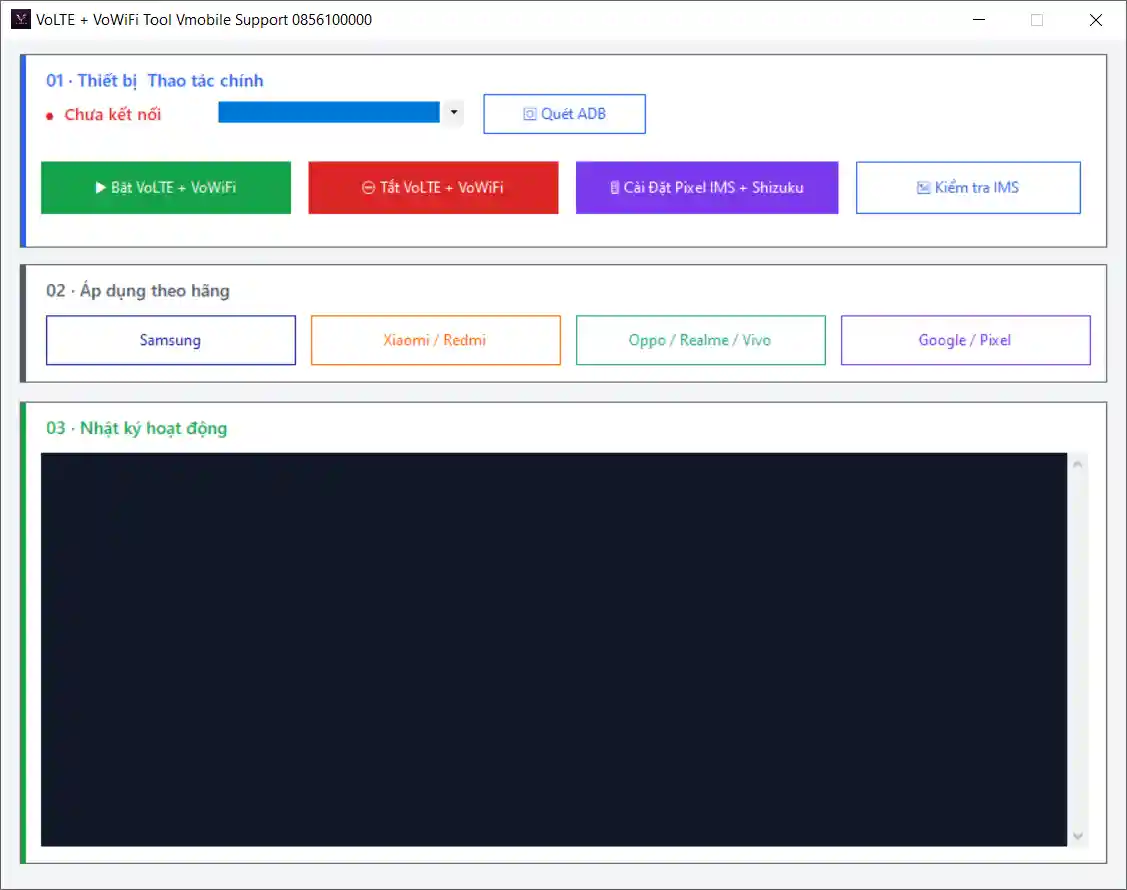
VoLTE + VoIP Wi-Fi Tool Key Features
- Enable or disable VoLTE and VoIP Wi-Fi calling with one click
- ADB device scanner — detect connected Android phones automatically
- Brand selection — apply settings specific to Samsung, Xiaomi, Oppo, or Google Pixel
- Install Pixel IMS directly from the tool
- Install Shizuku directly from the tool
- Check IMS registration status on the connected device
- Live activity log showing what the tool is doing in real time
- No activation, no login, no installation — runs directly from EXE
Download VoLTE + VoIP Wi-Fi Tool
- Tool Name: VoLTE + VoIP Wi-Fi Tool
- File Size: 13.3 MB
- Developer: VMobile
- License: Free
- Password: No Password
VoLTE + VoIP Wi-Fi Tool How to Use
- Download the tool from the MEGA link above.
- Extract the downloaded archive using 7-Zip or WinRAR.
- Enable USB Debugging on your Android phone from Developer Options.
- Connect your phone to the PC via USB cable and allow the ADB permission prompt.
- Run
volte.exe— the interface opens instantly with no activation or sign-in required. - Select your phone brand — Samsung, Xiaomi, Oppo, or Google Pixel.
- Click Scan ADB Devices to detect your connected phone.
- Check IMS Status to see the current IMS registration state.
- If using a Pixel device — install Pixel IMS and Shizuku first using the built-in installer buttons before enabling VoLTE.
- Click Enable VoLTE + VoIP Wi-Fi to turn on the feature, or Disable to turn it off.
- Monitor the activity log to confirm the operation completed successfully.
- Reboot the phone and check calling settings to confirm VoLTE is now active.
Important Notes
- VoLTE and VoIP Wi-Fi availability depends on your carrier and device model — not all networks support enabling these features via ADB.
- USB Debugging must be enabled before connecting — go to Settings → About Phone → tap Build Number 7 times → Developer Options → enable USB Debugging.
- Google Pixel users need to install both Pixel IMS and Shizuku before enabling VoLTE — these installers are built into the tool.
- Always reboot the phone after enabling VoLTE — changes may not take effect without a restart.
- The tool was tested on Windows with the interface confirmed working — live device VoLTE activation results may vary by model and carrier.
Conclusion
VoLTE + VoIP Wi-Fi Tool by VMobile is a straightforward, no-login, no-activation Windows utility that handles VoLTE and Wi-Fi calling setup on Samsung, Xiaomi, Oppo, and Google Pixel phones through ADB. The built-in Pixel IMS and Shizuku installer, IMS status checker, brand-specific settings, and live activity log make it more useful than a simple ADB script — and the single EXE format means there is nothing to install. If you regularly deal with VoLTE issues on customer phones, this free tool is worth downloading and keeping on your PC. Download it today using the MEGA link above.
Credits: Developed by VMobile. All credits go to the original developer.
Disclaimer: For educational purposes only. VoLTE availability depends on your carrier and device. Use responsibly. We are not liable for any device damage or data loss.


