Download TMT Qualcomm Tool V1.0.2025 (Latest Version) Free
If you own a Qualcomm-based Oppo or Realme smartphone and face issues such as FRP locks, factory resets, or network errors, the TMT Qualcomm Tool V1.0.2025 is the perfect solution. This free tool is specifically built for Qualcomm-powered devices, providing essential repair functions without the need for costly software. Whether you are a mobile technician or a regular user, this tool saves both time and effort by simplifying common repair tasks.
What is TMT Qualcomm Tool V1.0.2025?
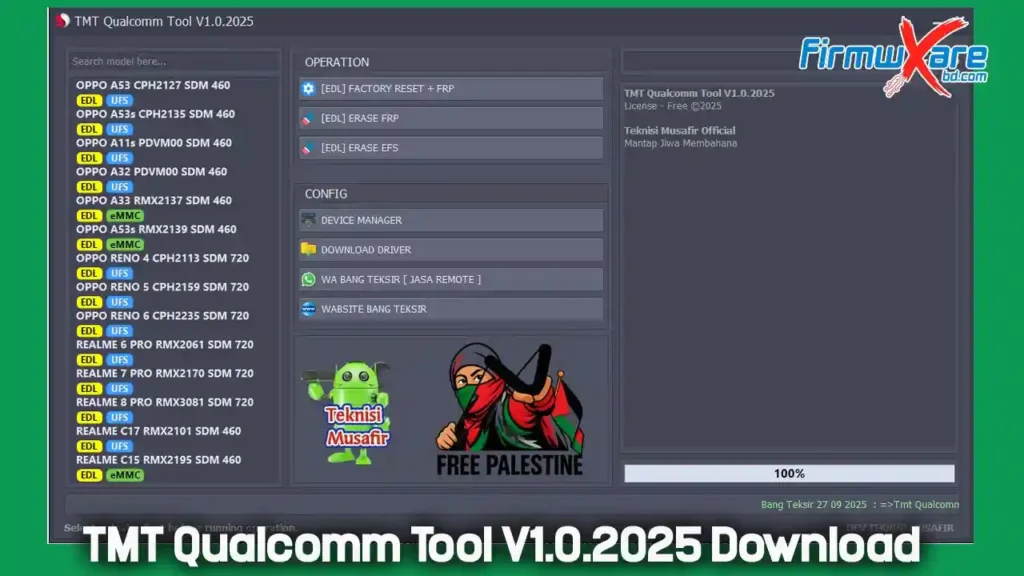
The TMT Qualcomm Tool V1.0.2025 is a lightweight Windows program developed for Oppo and Realme smartphones with Qualcomm Snapdragon chipsets. It operates in EDL (Emergency Download Mode) and offers three main functions:
- Factory Reset + FRP – Wipes all data and removes Google’s Factory Reset Protection.
- Erase FRP – Bypasses and removes only the Google account lock.
- Erase EFS – Clears the EFS partition to fix signal or network-related issues.
With these functions, the tool becomes essential for smartphone repair shops and advanced users alike.
Key Features of TMT Qualcomm Tool
- Simple Interface – Clean and user-friendly layout.
- EDL Mode Operation – Works directly in Qualcomm’s emergency mode.
- Wide Device Support – Compatible with popular Oppo and Realme Snapdragon models.
- Completely Free – No hidden charges or subscriptions.
- Lightweight Software – Small file size (31 MB) with no complicated setup.
Download TMT Qualcomm Tool V1.0.2025
- File Name: TMT Qualcomm Tool V1.0.2025
- Version: V1.0.2025
- Size: 31 MB
- Password: 1111
📥 Download Links:
How to Use TMT Qualcomm Tool
- Download and extract the tool using the password (1111).
- Install Qualcomm USB drivers (if not installed already).
- Boot your device into EDL mode.
- Connect your phone via USB cable.
- Launch the tool and choose the desired function (Factory Reset + FRP, Erase FRP, or Erase EFS).
- Wait for the process to finish and then reboot the phone.
⚠️ Note: Always back up important files before running resets or EFS wipes, as these operations will permanently delete data.
Supported Models
The TMT Qualcomm Tool works with several Oppo and Realme smartphones powered by Snapdragon 460 and Snapdragon 720 chipsets.
| Brand | Model | Chipset | Storage |
|---|---|---|---|
| Oppo | A53 CPH2127 | Snapdragon 460 | UFS |
| Oppo | A53s CPH2135 | Snapdragon 460 | UFS |
| Oppo | A11s PVDM00 | Snapdragon 460 | UFS |
| Oppo | A32 PVDM00 | Snapdragon 460 | UFS |
| Oppo | A33 RMX2137 | Snapdragon 460 | eMMC |
| Oppo | A53s RMX2139 | Snapdragon 460 | eMMC |
| Oppo | Reno 4 CPH2113 | Snapdragon 720 | UFS |
| Oppo | Reno 5 CPH2159 | Snapdragon 720 | UFS |
| Oppo | Reno 6 CPH2235 | Snapdragon 720 | UFS |
| Realme | 6 Pro RMX2061 | Snapdragon 720 | UFS |
| Realme | 7 Pro RMX2170 | Snapdragon 720 | UFS |
| Realme | 8 Pro RMX3081 | Snapdragon 720 | UFS |
| Realme | C17 RMX2101 | Snapdragon 460 | eMMC |
| Realme | C15 RMX2195 | Snapdragon 460 | eMMC |
Additional Options
- Device Manager Shortcut – Quick access to Windows Device Manager.
- Qualcomm Drivers Download – Ensures smooth communication between the tool and the device.
Conclusion
The TMT Qualcomm Tool V1.0.2025 is a powerful yet simple utility for Qualcomm-based Oppo and Realme smartphones. With functions like FRP removal, factory reset, and EFS repair, it replaces multiple tools and offers a free, lightweight solution for technicians and advanced users.