Download SPD Upgrade Tool R27.25.4601 (All Version) Free 2026
Are you looking for a reliable way to flash PAC firmware on your Unisoc or SpreadTrum-powered Android smartphone? The SPD Upgrade Tool is the official and most trusted solution for flashing stock ROM, resetting FRP, and removing screen locks on SPD devices. In this guide, we’ll walk you through everything you need to know about the Download SPD Upgrade Tool R27.25.4601 Latest Version, including its features, all previous versions, and step-by-step flashing instructions — no technical skills required.
What is SPD Upgrade Tool?
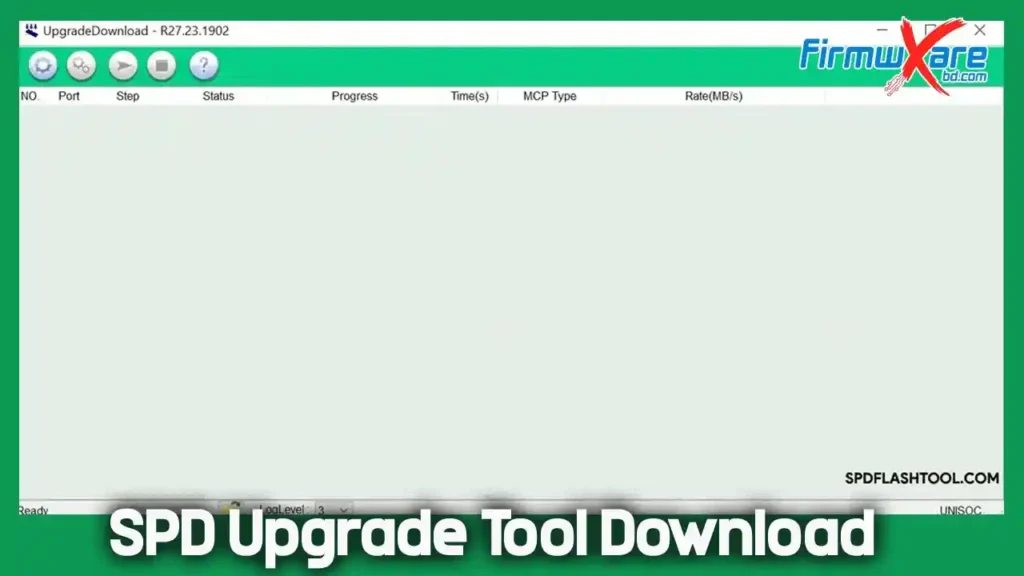
The SPD Upgrade Tool (also known as SPD Flash Tool) is an official flashing utility developed by Unisoc Technologies Co. (formerly SpreadTrum). It is specifically designed to flash PAC-based stock firmware on Android devices powered by Unisoc/SpreadTrum (SPD) chipsets. The latest version, R27.25.4601, brings improved device compatibility and better performance for flashing, FRP reset, and screen lock removal.
Unlike many third-party tools, the SPD Upgrade Tool is an official free tool provided directly by Unisoc Technologies, making it 100% safe and reliable for flashing your SPD device.
Key Features of SPD Upgrade Tool R27.25.4601
Here are some of the most notable features of the latest SPD Upgrade Tool:
🔧 Flash & Firmware Functions
- Flash PAC Stock ROM: Install or reinstall stock firmware on any SPD/Unisoc device.
- Upgrade or Downgrade Firmware: Easily move between firmware versions.
- Flash Custom or Stock Recovery: Supports flashing .IMG recovery files.
🔒 Unlock & Reset Functions
- FRP Lock Reset: Bypass Google account verification after a factory reset.
- Remove Screen Lock: Remove forgotten PIN, pattern, or password lock.
- Hard Reset / Format Device: Fully wipe and format your SPD device.
🛠️ General Features
- User-Friendly Interface: Clean and simple UI — anyone can use it without prior experience.
- Lightweight Package: Only 12 MB in size, occupying minimal storage space.
- Virus Scanned: Scanned with Kaspersky Antivirus — completely safe to download and use.
- Windows Compatible: Supports both 32-bit and 64-bit Windows systems.
How to Download SPD Upgrade Tool R27.25.4601
- Tool Name: SPD Upgrade Tool
- Latest Version: R27.25.4601
- File Size: 12 MB
- Compatibility: Windows 32 & 64 bit
- Developer: Unisoc Technologies Co.
All Versions Download Table
| Version | Download Link 1 | Download Link 2 |
|---|---|---|
| R27.25.4601 (Latest) | G-Drive | MediaFire |
| R27.24.2301 | G-Drive | Mega |
| R27.24.1301 | G-Drive | AFH |
| R27.23.1902 | G-Drive | AFH |
| R27.23.0101 | G-Drive | AFH |
| R26.21.2801 | G-Drive | AFH |
| R25.21.1401 | G-Drive | AFH |
| R24.0.0003 | G-Drive | AFH |
| R23.19.4001 | G-Drive | AFH |
| R22.0.0001 | G-Drive | AFH |
| R21.0.0001 | G-Drive | AFH |
| R20.0.0001 | G-Drive | AFH |
| R19.17.4301 | G-Drive | AFH |
| R17.17.1202 | G-Drive | AFH |
| R17.0.0001 | G-Drive | AFH |
| R4.0.0001 | G-Drive | AFH |
| R2.10.1003 | G-Drive | AFH |
| R2.9.9005 | G-Drive | AFH |
| R2.9.9001 | G-Drive | AFH |
Prerequisites
Before using the SPD Upgrade Tool, make sure you have the following:
- ✅ Install the correct USB Driver:
- ✅ Download the correct PAC firmware for your device
- ✅ Have a working USB cable
- ✅ Use a Windows PC (32-bit or 64-bit)
How to Install & Use SPD Upgrade Tool
🖥️ Installation
- Download the SPD Upgrade Tool from the link below and extract the
.zipfile. - Install the SPD USB Driver on your PC before proceeding.
- Open the extracted folder and launch the tool by double-clicking the
.exefile.
⚙️ Flashing the Firmware
- Once the tool opens, click on the Load Packet (firmware loading) button.
- Browse and select the PAC firmware file for your device.
- After the firmware is loaded, click the Start button.
- Power off your phone and connect it to the PC via USB cable while holding Volume UP + Volume DOWN simultaneously.
- The tool will automatically detect your device and begin the flashing process.
- Wait for the process to complete — your device may restart several times, which is completely normal.
- Once done, your device will reboot with the firmware successfully installed.
Device Compatibility
The SPD Upgrade Tool supports a wide range of Android devices powered by Unisoc/SpreadTrum chipsets:
- ✅ Chipsets: Unisoc (SpreadTrum / SPD)
- ✅ Brands: Walton, Infinix, Tecno, itel, Symphony, Micromax, Lava, ZTE, and many other SPD-based Android devices
- ✅ Firmware Format: PAC (.pac)
- ✅ OS: Windows XP, Vista, 7, 8, 10, 11 (32-bit & 64-bit)
Conclusion
If you’re looking for a safe, official, and easy-to-use tool to flash, reset, or fix your Unisoc/SpreadTrum Android device, the SPD Upgrade Tool R27.25.4601 is the best choice available. It supports all PAC-based firmware, covers a wide range of SPD-powered devices, and is completely free to download and use — making it an essential tool for any Android technician or power user.
👉 Download SPD Upgrade Tool R27.25.4601 Latest Version today and flash your SPD device safely and easily in just a few minutes!