Samsung Odin3 v3.14.4 (Latest Version) Download free for Windows
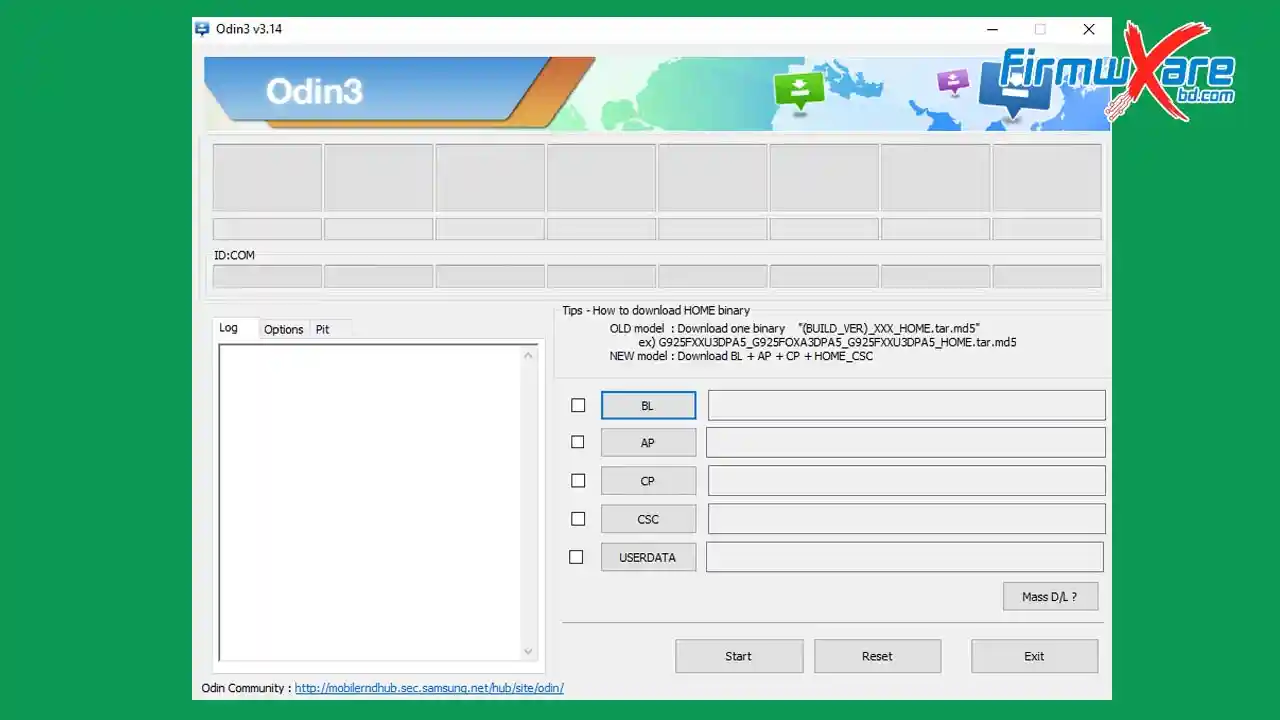
Samsung Odin3 v3.14.4 is a free Windows flash tool developed by Samsung Electronics for flashing MD5 and ZIP-based stock ROM (firmware) on Samsung Android smartphones and tablets. It also supports custom recovery flashing, FRP removal, device repair, and unlocking — making it the most trusted Samsung flash utility for mobile technicians worldwide.
Samsung Odin3 v3.14.4 Key Features
- Flash MD5 and ZIP-based stock ROM on Samsung devices
- Flash custom recovery files on Samsung smartphones
- Remove FRP (Factory Reset Protection) on Samsung devices
- Unlock and repair Samsung smartphones and tablets
- Supports Download Mode connection
- Includes Samsung USB Driver and tutorial in the ZIP package
- Free and officially developed by Samsung Electronics
- Compatible with Windows (32-bit and 64-bit)
Download Samsung Odin3 (All Versions)
- File Name: odin3.zip
- Version: v3.14.4 (Latest)
- Author: Samsung Electronics
- License: Free
- Password: No Password
Old Versions
| Version | Mirror 1 (Direct) | Mirror 2 (G Drive) |
|---|---|---|
| v3.14.1 | Direct | G Drive |
| v3.13.3 | Direct | G Drive |
| v3.13.1 | Direct | G Drive |
| v3.12.7 | Direct | G Drive |
| v3.12.5 | Direct | G Drive |
| v3.12.4 | Direct | G Drive |
| v3.12.3 | Direct | G Drive |
| v3.11.2 | Direct | G Drive |
| v3.11.1 | Direct | G Drive |
| v3.10.7 | Direct | G Drive |
| v3.10.6 | Direct | G Drive |
| v3.10.5 | Direct | G Drive |
| v3.09.0 | Direct | G Drive |
| v3.07.0 | Direct | G Drive |
| v3.06.0 | Direct | G Drive |
| v1.86.0 | Direct | G Drive |
| v1.83.0 | Direct | G Drive |
| v1.82.0 | Direct | G Drive |
How to Use Samsung Odin3
- Download Samsung Odin3 from the link above and extract the ZIP file.
- Install Samsung USB Driver on your computer.
- Open the Samsung Odin Downloader tool.
- Click on AP and locate the Samsung stock ROM file.
- Boot your Samsung device into Download Mode and connect it to the PC via USB.
- Once the device is detected, click Start to begin flashing.
- Wait 5–10 minutes for the process to complete — a PASS message confirms success.
Conclusion
Samsung Odin3 v3.14.4 is the go-to flashing tool for anyone working with Samsung Android devices. Whether you need to flash stock firmware, install a custom recovery, remove FRP, or repair a bootlooped device, Odin3 handles it all quickly and reliably. It is completely free, officially developed by Samsung Electronics, and comes bundled with the Samsung USB Driver. Download the latest version now and keep it ready in your Samsung repair toolkit.
Credits: All credits go to Samsung Electronics for developing and distributing this tool for free. Disclaimer: For educational purposes only. Use responsibly. We are not liable for any device damage.