Download FlexUnlock Tool v1.2.17.00 (Latest Version) – Lifetime Free Access
FlexUnlock Tool v1.2.17.00 is a powerful all-in-one solution designed for mobile repair technicians and Android users. It simplifies advanced tasks such as FRP removal, MDM bypass, bootloader unlocking, and firmware flashing—all from a single, clean interface. The tool supports many popular brands, including Samsung, Xiaomi, Motorola, Nokia, Huawei, and Pixel. With the latest update, users get better stability, improved performance, and expanded device support.
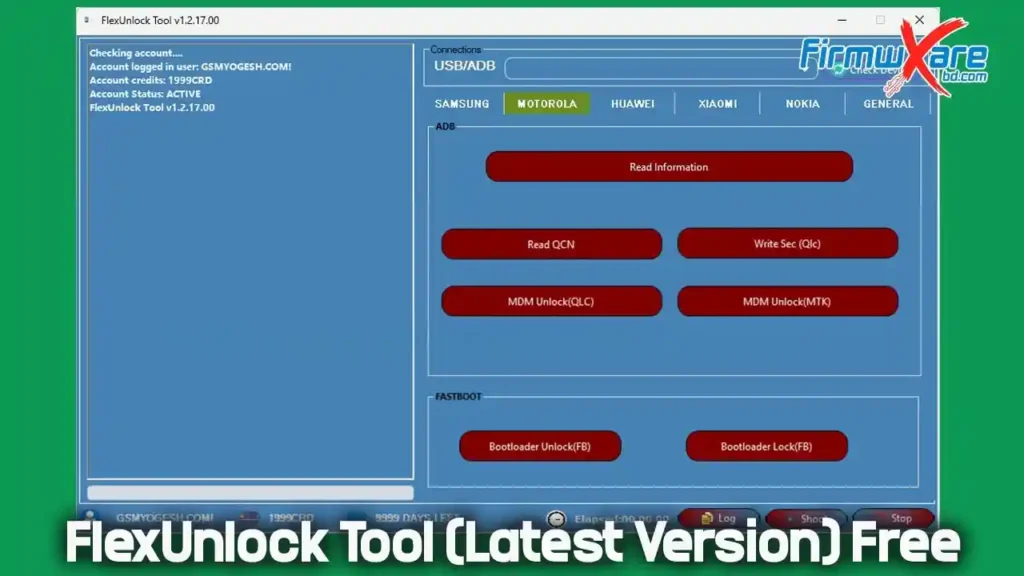
What Is FlexUnlock Tool Used For?
FlexUnlock Tool is mainly used for professional Android servicing and troubleshooting. It allows users to perform complex repair and unlocking operations without requiring advanced technical knowledge.
Main Uses:
- Remove FRP lock
- Bypass MDM / IT Admin restrictions
- Unlock or relock bootloader
- Read complete device information
- Flash firmware
- Fix common Android software issues
- Works with Samsung, Xiaomi, Pixel, Nokia, Motorola, Huawei, and more
Supported Working Modes:
- ADB
- Fastboot
- MTP
- Server-based system
All features are available in one clean and user-friendly dashboard.
Features of FlexUnlock Tool
✅ Samsung Features
- FRP removal via ADB & MTP
- KG bypass (2022, 2023, 2024)
- IT Admin bypass
- CSC change
- Odin flashing (AP, BL, CP, CSC)
- Read & write PIT
- Boot update and EFS clear
- QR code unlock (Android 9–14+)
✅ Motorola Features
- Read device information
- QCN read/write
- MDM unlock (QLC & MTK)
- Bootloader unlock / lock
✅ Huawei Features
- Reboot to Bootloader
- Reboot to eRecovery
- FRP removal via Fastboot
- Bootloader unlock / lock
- Load dload firmware
✅ Xiaomi Features
- Read phone information
- Bootloader unlock
- Switch BL to EDL mode
- Mi Account removal
- Create critical data files
- Server-based operations
✅ Nokia Features
- Read device information
- MDM bypass (2023–2025)
- IT Admin removal
- Bootloader unlock / lock
✅ General Features
- BIN / IMG / Proinfo editor
- MTK device support (Tecno, Infinix, Itel)
- Transsion MDM removal
- Pixel FRP removal
- File request system
- Stable and secure server connection
Download FlexUnlock Tool v1.2.17.00
- File Name: FlexUnlock_V1.2.17.00.rar
- Version: v1.2.17.00
- File Size: 68 MB
🔗 Download Link: Proton Drive
How to Install & Use FlexUnlock Tool
Step 1: Download
Download FlexUnlock Tool v1.2.17.00 along with all required files.
Step 2: Extract Files
Extract the downloaded archive to a folder on your desktop.
Step 3: Install the Tool
Right-click on the setup file and select Run as Administrator.
Install all required components.
Step 4: Open the Tool
Launch FlexUnlock Tool after installation.
Step 5: Login
Log in using your valid credentials. Once logged in, the tool will be fully activated.
Benefits After Login:
- No repeated login required
- No update pop-ups
- Smooth and stable performance
- Lifetime access enabled
Conclusion
FlexUnlock Tool v1.2.17.00 is a reliable, fast, and feature-rich Android service tool suitable for both beginners and professionals. With lifetime free access, broad brand support, and powerful unlocking features, it is an excellent choice for modern mobile repair work. Download FlexUnlock Tool today and take full control of Android unlocking and servicing with confidence. 🚀


